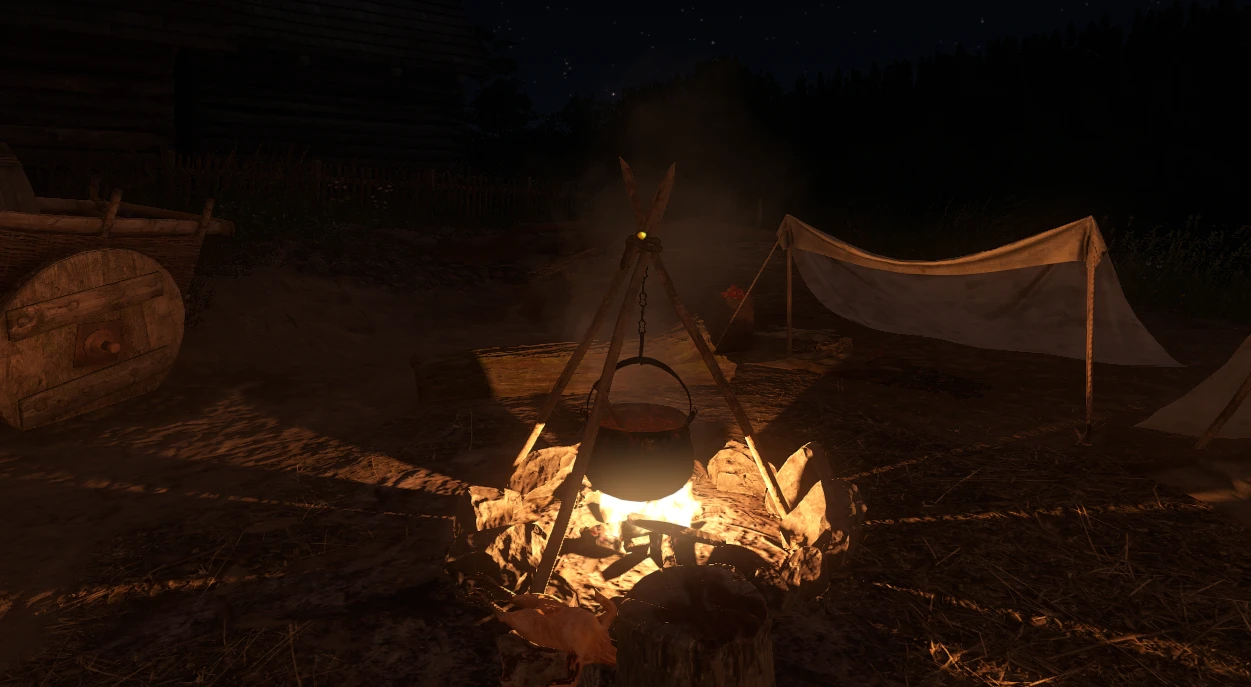
Cooking cauldron flickering smoke Fix
⚪ Last updated 2020Preview
🔍 Analysis
- 👍 1.8% endorsement rate — high engagement, a strong quality signal
- 🏆 #18 of 72 Visuals and Graphics mods in this game by downloads
📋 About This Mod
Exctarct this "Cooking cauldron smoke Fix" folder to the Kingdom Come Deliverance\Mods.
So after 48 hours I found the cause of the flickering smoke problem. If you open the GameData.pak "Prefabs" folder, you will see the fires.xml file there, which forms 2 light sources for the campfire. The flickering problem is caused by "Standard. Light_Fire_Medium3". The parameters of this glow are in the same archive. The problem was that this light source did not have enough glow power, which made the smoke black at night. But due to the fact that light source has an animation that causes flashes of bright light, at these moments the smoke was just lit up. In other words, the smoke lighting threshold has been corrected. The smoke looks like in a vanilla game. This is the best solution to the problem today.
This small mod fixes the flickering smoke issue with cooking cauldrons in Kingdom Come Deliverance by adjusting the light source parameters in the fires.xml file. It corrects the smoke lighting threshold so smoke appears as in vanilla, without the distracting flicker. For players bothered by this visual glitch, it's a simple drop-in fix.
✨ Key Features
📊 Pros & Cons
✅ Pros
- Direct fix for a known visual bug—no more flickering smoke ruining your campfire scenes
- Simple drop-in installation, no mod manager or extra tools needed
- Community-trusted with 719 endorsements and over 40k downloads
⚠️ Cons
- Last updated in December 2020—may not be compatible with newer game patches
- Only addresses the cauldron smoke flicker, not other potential lighting issues
- No detailed compatibility notes or troubleshooting provided by the author
For Kingdom Come Deliverance players who notice the flickering smoke around cooking cauldrons and want a quick, vanilla-friendly fix. If you're a purist who wants the game to look as intended without mods altering visuals, this is perfect. Skip if you're looking for broader graphical overhauls—this is a single-issue fix.
💡 Beginner Tips
- Make sure you extract the folder exactly as named into the Mods directory—don't rename it or the mod may not load.
- If you're using other mods that modify fires.xml, this could conflict—check for overlapping files.
- After installing, load a save near a campfire to verify the smoke looks correct and no flicker remains.
📊 Mod Details
- Game
- Kingdom Come Mods
- Author
- Verter
- Version
- 2.0
- Downloads
- 40,257
- Endorsements
- 719
- Category
- Visuals and Graphics
- Created
- 12/5/2020
- Updated
- 12/7/2020
🧩 Commonly Used Together
Users add these mods to the same collections — a real compatibility signal, not an AI guess.
🔧 How to Install Kingdom Come Mods
Create /Mods/ folder in Data directory. Use Vortex for complex mods.
📖 Full step-by-step install guide for Kingdom Come →
Visit the official mod page for specific installation instructions for this mod.
🎮 Need cheat codes or console commands? Check ur gaming wiki for Kingdom Come commands, item IDs, and more.
Keep browsing — more Kingdom Come mods await