A Sorted Inventory
⚪ Last updated 2020Preview
🔍 Analysis
- 👍 2.6% endorsement rate — high engagement, a strong quality signal
- 🏆 #7 of 219 Gameplay mods in this game by downloads
📋 About This Mod
Drake0713's Yet Another Sorting Mod seems to completely (and brilliantly) supersede A Sorted Inventory, go check it out!
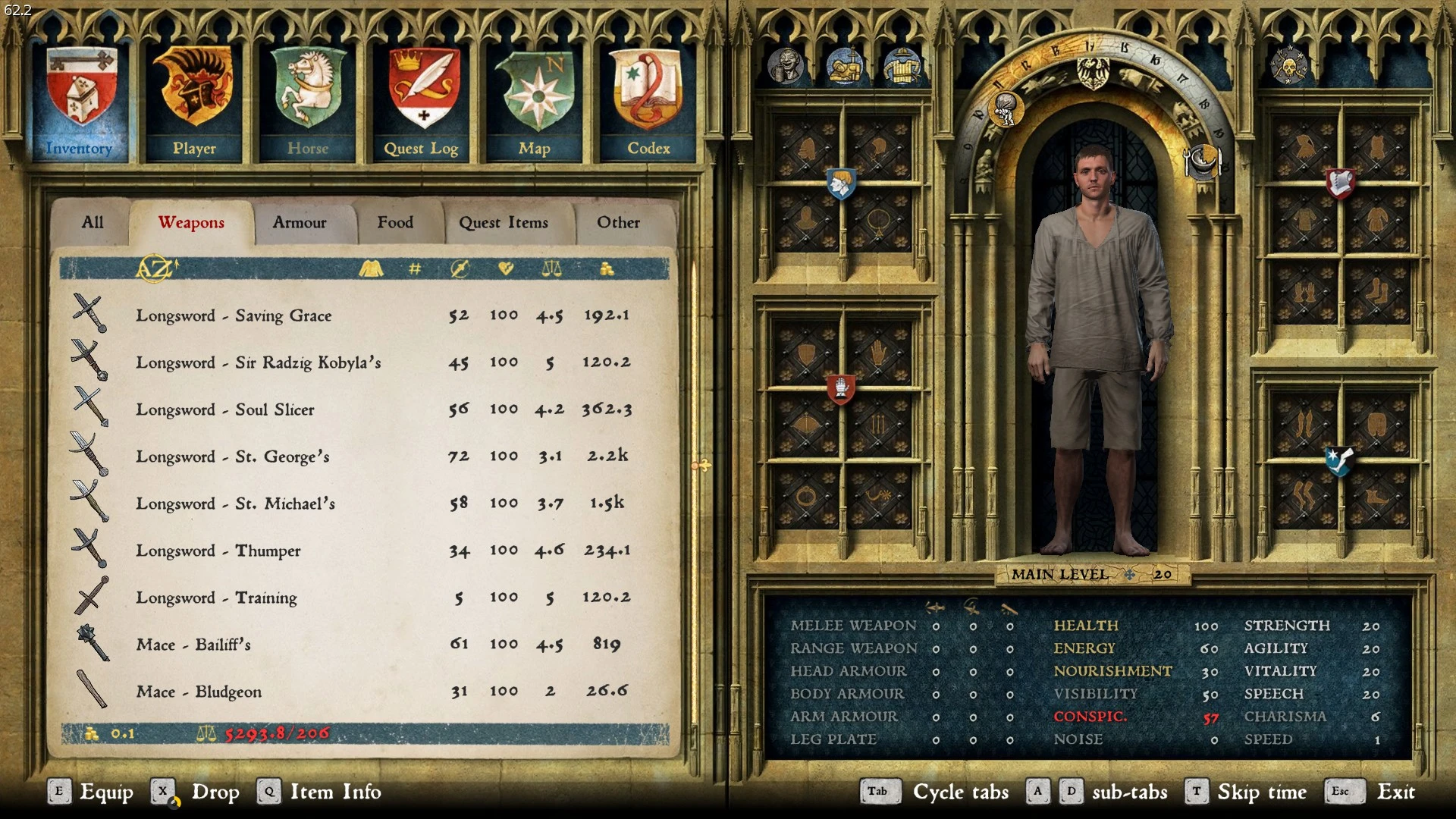
Reorganised. Overcapitalised.This mod renames 99% of the items in the game files (both used and unused) with a rudimentary categorisation system. This is done by adding 'tags' at the start of the name of each item that groups them together when the inventory is sorted alphabetically. See the screenshots for examples. Directly inspired by this mod right here.
How does this mod work?
I literally just changed text around on a . XML file for a few hours. You can do it too.
What is this compatible with?
This mod is compatible with everything that doesn't touch the 'text_ui_items.xml' file, and is incompatible with everything that does.
Will this work with any kind of mod loader?
I've been told that this mod works just fine with Vortex! Let me know if you have any problems. If you're using Vortex and my mod isn't working, check that the mod has been listed in the created 'mod_order.txt' file in the 'Mods' folder. If it's not in there, add it in. This seems to be a Vortex issue rather than a KC:D issue.
Will this work in another language?
This mod is only for the English localisation. If you want to make a translation, that's awesome, but I don't plan on doing any myself. I recommend taking a look at this mod. I've not used it myself, but it looks like the perfect tool for localisation work!
How do I install it?
-
[]Using an archive program such as WinRAR or 7-Zip, open my mod.
[
]Open the root folder of Kingdom Come: Deliverance (Example: steamapps/common/KingdomComeDeliverance).[]Go to the 'Mods' folder that's alongside both Data and Localization (chances are you don't have one, but that's fine, just create it yourself).
[]Drag the folder inside the downloaded archive called 'A_Sorted_Inventory' into the 'Mods' folder. (If there's another folder inside with a similar name, move that into 'Mods' instead.
How do I uninstall it?
-
[]Navigate to your 'Mods' folder (Example: steamapps/common/KingdomComeDeliverance/Mods).
[
]Delete the folder named 'A_Sorted_Inventory'."My mods aren't working since the latest patch!" / "This mod breaks when I have another mod installed!"
As stated above, if any other mod comes with a custom 'text_ui_items' .xml file, one of the two mods will be entirely overwritten. If you're having this problem, you need to do one/two things:
-
[]For my mod to be compatible with anything that touches the same .xml file, the two (or more) files need to be manually spliced, there's no way around it. You can make your own custom edition of my mod if you wish (You only need notepad!), but I can also make a compatible version for you and upload it onto this page for everyone else too. Feel free to post a comment!
[
]If you have the custom .xml file, and it still doesn't work, this is most likely because the mods are loaded in the wrong order; the custom .xml should be at the end, loaded after all your other mods. Vortex, from what I know, has an in-built system for this, but if you want to make a load order manually have no fear! rataj's post in this thread should have you covered.
Any feedback? Any unresolved issues? Please leave a comment! I check often!
If you like what I've done and want to say thanks, please leave an endorsement!
-
[]For my mod to be compatible with anything that touches the same .xml file, the two (or more) files need to be manually spliced, there's no way around it. You can make your own custom edition of my mod if you wish (You only need notepad!), but I can also make a compatible version for you and upload it onto this page for everyone else too. Feel free to post a comment!
-
[]Navigate to your 'Mods' folder (Example: steamapps/common/KingdomComeDeliverance/Mods).
A Sorted Inventory is a Kingdom Come: Deliverance mod that renames 99% of items with a rudimentary categorization system, adding tags at the start of item names to group them when sorted alphabetically. It's a simple XML text edit, compatible with anything that doesn't touch the text_ui_items.xml file, and works with Vortex. The author notes it's superseded by Drake0713's Yet Another Sorting Mod.
✨ Key Features
📊 Pros & Cons
✅ Pros
- Huge community trust: 8,020 endorsements and 310k downloads — this mod is battle-tested.
- Simple XML edit means it's lightweight and unlikely to cause performance hits.
- Author openly points to a superior successor, showing they care about the community over ego.
⚠️ Cons
- Author himself says Drake0713's Yet Another Sorting Mod completely supersedes this — you're better off using that one.
- Only English localisation — non-English players are out of luck unless they translate it themselves.
- Last updated in 2020 — may be outdated compared to newer mods or game patches.
For Kingdom Come: Deliverance players who want a cleaner inventory without heavy mods. If you're new to modding, this is a safe pick, but if you want the best sorting experience, go with the successor mod the author recommends. Skip if you play in another language or want more advanced sorting features.
💡 Beginner Tips
- Install manually by dragging the 'A_Sorted_Inventory' folder into your 'Mods' folder — no mod manager needed.
- If using Vortex and it doesn't work, check that the mod is listed in the 'mod_order.txt' file in the 'Mods' folder; add it if missing.
- This mod only works with the English localisation — switch your game to English or skip it.
📊 Mod Details
- Game
- Kingdom Come Mods
- Author
- Haslam
- Version
- 1.18
- Downloads
- 310,503
- Endorsements
- 8,020
- Category
- Gameplay
- Created
- 2/27/2018
- Updated
- 1/9/2020
🔗 Required By 1 Mod
These mods list this mod as a dependency.
🧩 Commonly Used Together
Users add these mods to the same collections — a real compatibility signal, not an AI guess.
🔧 How to Install Kingdom Come Mods
Create /Mods/ folder in Data directory. Use Vortex for complex mods.
📖 Full step-by-step install guide for Kingdom Come →
Visit the official mod page for specific installation instructions for this mod.
🎮 Need cheat codes or console commands? Check ur gaming wiki for Kingdom Come commands, item IDs, and more.
Keep browsing — more Kingdom Come mods await