Hogwarts Legacy Save Tool
🟡 Updated this yearPreview
🔍 Analysis
- 👍 2.2% endorsement rate — high engagement, a strong quality signal
- ✅ Updated 148 days after the latest game patch — actively maintained
- 🏆 #13 of 61 Tools and Utilities mods in this game by downloads
📋 About This Mod
An open-source windows command-line tool to get all the save-game editors working again!
Versions
See the "Changelogs" dropdown just above.
Introduction
Some time in March/April 2023 an official update to the game changed the format of the save files. All the save-game editors broke and they haven't worked since. This mod is a Windows command-line tool to convert these new-format (compressed) save files back into old-format (decompressed) save files. You can use the old save-file editors to edit the decompressed file, and then use this tool to convert it back into a compressed file so that the game will load it.
Decompressed save files have been confirmed to work with (and hence resurrect from the dead) the following save-game tools:
-
[]Hogwarts Legacy Save Game Editor[/]
[]Hogwarts Legacy Save Editor[/]
[]Legilimens - The Hogwarts Legacy Collectible Finder[/]
Acknowledgements
This tool was not created by me (@icouldifiwantedto), I'm just posting it on Nexus. The tool was created by @katt, a programmer who generously donated weeks of their time despite never having played Hogwarts Legacy. Huge thanks to @katt!
Installation
-
[]Uncompress the zip file and put the HLSaveTool folder somewhere convenient.[/]
[]Download this file and put it in the HLSaveTool folder.[/]
Usage
[]In Windows Explorer, go to: C:\Users\\AppData\Local\Hogwarts Legacy\Saved\SaveGames\[/]
[]There will be a folder whose name is an eight or nine-digit number. That's your save-games folder.[/]
[]Identify the save file you want to edit based on the date it was created.[/]
[]Rename it from .sav to .orig (e.g: HL-03-05.sav to HL-03-05.orig).[/]
[]Copy that file (e.g. HL-03-05.orig) to the HLSaveTool folder.[/]
[]First Left-Click your HLSaveTool folder, then press SHIFT and Right-Click your HLSaveTool folder.[/]
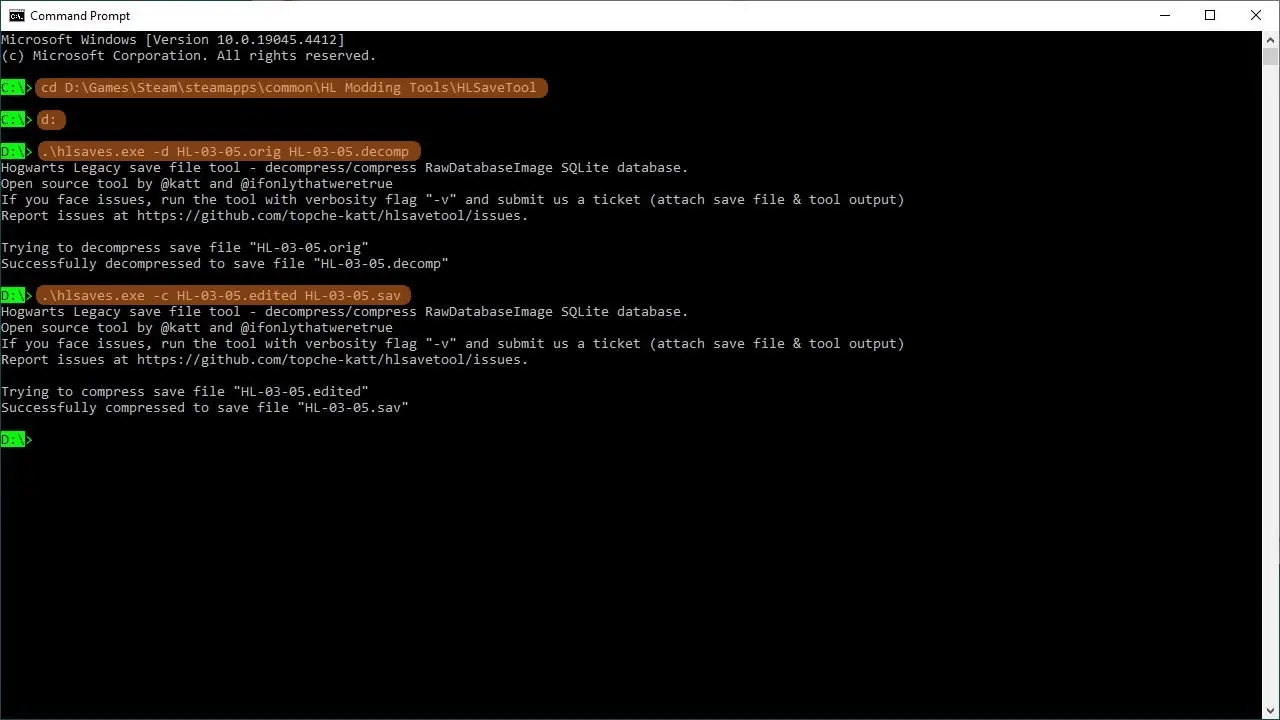
[]Select "Open CMD window here" or "Open Powersell window here" (whichever is available or whichever you prefer), and then type the following commands in the new window that appears:[/]
[*]Decompress your save file, e.g: .\h
📊 Mod Details
- Game
- Hogwartslegacy Mods
- Author
- katt and icouldifiwantedto
- Version
- 2.0.1
- Downloads
- 15,128
- Endorsements
- 327
- Category
- Tools and Utilities
- Created
- 6/8/2024
- Updated
- 4/30/2026
🔧 How to Install Hogwarts Legacy Mods
Download from Nexus Mods.
📖 Full step-by-step install guide for Hogwarts Legacy →
Visit the official mod page for specific installation instructions for this mod.
🎮 Need cheat codes or console commands? Check ur gaming wiki for Hogwarts Legacy commands, item IDs, and more.
Keep browsing — more Hogwarts Legacy mods await