SpellSpeak
⚪ Last updated 2023⚠️ Install Order · 1 step
Install in this order, then this mod last — most mods fail to load without their framework and dependencies in place.
Preview
🔍 Analysis
- 👍 3.1% endorsement rate — high engagement, a strong quality signal
- 🏆 #27 of 61 Tools and Utilities mods in this game by downloads
📋 About This Mod
Now including Spell Combinations!
Spell combinations give you the power to cast multiple spells with one phrase. Check out the tutorial video to see it in action.
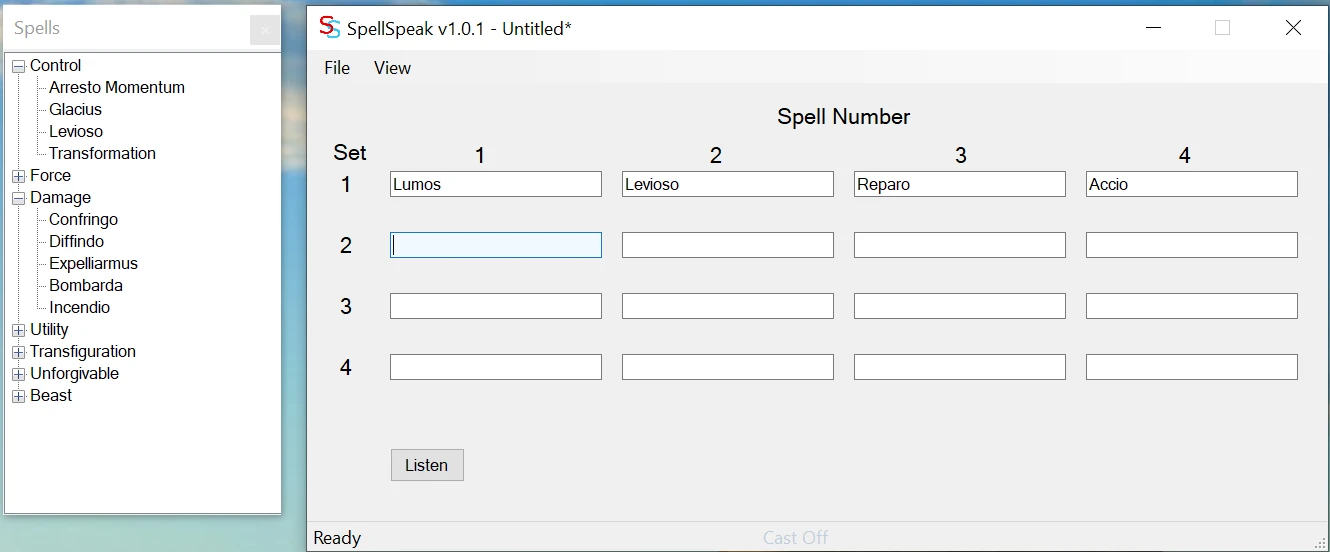
SpellSpeak is a program that enables you to speak the names of spells to cast them in Hogwarts Legacy®. It switches between the sixteen spell slots that the game has laid out as four spells each of up to four sets that you can obtain with your Talent points.
To be perfectly clear, SpellSpeak doesn't give you anything that you don't already have. If you have not spent Talent points on extra spell sets, although SpellSpeak will send the keyboard key to switch to that spell set, it will fail to switch in the game. SpellSpeak also can't cast any spells that you haven't learned. If the spell isn't loaded into the corresponding spell slot in the game, it won't be cast. SpellSpeak isn't a cheat engine, nor is it intended to be (not that judicious cheating is evil <grin>). It is designed to enhance immersion. It may help you to be marginally better in battle, but surprisingly that comes from the possibility of being quicker at yelling Protego than fumbling for the Q key, or using your Tools more frequently since you can speak the command while you're casting instead of finding the Tab key without losing hold of the 1-4 keys.
An unfortunate caveat with SpellSpeak is that speech recognition has latency. It takes somewhere around ¾ second to recognize the spell name (this will differ depending on your computer's capabilities). The processing that happens after the spell is recognized to send keystrokes to the game takes less than 1 millisecond, so almost all of the latency is outside of SpellSpeak's control. This may be a showstopper for you in battle; if it is, well, it is, thanks for trying. SpellSpeak also emulates keystrokes for the keybinds in the game, so you may still find it useful to say “Collections” to bring up your collection list, or “Okay” to dismiss a prompt.
To help mitigate the latency, SpellSpeak can use Auto Hotkey as an optional component. With Auto Hotkey installed, the last spoken spell will be mapped onto the number 5 key (this can be changed in the Auto Hotkey script) so that you can subsequently cast it more quickly.
While the technologies that SpellSpeak uses are complex, SpellSpeak itself is actually fairly simple and really dumb. You can think of it as if it were blind – it cannot see into the game to see which spells you actually have loaded in your slots. If you have told SpellSpeak that you have this layout:
Spell set 1: Lumos, Levioso, Reparo, Accio
Spell set 2: Confringo, Diffindo, Arresto Momentum, Depulso
Spell set 3: Expelliarmus, Bombarda, Arresto Momentum, Flipendo
Spell set 4: Incendio, Dissilusionment, Descendo, Transformation
When SpellSpeak hears you say“Confri
SpellSpeak is a utility mod that lets you cast spells by speaking their names aloud, using voice recognition to trigger spells from your active list. It's for players who want a more immersive or hands-free way to play, though it has a modest following with 113 endorsements and was last updated in April 2023.
✨ Key Features
📊 Pros & Cons
✅ Pros
- Immersive and unique way to cast spells—great for roleplayers.
- Hands-free casting can be a game-changer for accessibility.
- Community-tested with 113 endorsements and 3,695 downloads.
⚠️ Cons
- Voice recognition may be finicky in noisy environments or with accents.
- Limited to your active spells list—no support for custom spell names.
- Last updated in April 2023—may have compatibility issues with newer game versions.
For Skyrim players who want a fresh, immersive twist on magic combat. If you're a roleplayer or streamer looking for a unique way to engage with spells, this is for you. Skip if you prefer traditional hotkey casting or have a quiet play environment.
💡 Beginner Tips
- Make sure your microphone is properly configured in Windows before launching the game.
- Test with a simple spell like 'Frostbite' to calibrate voice recognition.
- If the mod doesn't respond, check that your active spells list is set and the mod is enabled in your mod manager.
📊 Mod Details
- Game
- Hogwarts Legacy Mods
- Author
- seekerd3
- Version
- 1.3.0
- Downloads
- 3,695
- Endorsements
- 113
- Category
- Tools and Utilities
- Created
- 2/24/2023
- Updated
- 4/4/2023
🔧 How to Install Hogwarts Legacy Mods
Download from Nexus.
📖 Full step-by-step install guide for Hogwarts Legacy →
Visit the official mod page for specific installation instructions for this mod.
🎮 Need cheat codes or console commands? Check ur gaming wiki for Hogwarts Legacy commands, item IDs, and more.
Keep browsing — more Hogwarts Legacy mods await