PakChunk Checker
⚪ Last updated 2024⚠️ Install Order · 1 step
Install in this order, then this mod last — most mods fail to load without their framework and dependencies in place.
Preview
🔍 Analysis
- 👍 1.7% endorsement rate — high engagement, a strong quality signal
- 🏆 #5 of 61 Tools and Utilities mods in this game by downloads
📋 About This Mod
Versions
See the "Changelogs" dropdown just above.
Introduction
There's already a Chunk ID Conflict Manager to resolve pakchunk conflicts, but I didn't want to resolve conflicts. I just wanted to check whether the mod I'd just created conflicted with any of the mods I already had. So I created this batch script to check. It doesn't resolve any conflicts, it just tells you if there are any.
Installation
-
[]Download the mod.
[
]Extract the PakChunkChecker.bat file and the MANIFEST folder into yourSteam\steamapps\common\Hogwarts Legacy\Phoenix\Content\Paks\~mods\ folder.
[]Make sure the PakChunkChecker.bat file and the MANIFEST folder didn't end up in
Steam\steamapps\common\Hogwarts Legacy\Phoenix\Content\Paks\~mods\Phoenix\Content\Paks\~mods\ by mistake!
If they did, move them to
Steam\steamapps\common\Hogwarts Legacy\Phoenix\Content\Paks\~mods\
and delete the unnecessary
Steam\steamapps\common\Hogwarts Legacy\Phoenix\Content\Paks\~mods\Phoenix folder.
Usage - Easy Methods
-
[]Double click PakChunkChecker.bat in Windows Explorer.
-
[]Drag & drop PakChunkChecker.bat from Windows Explorer to your desktop while holding ALT.
[
]That will create a shortcut. Feel free to rename it. - Double-click the shortcut to run the batch file.
Usage - Harder Method
1) Open a cmd window. (Do not run it as Administrator.)
2) Go to your ~mods folder.
3) Run PakChunkChecker.bat
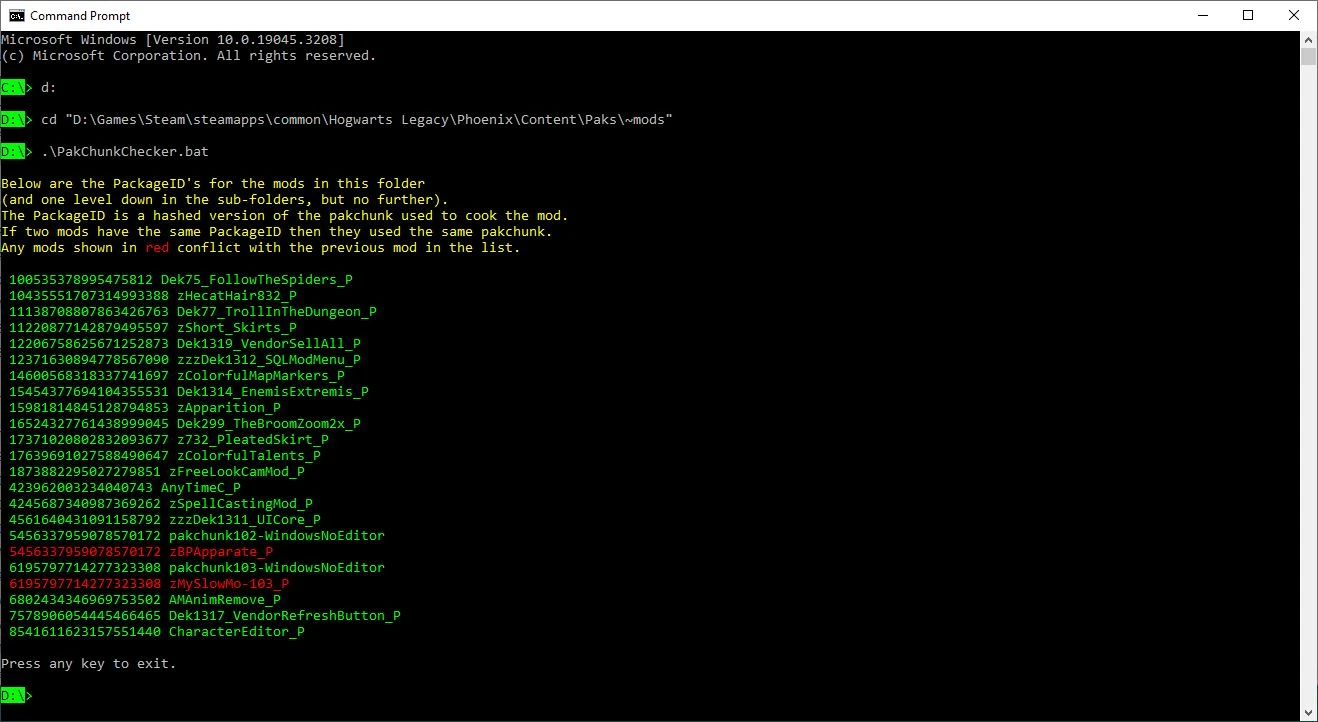
In other words do what you see in the image below (but amend it to reflect the location of your ~mods folder). In my case the ~mods folder is on my D: drive so I have to change drive (using the "d:" command) then cd to the right folder. If your ~mods folder is on your C: drive you won't need to change drives.
As you can see in the above example the zBPApparate_P mod (Blueprint Apparate Modloader) conflicts with pakchunk102-WindowsNoEditor (which is the mod I just created). They both have the same PackageID (which is a hashed copy of the pakchunk number). If two mods have the same PackageID then they must have been cooked using the same pakchunk number.
-
[]Drag & drop PakChunkChecker.bat from Windows Explorer to your desktop while holding ALT.
PakChunk Checker is a Windows batch script that scans your ~mods folder to detect duplicate pakchunk numbers, helping modders avoid conflicts. With 588 endorsements and 33,950 downloads, it's a practical tool for modded installations. Last updated June 2024, it remains relevant for current modding setups.
✨ Key Features
📊 Pros & Cons
✅ Pros
- Community-trusted with 588 endorsements and over 33k downloads.
- Dead simple to use—just run the batch script and it checks your mods folder.
- Essential for modders who want to avoid pakchunk conflicts that cause crashes.
⚠️ Cons
- Windows only—no Mac or Linux support.
- No GUI, so command-line comfort is needed.
- Last updated June 2024—may not cover newer games or mod formats.
For modders who manually manage their ~mods folder and want to avoid pakchunk conflicts. If you use a mod manager that handles conflicts automatically, you might not need this. Skip if you're on Mac or Linux.
💡 Beginner Tips
- Run the script from the same directory as your ~mods folder or adjust the path in the script.
- If you're not comfortable with batch files, test on a backup copy of your mods folder first.
- Use it after adding new mods to catch conflicts before launching the game.
📊 Mod Details
- Game
- Hogwarts Legacy Mods
- Author
- icouldifiwantedto
- Version
- 3.2
- Downloads
- 33,950
- Endorsements
- 588
- Category
- Tools and Utilities
- Created
- 7/17/2023
- Updated
- 6/16/2024
🔧 How to Install Hogwarts Legacy Mods
Download from Nexus.
📖 Full step-by-step install guide for Hogwarts Legacy →
Visit the official mod page for specific installation instructions for this mod.
🎮 Need cheat codes or console commands? Check ur gaming wiki for Hogwarts Legacy commands, item IDs, and more.
Keep browsing — more Hogwarts Legacy mods await