No Floating Icons
⚪ Last updated 2023⚠️ Install Order · 1 step
Install in this order, then this mod last — most mods fail to load without their framework and dependencies in place.
Preview
🔍 Analysis
- 👍 5.4% endorsement rate — high engagement, a strong quality signal
- 🏆 #45 of 73 User Interface mods in this game by downloads
📋 About This Mod
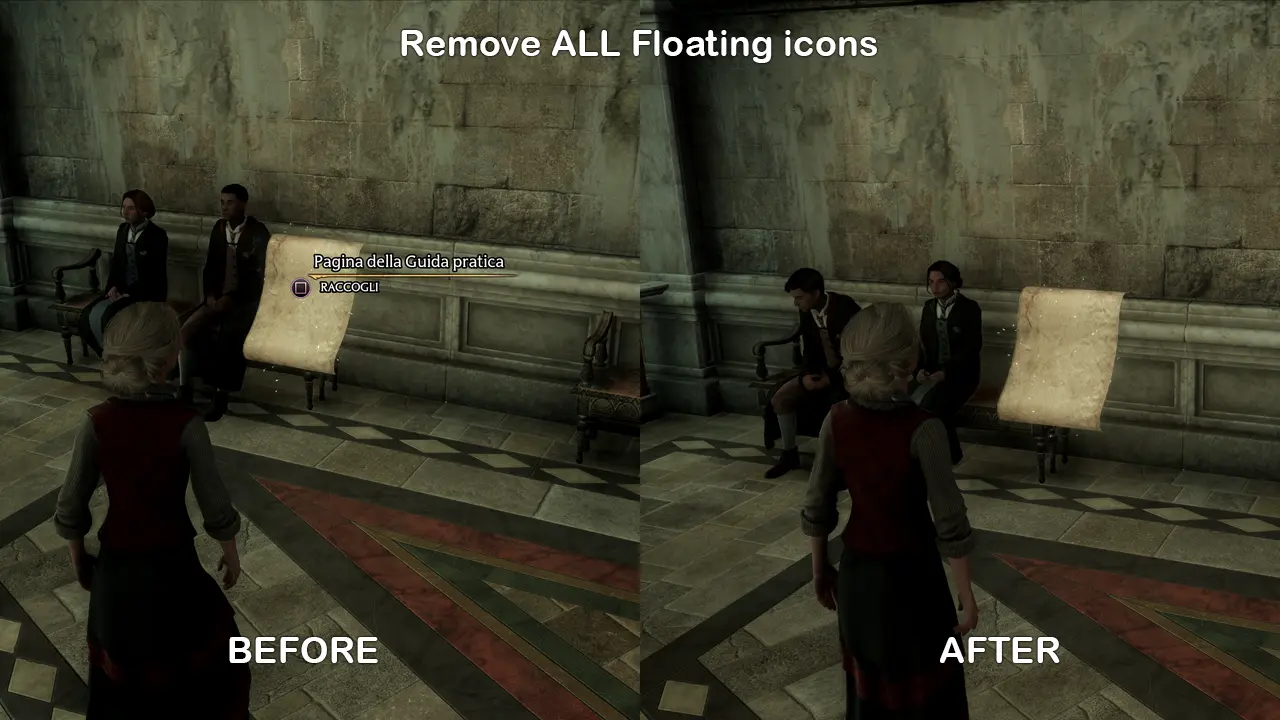
A mod that removes the white floating icons that show up when you're far away from an interactable object/item/NPC
OR, alternatively, it removes every single floating icon (white dots, button prompts, mission icons, etc.), only for hardcore immersion players.
You can still see icons in map, minimap and everywhere in the UI menus except for the actual 3D world.
You have two options in the downloads section, doesn't matter if you install one or both.
INSTALLATION
Copy the content of your selected .zip file into Hogwarts Legacy\Phoenix\Content\Paks
For more immersion, you could be interested in removing that annoying white outline glow that surrounds every interactable object/enemy.
To do so you have to do the following:
-
[]Go to %localappdata%\Hogwarts Legacy\Saved\Config\WindowsNoEditor
[
]Open GameUserSettings.ini[]Search for "UseMinimalHud"
[]Set it to UseMinimalHud=True
- Save
Then while you're in game, after loading the savegame, go to the UI Settings (last option) then toggle ANY option, doesn't matter which one you pick, on/off/on, then return to the game. This triggers an apply of that setting. The white glow is gone BUT it is just temporary. If you quick travel, load game, you die, anything that triggers the loading screen, you have to go back to the UI settings to reapply.
This is still annoying but better than nothing. I'm still doing research to make it permanent.
My other mods:
Tempus Imperium - Day Night Cycle Speed Modifications
Crystal Clear MiniMap
Remove New Item Notification Icon
Remove High Level Enemy Warning
Barelyo - Barely Visible Revelio
Guiding Trail Enhancements
No Floating Icons
No Floating Icons is a compact UI mod for Skyrim that removes floating icons above NPCs and objects, with an option to remove only the white ones. With 74 endorsements and 1,358 downloads, it's a niche quality-of-life tweak for players who prefer a cleaner HUD. Last updated in February 2023.
✨ Key Features
📊 Pros & Cons
✅ Pros
- Clean UI without icons cluttering your view (74 endorsements)
- Two options: full removal or just the white ones—flexible for different tastes
- Lightweight mod, no extra dependencies, just drop it in
⚠️ Cons
- Last updated Feb 2023—might not be compatible with the latest Skyrim patches
- No install instructions or compatibility notes from the author
- Removing all icons might make it harder to spot quest markers or important NPCs
For Skyrim players who want a more immersive, HUD-free experience and don't mind losing the visual cues. Also for those who find the white icons particularly annoying but still want some markers. Skip if you rely heavily on floating icons to navigate or find NPCs.
💡 Beginner Tips
- If you use a mod manager like Vortex or MO2, install this mod through it to keep your load order clean.
- Test both versions (full removal vs white-only) to see which fits your playstyle—you can switch easily.
- Make sure to place this mod after any UI overhaul mods in your load order to avoid conflicts.
📊 Mod Details
- Game
- Hogwarts Legacy Mods
- Author
- RyselZ
- Version
- 1.0
- Downloads
- 1,358
- Endorsements
- 74
- Category
- User Interface
- Created
- 2/12/2023
- Updated
- 2/12/2023
🔧 How to Install Hogwarts Legacy Mods
Download from Nexus.
📖 Full step-by-step install guide for Hogwarts Legacy →
Visit the official mod page for specific installation instructions for this mod.
🎮 Need cheat codes or console commands? Check ur gaming wiki for Hogwarts Legacy commands, item IDs, and more.
Keep browsing — more Hogwarts Legacy mods await