More Spell Sets
⚪ Last updated 2023⚠️ Install Order · 1 step
Install in this order, then this mod last — most mods fail to load without their framework and dependencies in place.
Preview
🔍 Analysis
- 👍 2.4% endorsement rate — high engagement, a strong quality signal
- 🏆 #75 of 259 Gameplay mods in this game by downloads
📋 About This Mod
Install:
UE4SS
You'll need to download the latest version of UE4SS_Xinput_v2. 5. 1.zip and extract all the contents to:
C:\SteamLibrary\steamapps\common\Hogwarts Legacy\Phoenix\Binaries\Win64\
Make sure you have BPModLoaderMod : 1 in your Mods.txt at the dir below:
C:\SteamLibrary\steamapps\common\Hogwarts Legacy\Phoenix\Binaries\Win64\Mods\Mods.txt
Extract Mod to:
C:\Program Files\Steam\steamapps\common\Hogwarts Legacy\Phoenix\Content\Paks\LogicMods\
Apparate
Make sure you have Apparate Modloader
Extract mod to:
C:\SteamLibrary\steamapps\common\Hogwarts Legacy\Phoenix\Content\Paks\~mods\
Start game, Press F8 and type MRSlots
How to use:
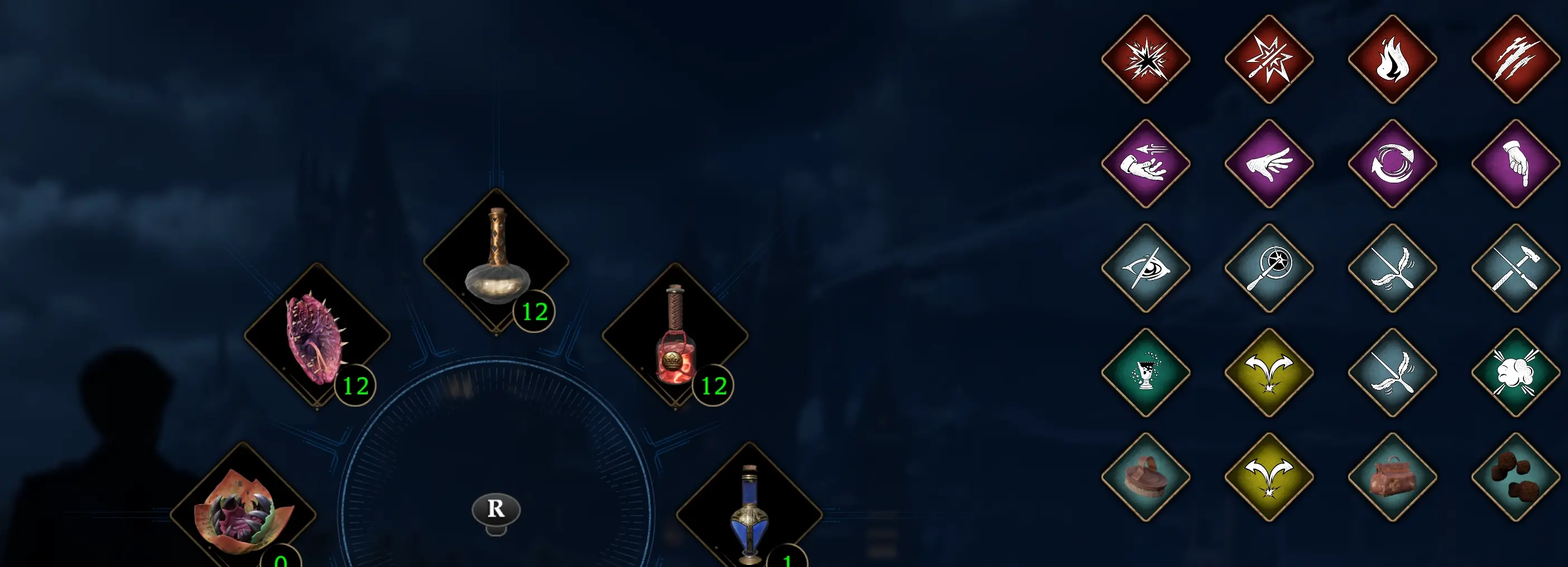
The sets appear next to your Quick Wheel, this has the added benefit of pausing the game while you switch sets.
The mod can snapshot whatever you have slotted in your current selected set
Controls:
Hold Tab/L1/R1 As normal to show the Quick Wheel
Down select a set Works with keyboard arrows, DPad or analogue stick
Left deselect the sets Optional in case you choose not to switch sets
Hold R/RT Save your current equipped spell set to the highlighted set.
Release Tab/L1/R1 When the wheel closes it will automatically equip your selected set
Delete Save:
If you want to reset the save, the mod saves it file to here:
%localappdata%\Hogwarts Legacy\Saved\SaveGames\SpellSetsModSave.sav
Planned Updates:
Mouse wheel navigation
Multi character support
Key map settings
Delete Set button
Spell meters (show fill amount)
Mod support
My Other Mods:
QuickUtilities
+ Puzzle Hint Voiceover Remover
Target Highlight (Outline) Remover
Detection HUD Hider
More Spell Sets adds five additional spell sets for players to create, store, and switch between, expanding loadout flexibility. It's a straightforward quality-of-life mod for gamers who want more variety in their spell configurations.
✨ Key Features
📊 Pros & Cons
✅ Pros
- Community-trusted with 331 endorsements and over 14k downloads.
- Straightforward feature that directly expands your loadout options.
- Last updated in April 2023, so it's relatively recent for compatibility.
⚠️ Cons
- Only adds 5 sets—might not be enough for players wanting a massive overhaul.
For mage-focused players who feel limited by the default spell set slots and want more flexibility without a major overhaul. Skip if you're looking for new spells or gameplay mechanics—this is purely a utility mod.
💡 Beginner Tips
- Check if the mod requires a specific mod manager or manual installation—since no instructions are given, try dropping files into your Data folder if it's a Bethesda game.
- If you're using other spell-related mods, test this one in a new save to avoid conflicts.
- Look for a config file or in-game menu to customize which spell sets are added.
📊 Mod Details
- Game
- Hogwarts Legacy Mods
- Author
- HaywirePhoenix
- Version
- 1
- Downloads
- 14,037
- Endorsements
- 331
- Category
- Gameplay
- Created
- 3/31/2023
- Updated
- 4/12/2023
🧩 Commonly Used Together
Users add these mods to the same collections — a real compatibility signal, not an AI guess.
🔧 How to Install Hogwarts Legacy Mods
Download from Nexus.
📖 Full step-by-step install guide for Hogwarts Legacy →
Visit the official mod page for specific installation instructions for this mod.
🎮 Need cheat codes or console commands? Check ur gaming wiki for Hogwarts Legacy commands, item IDs, and more.
Keep browsing — more Hogwarts Legacy mods await