Mod Merger Checker
⚪ Last updated 2024⚠️ Install Order · 1 step
Install in this order, then this mod last — most mods fail to load without their framework and dependencies in place.
Preview
🔍 Analysis
- 👍 3.3% endorsement rate — high engagement, a strong quality signal
- 🏆 #9 of 61 Tools and Utilities mods in this game by downloads
📋 About This Mod
Versions
See the "Changelogs" dropdown just above.
Introduction
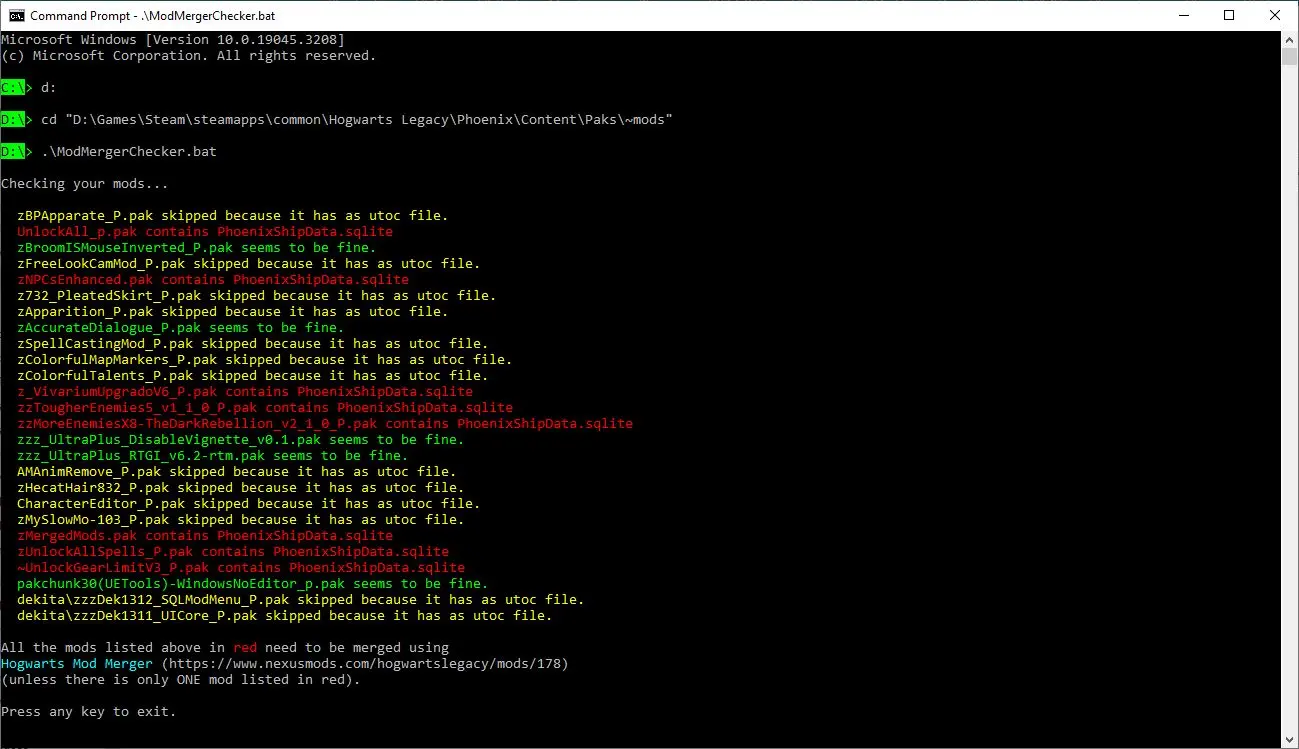
Some mods need to be "merged" using the Hogwarts Mod Merger program. But which ones? If the mod creator doesn't tell you that their mod needs to be merged it can be very difficult to tell, and back in the early days (especially before the Mod Merger program was created) mod creators didn't tell you. Well, worry not! This script can tell you which of the mods in your ~mods folder need merging.
The reason certain mods need to be merged is because they edit the game's SQL data stored in the PhoenixShipData.sqlite file. But the game can only hold one copy of this file, so if more than one mod tries to import an edited version of it, whichever one loads last will overwrite all of the others. The solution is to apply the changes from all your mods to a single copy of the file and then load that into the game. That is exactly what the Hogwarts Mod Merger program does. But before you use it you need to know which files need merging.
This script figures that out by unpacking every .pak file (except the ones with an associated .utoc file, because those are a different type of mod) to see if there's a copy of the PhoenixShipData.sqlite file inside. If there is, it will list that .pak file in red.
Installation
-
[]Download the mod.
[
]Extract the ModMergerChecker.bat file and the MANIFEST folder into yourSteam\steamapps\common\Hogwarts Legacy\Phoenix\Content\Paks\~mods\ folder.
[]Make sure the ModMergerChecker.bat file and the MANIFEST folder didn't end up in
Steam\steamapps\common\Hogwarts Legacy\Phoenix\Content\Paks\~mods\Phoenix\Content\Paks\~mods\ by mistake!
If they did, move them to
Steam\steamapps\common\Hogwarts Legacy\Phoenix\Content\Paks\~mods\
and delete the unnecessary
Steam\steamapps\common\Hogwarts Legacy\Phoenix\Content\Paks\~mods\Phoenix folder.
Usage - Easy Methods
- []Double click ModMergerChecker.bat in Windows Explorer.
[]Drag & drop ModMergerChecker.bat from Windows Explorer to your desktop while holding ALT.
[]That will create a shortcut. Feel free to rename it.
[*]Double-click the short
Mod Merger Checker is a Windows batch script that scans your ~mods folder to identify which mods need merging. With 637 endorsements and 19,537 downloads, it's a practical tool for modders managing large load orders. Last updated June 2024, it remains relevant for current modding workflows.
✨ Key Features
📊 Pros & Cons
✅ Pros
- Community-approved with 637 endorsements — clearly useful for many modders.
- Lightweight batch script — no bloat, just does its job.
- High download-to-endorsement ratio suggests it works reliably.
⚠️ Cons
- Windows only — Mac and Linux users are out of luck.
- No detailed documentation provided — you'll need to figure out the output format yourself.
- Last updated June 2024 — may not support the latest modding tools or game versions.
For modders who juggle dozens of mods and need a quick way to spot which ones need merging. If you're on Windows and want a no-frills utility, this is for you. Skip if you're on another OS or expect a GUI — this is a command-line script.
💡 Beginner Tips
- Run the script from the command line in your mods folder to get a list of mods that need merging.
- Check the script's output carefully — it likely lists mods that have multiple files or plugins that should be combined.
- If you're using a mod manager, make sure your ~mods folder path is correct before running.
📊 Mod Details
- Game
- Hogwarts Legacy Mods
- Author
- icouldifiwantedto
- Version
- 3.2
- Downloads
- 19,537
- Endorsements
- 637
- Category
- Tools and Utilities
- Created
- 7/19/2023
- Updated
- 6/7/2024
🔧 How to Install Hogwarts Legacy Mods
Download from Nexus.
📖 Full step-by-step install guide for Hogwarts Legacy →
Visit the official mod page for specific installation instructions for this mod.
🎮 Need cheat codes or console commands? Check ur gaming wiki for Hogwarts Legacy commands, item IDs, and more.
Keep browsing — more Hogwarts Legacy mods await