Locked Menu Bug Fix
⚪ Last updated 2024⚠️ Install Order · 1 step
Install in this order, then this mod last — most mods fail to load without their framework and dependencies in place.
Preview
🔍 Analysis
- 👍 2.6% endorsement rate — high engagement, a strong quality signal
- 🏆 #46 of 73 User Interface mods in this game by downloads
📋 About This Mod
Versions
See the "Changelogs" dropdown just above.
Introduction
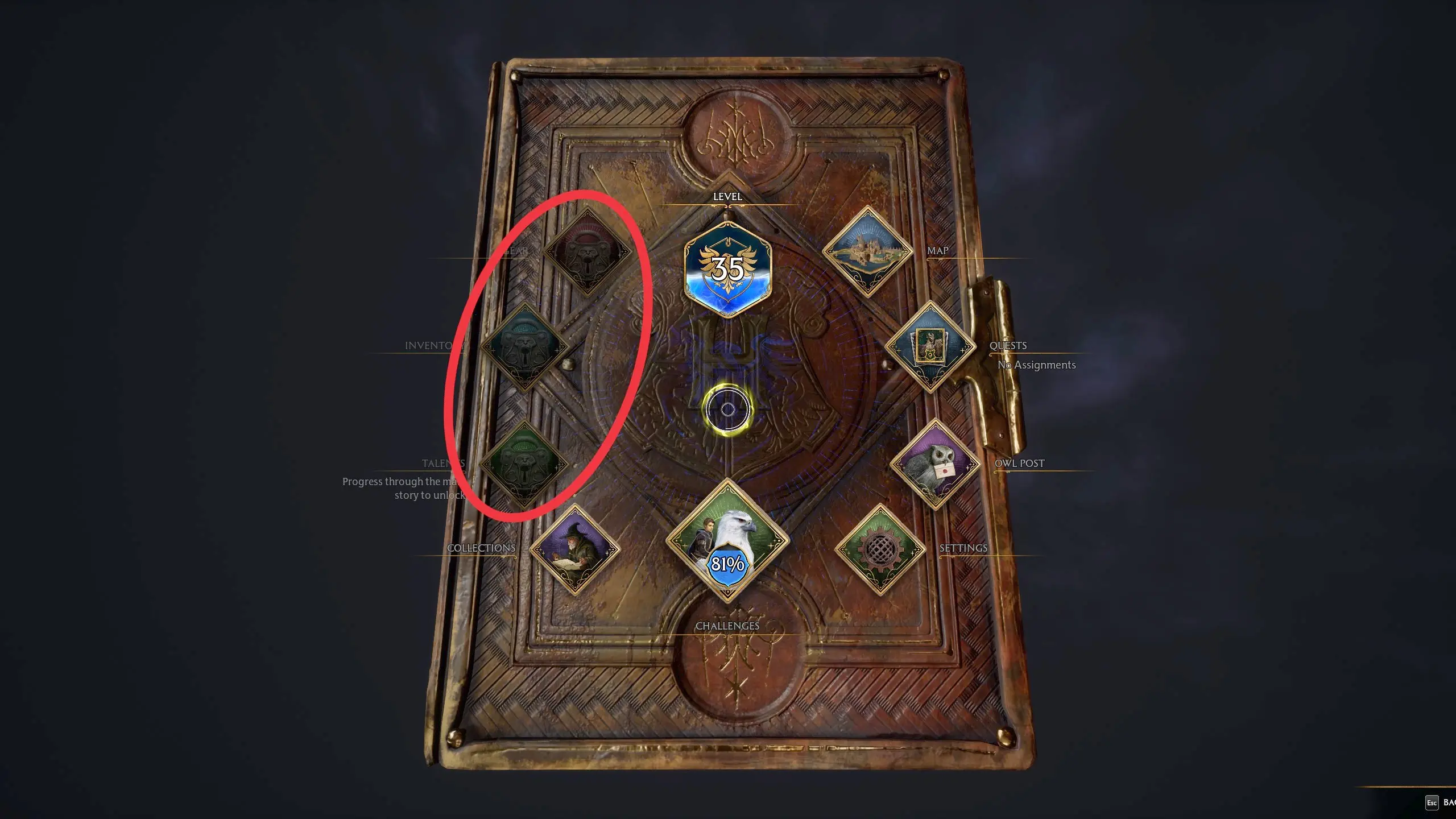
During tasks like the Deathly Hallows mission some of the menu items are disabled (they're greyed-out and cannot be selected). Once you've completed the mission they should be re-enabled but due to a bug in the game they sometimes remain disabled and there is no way for the player to re-enable them. This mod will do so. It also re-enables the tool wheel.
Installation
You should be able to install the mod automatically using Vortex (then skip to step 4 below), but Vortex can be a bit unreliable with Hogwarts Legacy mods (it doesn't always delete mods properly) so I would recommend installing it manually as follows:
-
[]Download the mod.
[
]Unzip the contents.[]Move zUnlockMenuTabs-1012_P.utoc, zUnlockMenuTabs-1012_P.ucas, and zUnlockMenuTabs-1012_P.pak to the Steam\steamapps\common\Hogwarts Legacy\Phoenix\Content\Paks\~mods\ folder.
[]Install Blueprint Apparate Modloader if you haven't already.
[]Start Hogwarts Legacy
[]Load your most recent save-file.
[]Press the F8 key to activate Blueprint Apparate Modloader.
[]Type UnlockMenuTabs in the little window and hit the Enter key on your keyboard.
[]The word UnlockMenuTabs should disappear and reappear lower down in that window with an X next to it. If it doesn't - if it stays on the top line - then either a) you put the .utoc, .ucas and .pak files in the wrong folder, or b) one of your existing mods is already using pakchunk 1009. Use my PakChunk Checker to check that. If you have a pakchunk conflict see the Conflicts section below.
[]Press F8 again to close the modloader window.
Default Key Bindings
Once installed, start the game and load your most recent save. Hit ALT-Scroll_Lock to unlock your menus.
Custom Key Bindings
You can change the key bindings to anything you like as follows:
[*]Download & install the latest version of this mod, start the game, do the F8 thing (if you haven't already), load a sa
Locked Menu Bug Fix is a small UI mod for Hogwarts Legacy that unlocks greyed-out menu items after completing tasks like the Deathly Hallows mission, and also unlocks the tool wheel. With 30 endorsements and 1,156 downloads, it's a niche fix for a specific annoyance.
✨ Key Features
📊 Pros & Cons
✅ Pros
- Fixes a real annoyance for completionists who hate seeing locked menu items after finishing quests.
- Tiny download (1,156 downloads) means it's lightweight and doesn't bloat your game.
- Simple, focused purpose—no extra fluff, just the fix you need.
⚠️ Cons
- Only 30 endorsements—small user base, so not widely tested.
- Last updated July 2024—might not be compatible with future game patches.
For Hogwarts Legacy players who've finished the main story and are bothered by greyed-out menu options. If you're a completionist or just want a cleaner UI, this is for you. Skip if you're fine with the locked items or want more comprehensive UI overhauls.
💡 Beginner Tips
- Make sure to back up your save before installing any mod, just in case.
- If you're using a mod manager, follow its instructions for manual installs.
- Check the mod's page for any updates after game patches.
📊 Mod Details
- Game
- Hogwarts Legacy Mods
- Author
- icouldifiwantedto
- Version
- 2.2
- Downloads
- 1,156
- Endorsements
- 30
- Category
- User Interface
- Created
- 9/25/2023
- Updated
- 7/16/2024
🔧 How to Install Hogwarts Legacy Mods
Download from Nexus.
📖 Full step-by-step install guide for Hogwarts Legacy →
Visit the official mod page for specific installation instructions for this mod.
🎮 Need cheat codes or console commands? Check ur gaming wiki for Hogwarts Legacy commands, item IDs, and more.
Keep browsing — more Hogwarts Legacy mods await