iCEnhancer 3.0 Natural
⚪ Last updated 2023Preview
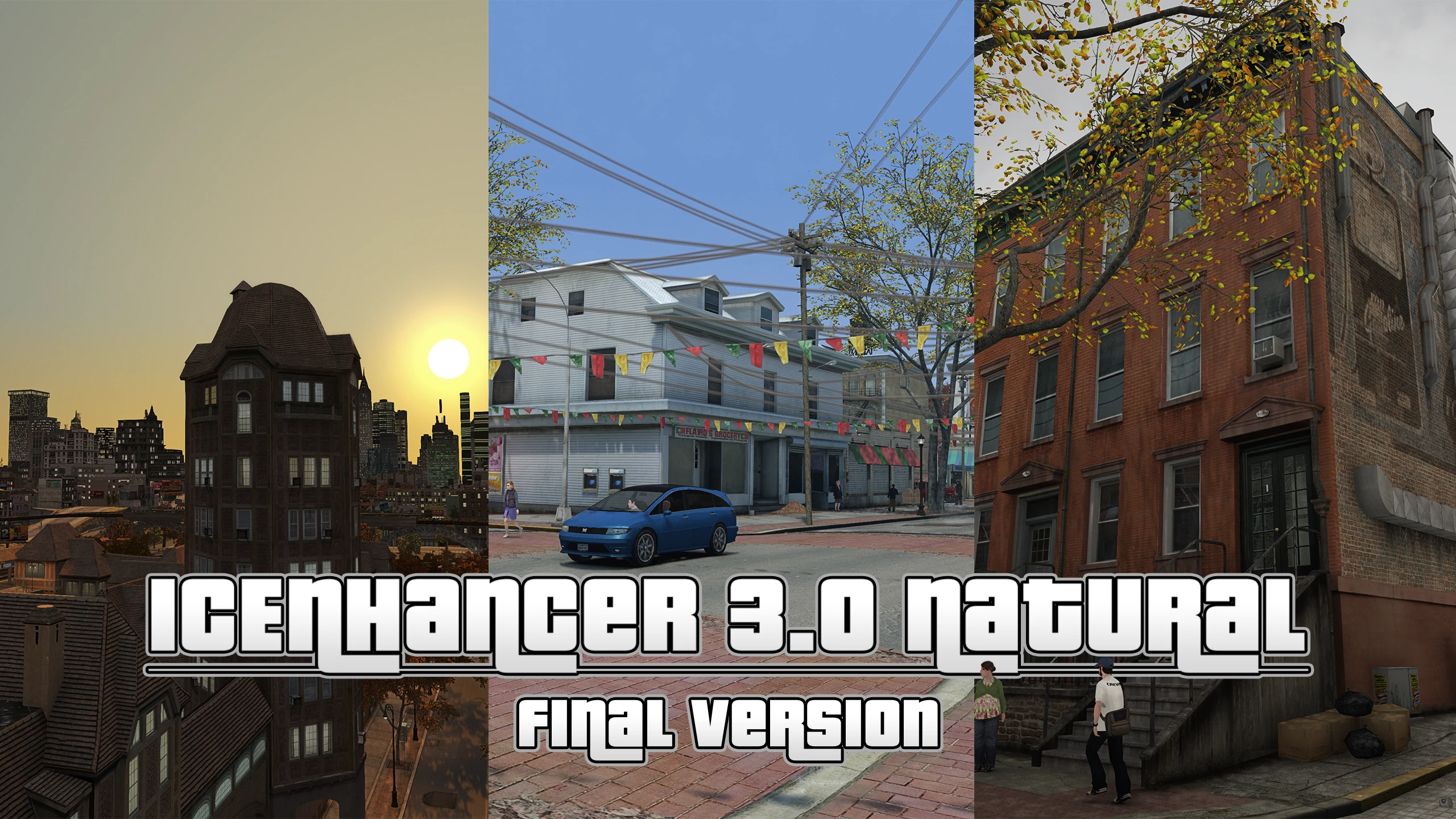
🔍 Analysis
- 👍 1.3% endorsement rate — high engagement, a strong quality signal
- 🏆 #1 of 76 Visuals and Graphics mods in this game by downloads
📋 About This Mod
This mod aims to make GTA IV more natural, less dark and more vibrant. My inspiration was the never released iCEnhancer C by Icelaglace. I spent about 500-1000 hours to create and update this mod.
Mod Description:
This mod was developed for GTA IV patch 1. 0. 4. 0 and later 1. 0. 7. 0/1. 0. 8. 0/EFLC support were added. If you want the best visuals I strongly recommend to use patch 1. 0. 4. 0 version. The 1. 0. 7. 0/1. 0. 8. 0/EFLC version does not look same as good as the 1. 0. 4. 0 version because of ENB limitation on newer patches. A lot of thanks to BisonSales, Orangebrains and icelaglace who helped me with some issues I had. Also thanks to Icelaglace again for his original iCEnhancer 3. 0 graphic mod. Without his mod this modified Icenhancer 3. 0 version wouldn't be possible obviously. Also big thanks to donnits who helped me to make iCEnhancer 3. 0 Natural compatible with Patch 7&8 and EFLC.
More screenshots in 1080p, 1440p and 4K.
I'm not the creator/original author of the iCEnhancer series.
This is just a custom preset for iCEnhancer 3. 0 and not a new version of iCEnhancer.
icelaglace is the original author of the iCEnhancer graphics mod series.
Additional included mods and optionals:
-Improved and added light sources for over 150 models
-Improved prop models such as street/park lights and busstops
-Map improvements with added props/assets for better detail and depth
-Compatibility to Enhanced Snow Mod 2. 0
-Alternative water shader
-Better general vehicle textures
-Better blood textures
-Graphic quality options
-Reshade preset
-Much more useful optionals
Alternatively, I can also recommend my timecycle only graphics mod, which is compatible with any patch, including the latest Steam/RGL version + with Fusion Fix, so you can benefit from a z-fighting fix and other shader fixes/improvements. Don't combine this mod with iCEnhancer 3. 0 Natural.
Join my Discord community for free early access updates for my mods and other files I haven't released on mod sites yet, such as custom tree models from RDR2 and GTA V and additional texture/model improvements:
Installation:
You'll need to download ENB's "d3d9.dll" file from here (You only need the "d3d9.dll" file from the "Wrapper version" folder, nothing else). Otherwise this mod won't work properly!
For further information open up "ENB Files.txt".
Complete installation instructions for this graphics mod can be found inside "Readme.txt"
WARNING:
-If you change the weather/time with a mod menu/trainer the game will need a few seconds in order to set new brightness settings. Same goes for other functions which skip time/weather.
-In order to have proper visuals it's recommended to not use any freeze time options from mod menus/trainers because this will conflict with ENB's adaptation function. In other words you'll get a way too bright or way too dark image after a certain time.
-Extra Sunny 2 is not a supported weather preset. It's not being used by GTA IV's timecycle/weather system, even if you're able to enable it with a mod menu/trainer so don't use it.
Troubleshooting and FAQ:
1. Game looks very bright, blurry and noisy:
-The "shaders" folder inside "common" folder in your GTAIV root is probably broken. Make sure to use vanilla shaders depending on your patch. You can find the original shaders for every patch inside the optionals folder. In case you use patch 7/8/EFLC make sure that dax1 shaders are working properly ("ShaderOverDax1" folder and "dax.dll" must be inluded inside your GTAIV main folder with "ProxyLibrary=dax.dll" in enbseries.ini).
-In case you don't use an Nvidia GPU you can try the "AMD GPU Fix" from the "Troubleshooting & Support" folder.
2. Blackscreen at night or overall ingame blackscreen (Still ingame sound, hud, menus):
-ENB is not loading. Check if you have installed ENB properly or if your anti virus tool blocks ENB .dll files.
-It could be a broken shaders folder as well. Use original shaders from the optionals folder for needed shaders.
-In case you don't use an Nvidia GPU you can try the "AMD GPU Fix" from the "Troubleshooting & Support" folder.
3. Can't use graphic memory, stuttering or other issues:
-Go to the "Optionals" folder and then open the "Commandline" folder.
-Drag&Drop the "commandline.txt" to your
📊 Mod Details
- Game
- GTA4 Mods
- Author
- DayL
- Version
- 2.0
- Downloads
- 156,458
- Endorsements
- 2,044
- Category
- Visuals and Graphics
- Created
- 4/25/2022
- Updated
- 10/26/2023
🔧 How to Install Gta4 Mods
Download from Nexus Mods.
📖 Full step-by-step install guide for Gta4 →
Visit the official mod page for specific installation instructions for this mod.
🎮 Need cheat codes or console commands? Check ur gaming wiki for Gta4 commands, item IDs, and more.
Keep browsing — more Gta4 mods await