GTA5O: Private Public Lobby with Multi-IP whitelist
⚪ Last updated 2017⚠️ Install Order · 3 steps
Install in this order, then this mod last — most mods fail to load without their framework and dependencies in place.
🖼️ Gallery (6 images)




🔍 Analysis
- 👍 0.2% endorsement rate
- 🏆 #74 of 126 tools mods in this game by downloads
📋 About This Mod
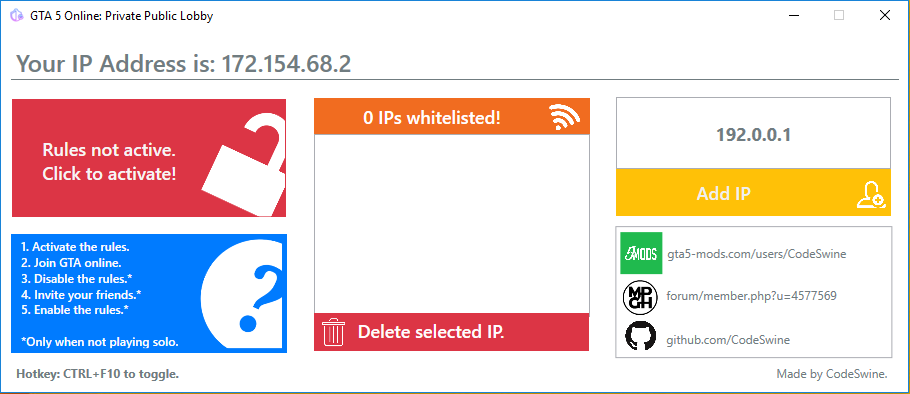
Description Comments (76) GTA5O: Private Public Lobby with Multi-IP whitelist A tool to setup your GTA5 firewall rules easily. Adding IPs to your whitelist enables your friends to stay in your session. Comes in handy whenever you want to do Public Session only missions in peace. Setup: Download the release and extract all files. Inside the folder start the . EXE as administrator. How-to (SOLO lobby): Start the program as admin with Windows firewall enabled. Click "Activate Rules". Join GTA online. How-to (Friends lobby): Start the program as admin with Windows firewall enabled. Add your friends IPs to the whitelist. Click "Activate Rules". Join GTA online. Click "Deactivate Rules" and invite your friends. If they're all there click "Activate rules" again. Requirements . NET Framework 4. 6. 1 Enabled Windows Firewall Administrator Priviliges If your friend is on the same network you'll need to add his local IP-Address! Source GitHub Note: you don't need to add your own IP Address. Source is on Github.
📊 Mod Details
- Game
- GTA V Mods
- Author
- CodeSwine
- Version
- 34
- Downloads
- 34,917
- Endorsements
- 63
- Category
- tools
- Created
- 8/22/2017
- Updated
- 8/23/2017
🔧 How to Install GTA V Mods
Script Hook V + OpenIV. Never mod GTA Online.
📖 Full step-by-step install guide for GTA V →
Visit the official mod page for specific installation instructions for this mod.
🎮 Need cheat codes or console commands? Check ur gaming wiki for GTA V commands, item IDs, and more.
Keep browsing — more GTA V mods await