dlclist Auto Compiler "Easy, Fast & Immediate"
⚪ Last updated 2020⚠️ Install Order · 3 steps
Install in this order, then this mod last — most mods fail to load without their framework and dependencies in place.
🖼️ Gallery (4 images)

🔍 Analysis
- 👍 0.9% endorsement rate
- 🏆 #101 of 126 tools mods in this game by downloads
📋 About This Mod
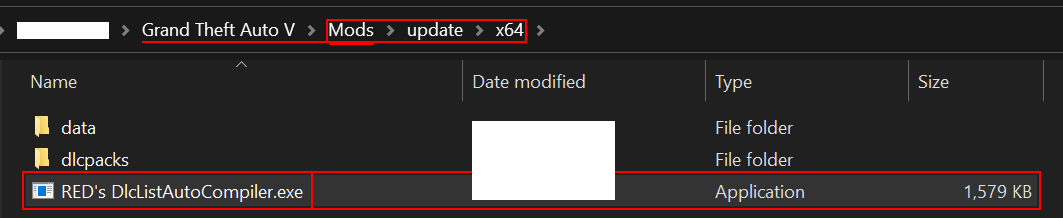
Introducing the RED’s dlclist AutoCompiler (the easiest to use) GENERAL INFORMATIONS: The scope of this tool here, is to simplify the way we install Vehicles, or folders in general by not taking care about our dlclist at all, because this tool will do it for you. Every single time that you will install (or uninstall) an folder, once run the .exe, your new dlclist.xml file will be completely redone, and you will find the new dlclist.xml into the same directory (where the compiler .exe is). The Mod’s code is C++. USAGE: Did you have to reinstall your game completely and you lost everything? Or maybe you need a faster way to install all the vehicles you need for Traffic Plus+? With this awesome tool, you basically just need to put your folders into your dlcpacks directory in (Mods/update/x64/dlcpacks) not even running OpenIV; directory, go back to x64, run the .exe and your new dlclist.xml, will be ready to be installed replacing the old one (This, always in Mods/update/update.rpf/common/data); you now don't need to write a new line in it whenever you install or uninstall something because the entire process is automatic. ⚠️ Disclaimer: This tool won’t affect game’s functionality or performance in any way since it’s an external tool. CHANGELOG: 1. 0_ Initial release; 1. 1_ Original DLCs are now added first then modded ones, and they'll be added following the original dlcpacks folder (outside the mods folder) and so, this DLCs will be added even if they're not in the modded dlcpacks directory; also, whenever the game will release an update, this compiler will add the new dlcpacks to the dlclist automatically.
RED's dlclist Auto Compiler is a tool that automatically manages your GTA V dlclist, so you don't have to manually edit it when adding vehicles or folders. With 204 endorsements and over 22,000 downloads, it's a popular utility for modders. It was last updated in April 2020.
✨ Key Features
📊 Pros & Cons
✅ Pros
- Huge community trust: 204 endorsements and 22,654 downloads show it's widely used.
- Saves time and hassle by automating a tedious part of mod installation.
- Simple and straightforward—just run it and it does the work.
⚠️ Cons
- Last updated in 2020, so it may not be compatible with the latest game updates.
- Only works for dlclist management—doesn't handle other mod installation steps.
This is for GTA V modders who frequently add vehicle mods or custom folders and are tired of manually editing the dlclist. It's especially useful for beginners who find dlclist editing confusing, and for veteran modders who want to speed up their workflow.
💡 Beginner Tips
- Make sure you have the latest version of the tool to ensure compatibility with your game version.
- Run the tool after adding new vehicle mods to automatically update your dlclist.
- If you encounter issues, check the mod's comments section for troubleshooting tips from other users.
📊 Mod Details
- Game
- GTA V Mods
- Author
- RED-ITA Just here to solve your problems
- Version
- 1.0
- Downloads
- 22,654
- Endorsements
- 204
- Category
- tools
- Created
- 1/27/2020
- Updated
- 4/6/2020
🔧 How to Install GTA V Mods
Script Hook V + OpenIV. Never mod GTA Online.
📖 Full step-by-step install guide for GTA V →
Visit the official mod page for specific installation instructions for this mod.
🎮 Need cheat codes or console commands? Check ur gaming wiki for GTA V commands, item IDs, and more.
Keep browsing — more GTA V mods await