Colored 3D Weapon + Radio Icons
⚪ Last updated 2024⚠️ Install Order · 3 steps
Install in this order, then this mod last — most mods fail to load without their framework and dependencies in place.
🖼️ Gallery (6 images)

🔍 Analysis
- 👍 0.8% endorsement rate
- 🏆 #90 of 665 misc mods in this game by downloads
📋 About This Mod
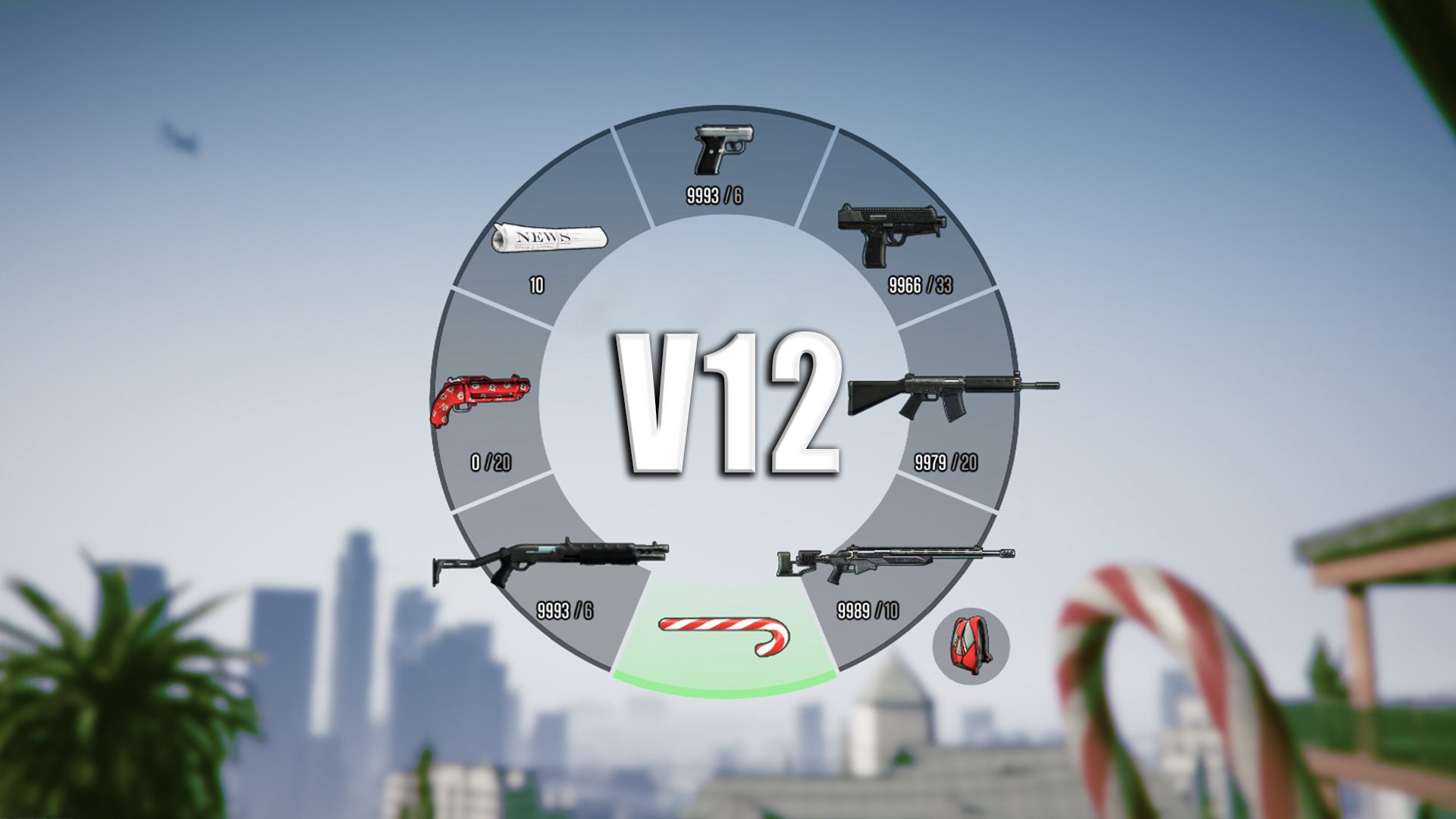
Colored 3D Weapon Icons INFORMATION This mod replaces the weapon & radio icons with colored 3D-icons. Hope you like it :) Pls don't reupload this mod. INSTALLATION -Go to mods\update\update.rpf\x64\data\cdimages\scaleform_generic.rpf -Click on Edit Mode and replace hud.ytd & mp_big_message_freemode.ytd CHANGELOG v2: -added colored 3D radio v3: -added Revolver icon (DLC) -added Switchblade icon (DLC) -fixed some details v4: -added Double Barreled Shotgun icon (DLC) -added Shrewsbury Compact Rifle icon (DLC) v5: -added all BIKER DLC weapons v6: -added all GUNRUNNING DLC weapons v7: -added all THE DOOMSDAY HEIST DLC weapon & radio icons v8: -added all AFTER HOURS DLC weapon & radio icons v9: -added all ARENA WAR DLC weapon & radio icons v10: -added all CASINO DLC weapon & radio icons v11: -added all TUNER DLC weapon & radio icons v12: -added all CHOP SHOP DLC weapon & radio icons
This mod replaces weapon and radio icons in GTA V with colored 3D versions, enhancing visual clarity and style. It's a simple visual overhaul for players who want a fresh look at their HUD. With 671 endorsements and recent updates, it's a popular choice for icon customization.
✨ Key Features
📊 Pros & Cons
✅ Pros
- Makes weapon icons pop with color and depth, easier to spot at a glance.
- Radio icons get a fresh 3D look that fits the game's style.
- Simple file replacement means no complex mod manager needed.
⚠️ Cons
- Only affects icons, not other HUD elements—so if you want a full overhaul, look elsewhere.
- Requires manual file replacement in update.rpf, which can be tricky for modding newbies.
- Compatibility risk with other mods that modify the same scaleform files.
This is for GTA V players who want a quick visual upgrade to their HUD icons without changing gameplay. It's perfect for modders who appreciate cleaner, more vibrant icons and don't mind a manual install. If you're into immersion or just like customizing your UI, this is a solid pick.
💡 Beginner Tips
- Make sure to back up the original hud.ytd and mp_big_message_freemode files before replacing, so you can revert if needed.
- Use OpenIV's Edit Mode to replace files—it's the standard tool for GTA V modding.
- If you have other HUD mods, install this one last to avoid conflicts.
📊 Mod Details
- Game
- GTA V Mods
- Author
- CSYON
- Version
- 2
- Downloads
- 79,963
- Endorsements
- 671
- Category
- misc
- Created
- 12/1/2015
- Updated
- 1/12/2024
🔧 How to Install GTA V Mods
Script Hook V + OpenIV. Never mod GTA Online.
📖 Full step-by-step install guide for GTA V →
Visit the official mod page for specific installation instructions for this mod.
🎮 Need cheat codes or console commands? Check ur gaming wiki for GTA V commands, item IDs, and more.
Keep browsing — more GTA V mods await