Classic Colored Radio Station Icons for GTA San Andreas Definitive Edition
⚪ Last updated 2021Preview
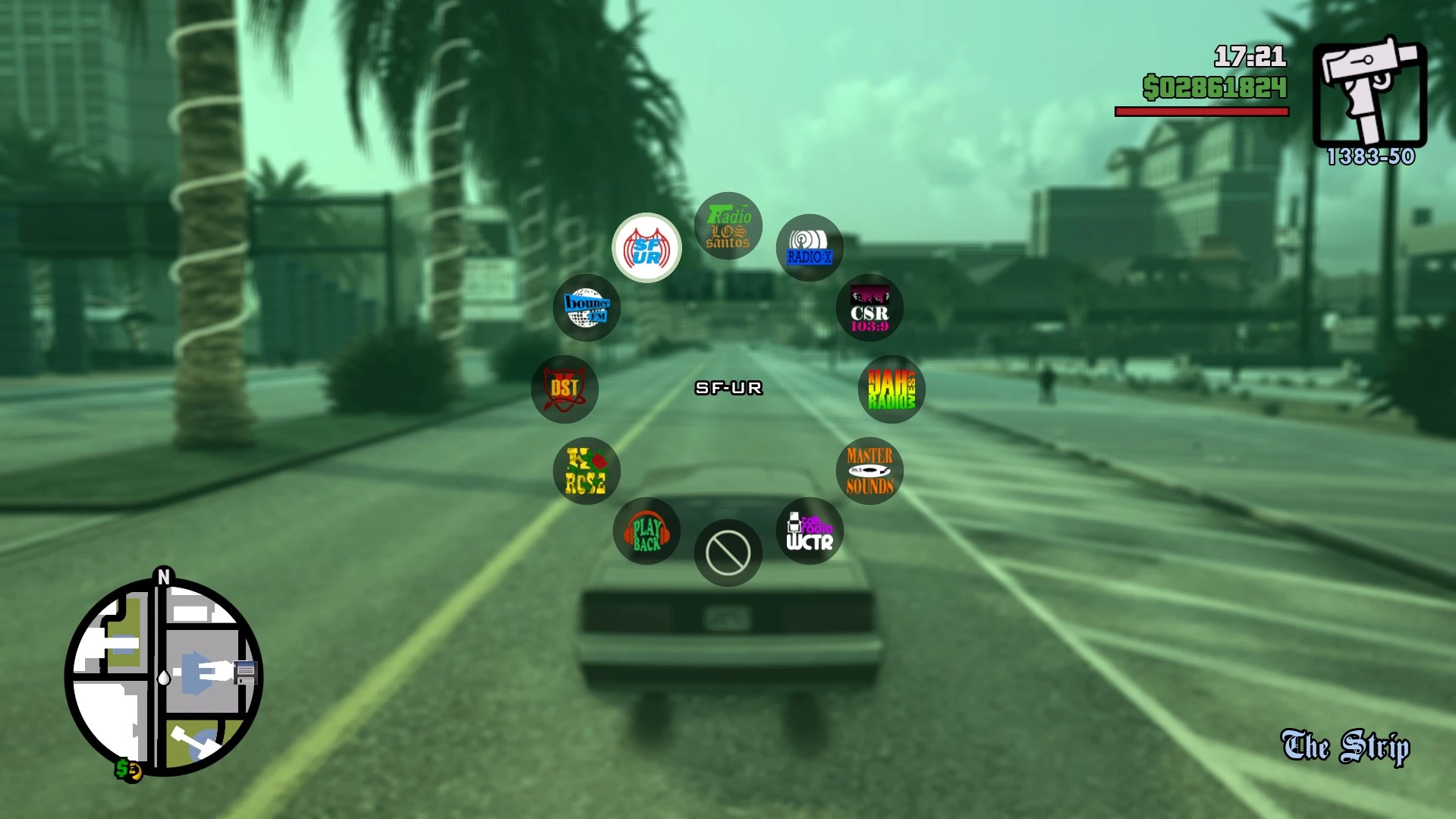
🔍 Analysis
- 👍 3.3% endorsement rate — high engagement, a strong quality signal
- 🏆 #2 of 56 User Interface mods in this game by downloads
📋 About This Mod
- Version 2. 0 Update (San Andreas)
Compatible with 1. 00, 1. 01 & 1. 03
· Fixed an issue where the radio icons turned black when highlighted.
· New UI with green tinted border icons.
· Tweaked radio icons with soft shadows
· New green flat "Off" sign.
The default radio wheel looks boring with all these white radio station icons, so let's replace it with something better!
Update 1: Now using PinbaII's HD radio station icons, it look's much cleaner now!
Installation:
move the . PAK file into the Gameface/Contents/Paks/~mods folder. If the folder doesn't exist, create it.
Credits: Thanks to PinbaII for creating the HD radio station icons!
This UI mod for GTA San Andreas Definitive Edition replaces the default white radio station icons with classic colored versions, offering a nostalgic visual upgrade. With 433 endorsements and over 13,000 downloads, it's a popular choice for players seeking a more vibrant interface.
✨ Key Features
📊 Pros & Cons
✅ Pros
- Community favorite with 433 endorsements and over 13k downloads.
- Simple visual upgrade that adds color to the UI without changing gameplay.
- Updated recently (December 2021) with a complete overhaul.
⚠️ Cons
- Only affects radio station icons—no other UI elements are changed.
- May conflict with other UI mods that alter the same icons.
- Compatibility with future game updates is uncertain since it's been a while.
For GTA San Andreas Definitive Edition players who want a more colorful and classic-looking radio interface. If you're a purist who prefers the original white icons, this isn't for you. It's purely cosmetic, so skip if you're looking for gameplay changes.
💡 Beginner Tips
- Make sure to back up your original files before replacing them, just in case.
- If you're using a mod manager, preview the icons before installing to see if you like the colors.
- This mod is for the Definitive Edition only—don't try it on the original San Andreas.
📊 Mod Details
- Game
- Grandtheftautothetrilogy Mods
- Author
- Gravarty
- Version
- 2.0
- Downloads
- 13,270
- Endorsements
- 433
- Category
- User Interface
- Created
- 11/17/2021
- Updated
- 12/6/2021
🔧 How to Install Grand Theft Auto: The Tri Mods
Download from Nexus Mods.
📖 Full step-by-step install guide for Grand Theft Auto: The Tri →
Visit the official mod page for specific installation instructions for this mod.
🎮 Need cheat codes or console commands? Check ur gaming wiki for Grand Theft Auto: The Tri commands, item IDs, and more.
Keep browsing — more Grand Theft Auto: The Tri mods await