Architect Mod
⚪ Last updated 2021Preview
🔍 Analysis
- 🏆 #45 of 137 Miscellaneous mods in this game by downloads
📋 About This Mod
Architect Mod
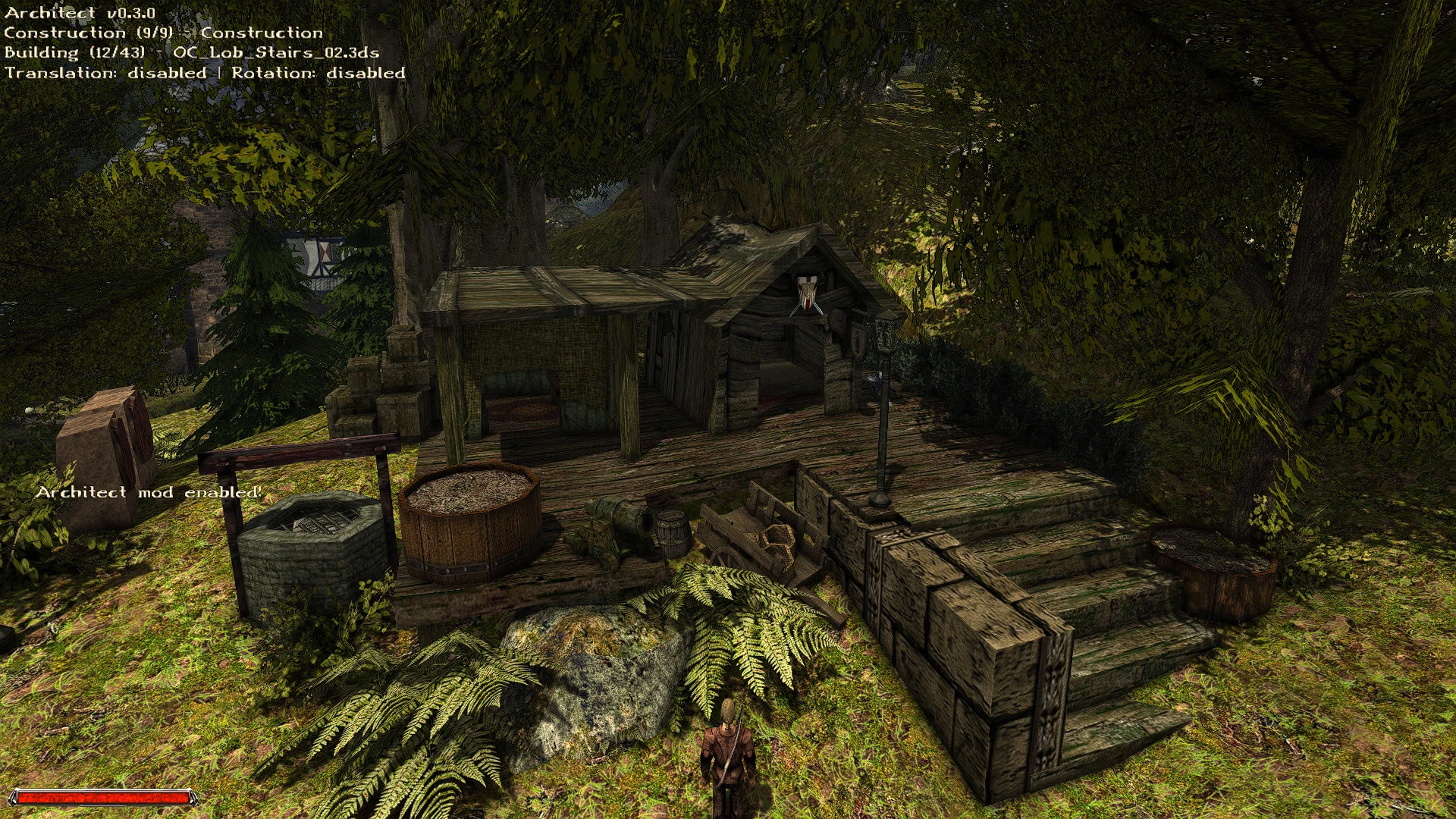
Architect - A modification which introduces base-building features and other mechanics to Gothic 2.
This mod allows you to build your own base within the world of Gothic 2.
You can select different models from from a set of categories.
These are the current categories:
-
[]CATEGORY_MOBS_ADDONS - Every model which is provided by the Addon (DNDR / TNoTR)
[
]CATEGORY_MOBS_HOUSEHOLD - Every model from households (beds, books, desks, etc.)[]CATEGORY_MOBS_MISC - Various models from the game which dont belong to a specific category (gates, deco, props, etc.)
[]CATEGORY_MOBS_NATURE - Everything from trees to grass to bushes to natur-y things
[]CATEGORY_MOBS_NEWWORLD - Everything from the new world (khorinis)
[]CATEGORY_MOBS_OLDWORLD - Everything from the old world
[]CATEGORY_MOBS_PLANKS - A category which contains basic building blocks for houses, or even complete houses, etc.
[]CATEGORY_MOBS_STONES - ... stones?
[]CATEGORY_CUSTOM_CONSTRUCTION - Custom Category which contains a sorted set of entities used only for buildings
[]CATEGORY_CUSTOM_NATURE - Custom category which only contains small foliage and deco stuff
[]CATEGORY_CUSTOM_INTERACTIVE - Custom category which contains the usable mobs from G2 - like the rune table, the alchemy table, ladders, seats, desks, etc.
Installation
Use the Spine-Mod Manager and download the mod with it =).
Download the latest release, unzip the archive into your Gothic II\data\ - folder.
If the installation was succesful you’ll see the instructions-message on how to use the mod when the game has been started
(and a savegame loaded or a new game hast been created).
These keys can be used to interact with the mod - they’re also shown ingame.
Mouse
-
[]Mouse wheel forward: Select the next construction
[]Mouse wheel backwards: Select previous construction
[]Mouse side button 1: Create construction
[]Mouse side button 2: Undo - delete last construction from history, undo creation
Keyboard - Keys
-
[]T: Toggle translation mode
[]R: Switch rotation mode
[]V: Set the viewed Vob to be processed
[] F12: Toggle Mod Status
Keyboard - Numpad
[]Numpad Division: Set active Vob to 90 ° - along the z-axis
[]Numpad 9: Shift around negative delta on Y-axis, rotate
[]Numpad 8: Shift by positive delta on Y-axis
[*]Numpad 7: Shift around positive delta
-
[]T: Toggle translation mode
A compact mod for Gothic 2 that adds base building and scene modification features. With 18 endorsements and last updated in April 2021, it's a niche tool for players who want to customize their in-game environment. The description is brief, but the core functionality is clear.
✨ Key Features
📊 Pros & Cons
✅ Pros
- Fills a niche for Gothic 2 players who want to build and modify scenes.
- Small but dedicated following (18 endorsements).
- Last updated in 2021, so it's relatively recent for a niche mod.
⚠️ Cons
- Very low endorsement count (18) suggests limited community testing.
- Last updated in 2021 — may not be compatible with the latest Gothic 2 patches or mods.
For Gothic 2 players who want to experiment with base building and scene customization. If you're looking for a polished, well-documented mod, this might not be it. Skip if you prefer gameplay overhauls or story content.
💡 Beginner Tips
- Check the mod's forum or comments section for any user-reported issues before installing.
- Make sure to back up your Gothic 2 save files before using scene modification features, as they can alter your world state.
- If you're using other mods, test this one in a separate profile to avoid conflicts.
📊 Mod Details
- Game
- Gothic2 Mods
- Author
- dataframe
- Version
- 0.4.0
- Downloads
- 309
- Endorsements
- 18
- Category
- Miscellaneous
- Created
- 4/16/2021
- Updated
- 4/16/2021
🔧 How to Install Gothic 2 Mods
Download from Nexus Mods.
📖 Full step-by-step install guide for Gothic 2 →
Visit the official mod page for specific installation instructions for this mod.
🎮 Need cheat codes or console commands? Check ur gaming wiki for Gothic 2 commands, item IDs, and more.
Keep browsing — more Gothic 2 mods await