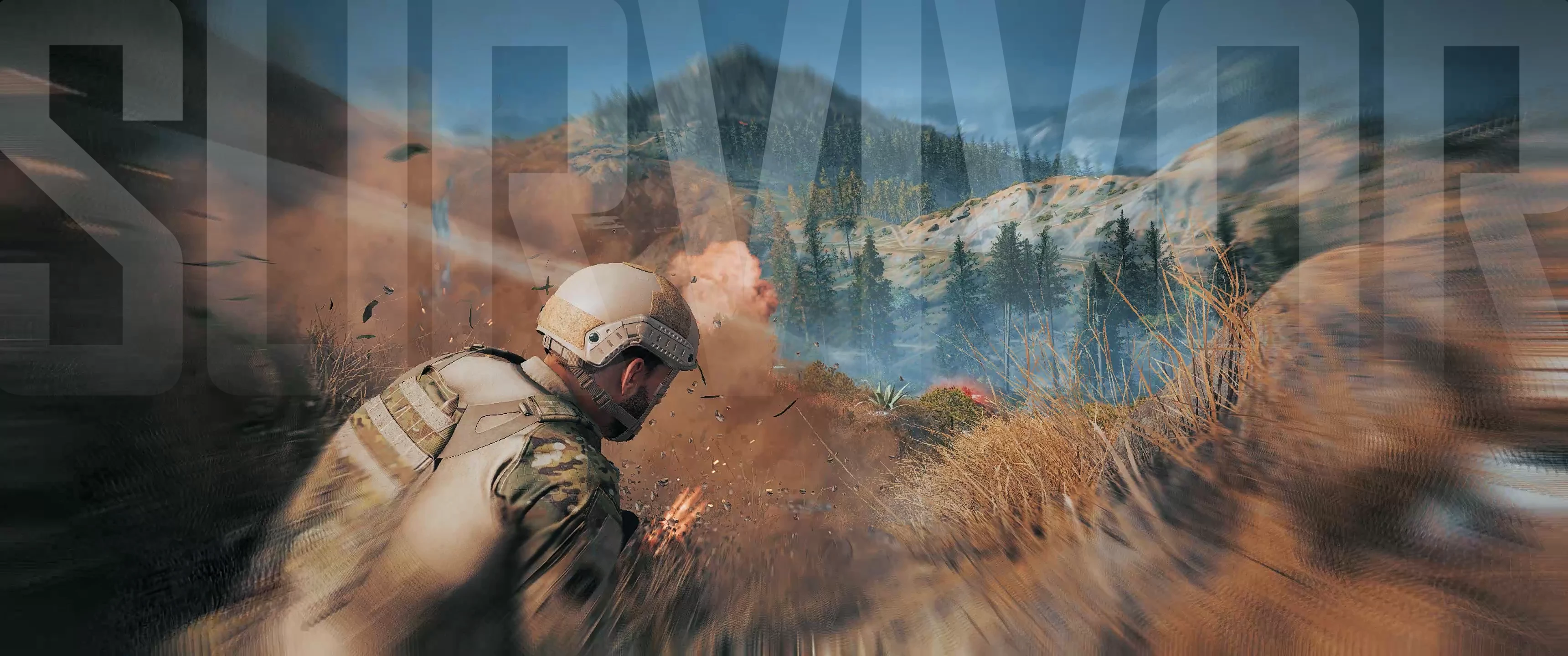
SURVIVOR - Lightweight filmic ReShade
⚪ Last updated 2023Preview
🔍 Analysis
- 👍 2.1% endorsement rate — high engagement, a strong quality signal
- 🏆 #5 of 52 ReShade Presets mods in this game by downloads
📋 About This Mod
I'm thrilled to introduce my new ReShade preset for Ghost Recon Breakpoint: SURVIVOR.
Crafted on ReShade 5. 3. 0 with the prod80 FX pack, this isn't just a basic visual enhancement. I've fine-tuned this preset to deliver an immersive visual uplift with minimal performance hit, costing no more than 5-6 fps. The preset uses a combination of the prod80 filmic LUT files and color correction filters.
This preset WILL take your game from bleh to stunning cinematic experience instantly.
WATCH THE RELEASE TRAILER ON YOUTUBE
1XuKqayxIdI
HOW TO INSTALL
Ready to dive in?
-
[]Download the preset ZIP file - Once downloaded, extract it either to your game's base directory (where GRB.exe is located), or add it to a new folder in the base directory (I like to put my preset files in a folder named 'reshade-inis').
[
]Download the official ReShade .exe from reshade.me and run it, following the simple installation prompts - During the .exe install, you'll be prompted to select an ".ini" preset, that's where you select up my preset file. Make sure you select NEXT and not skip.DISABLE BATTLE-EYE
Looks like BattleEye is blocking this ReShade version. To use this preset, you need to disable it. Here's how...
NB: If you are planning on using any GRB mods from Nexus, you're probably going to have to disable BE anyway
-
[]Exit Ubisoft Connect
[
]Open the BattlEye folder[]Run Uninstall_BattlEye.bat
[
[]Re-Open Ubisoft Connect
[]Open the GRB game properties, then navigate to Parameters > Game Launch Arguments
[]Add the following argument:/belaunch -be
[]Launch the game from Ubisoft Connect (do not launch via Steam or other platforms)
COMPATIBILITY
This will work with every other mod here. I highly recommend you grab the Spartan Mod Overhaul and Authentic Warfare Sound mod at a minimum.
CALIBRATION SETTINGS!!
I foolishly edited the preset whilst my Ca
-
[]Exit Ubisoft Connect
SURVIVOR is a lightweight filmic ReShade preset for Ghost Recon Breakpoint, built with ReShade 5.3.0 and prod80 FX pack. It provides a cinematic overhaul with minimal performance impact, as claimed by the author. With 174 endorsements and 8,383 downloads, it's a modestly popular choice for players seeking visual enhancement.
✨ Key Features
📊 Pros & Cons
✅ Pros
- Solid community backing (174 endorsements) and over 8k downloads show it's been tried and trusted
- Lightweight claim means you can get that filmic look without tanking your framerate
- Built on ReShade 5.3.0 and prod80 FX pack, so it's using proven tools
⚠️ Cons
- Last updated in July 2023, so it might not be fully compatible with the latest ReShade versions or game updates
- Only 174 endorsements out of 8k downloads—some users may have moved on or had issues
- Compatibility with other ReShade presets or mods could be a concern since it's a preset that changes global visuals
For Ghost Recon Breakpoint players who want a cinematic, filmic look without sacrificing performance. If you're into immersion and atmospheric visuals, this preset is worth a shot. Skip if you prefer vanilla graphics or want heavy gameplay mods—this is purely cosmetic.
💡 Beginner Tips
- Make sure you have ReShade installed and set up for Ghost Recon Breakpoint before adding this preset—it's a preset, not a standalone installer.
- After installing, tweak the preset's intensity in-game using the ReShade overlay to match your taste and monitor brightness.
- If you're using other visual mods, load this preset last to avoid conflicts, and test in a busy area to check performance.
📊 Mod Details
- Game
- Ghostreconbreakpoint Mods
- Author
- doubleDizz
- Version
- 1.0
- Downloads
- 8,383
- Endorsements
- 174
- Category
- ReShade Presets
- Created
- 7/3/2023
- Updated
- 7/9/2023
🔧 How to Install Ghost Recon Breakpoint Mods
Download from Nexus Mods.
📖 Full step-by-step install guide for Ghost Recon Breakpoint →
Visit the official mod page for specific installation instructions for this mod.
🎮 Need cheat codes or console commands? Check ur gaming wiki for Ghost Recon Breakpoint commands, item IDs, and more.
Keep browsing — more Ghost Recon Breakpoint mods await