AdvancedMimicUi
🟡 Updated this yearPreview
🔍 Analysis
- 👍 0.0% endorsement rate
- ✅ Updated 33 days after the latest game patch — actively maintained
- 🏆 #2 of 5 Utility, #mod, Plugin mods in this game by downloads
📋 About This Mod
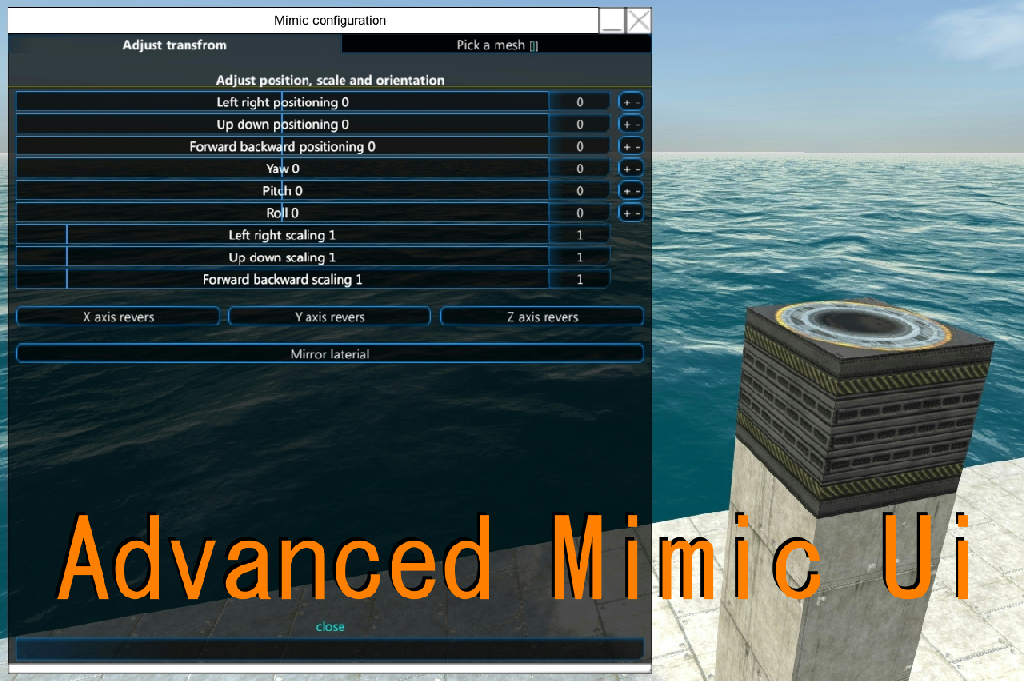
Mod latest version 5.2.3 FTD supported version 4.2.3 ~ 以下の文はグーグル翻訳を使用して日本語から英語に翻訳しています。 The following sentence is translated from Japanese to English using Google Translate. v5.0.0 Update! We have changed from VS2019 .NETFramework v4.6 to VS2022 .NETStandard v2.1 In line with this, we will discontinue support for FTD versions less than 4.2.3 If you would like to use the mods in an environment where the FTD version is less than 4.2.3, please use the previous mods that we have uploaded to GitHub. https://github.com/huwahuwa2017/FromTheDepths_HuwaMods_OldVersion Support for "Decoration" started from Mod Version 2.0.0 Elements to add or change Addition of a reverse sign button Added buttons to add constant values (+1, -1, +45, -45). Added a button to initialize the value Added a button to flip position and rotation with respect to the X, Y, and Z axes. Added a button to copy and paste all the data in the mimic block. Added a button to send data to the mimic block on the other side of the screen in mirror mode. Added a button to select a mirror mesh Display the name of the currently selected mesh in the GUI. Display the name of the selected mesh when the cursor is hovered over a mimic block. Just change the GUI, so you can safely load the vehicle even if you remove the MOD.
Mod latest version 5. 2. 3 FTD supported version 4. 2. 3 ~ 以下の文はグーグル翻訳を使用して日本語から英語に翻訳しています。 The following sentence is translated from Japanese to English using Google Translate. v5. 0. 0 Update! We have changed from VS2019 . NETFramework v4. 6 to VS2022 . NETStandard v2. 1 In line with this, we will discontinue support for FTD versions less than 4. 2. 3 If you would like to use the mods in an environment where the FTD version is less than 4. 2. 3, please use the previous mods that we have uploaded to GitHub. https://github.com/huwahuwa2017/FromTheDepths_HuwaMods_OldVersion Support for "Decoration" started from Mod Version 2. 0. 0 Elements to add or change Addition of a reverse sign button Added buttons to add constant values (+1, -1, +45, -45). Added a button to initialize the value Added a button to flip position and rotation with respect to the X, Y, and Z axes. Added a button to copy and paste all the data in the mimic block. Added a button to send data to the mimic block on the other side of the screen in mirror mode. Added a button to select a mirror mesh Display the name of the currently selected mesh in the GUI. Display the name of the selected mesh when the cursor is hovered over a mimic block. Just change the GUI, so you can safely load the vehicle even if you remove the MOD.
📊 Mod Details
- Game
- From The Depths Mods
- Author
- 76561198157843130
- Version
- N/A
- Downloads
- 2,966
- Endorsements
- 0
- Category
- Utility, #mod, Plugin
- Created
- 2/4/2020
- Updated
- 7/18/2026
🔧 How to Install From the Depths Mods
Subscribe on Steam Workshop. Mods auto-download and install. Launch the game to activate.
📖 Full step-by-step install guide for From the Depths →
Visit the official mod page for specific installation instructions for this mod.
🎮 Need cheat codes or console commands? Check ur gaming wiki for From the Depths commands, item IDs, and more.
Keep browsing — more From the Depths mods await