Final Fantasy Vii Remake Internal Menu
⚪ Last updated 2022Preview
🔍 Analysis
- 👍 5.3% endorsement rate — high engagement, a strong quality signal
- 🏆 #19 of 43 User Interface mods in this game by downloads
📋 About This Mod
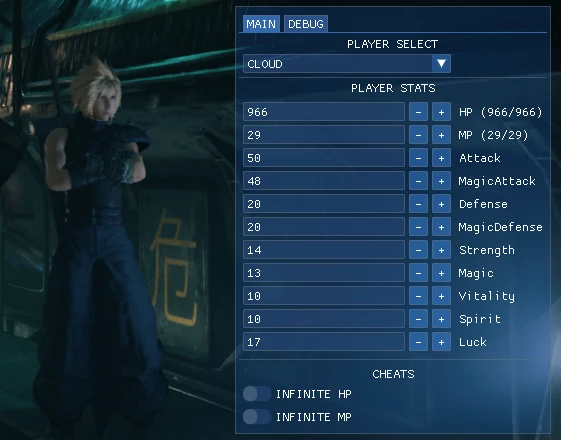
Internal Mod Menu with some basic cheats and Party Stat adjustments
Final Fantasy Vii Remake Internal Menu
NOTE
This is mainly a source project. Meaning you are free to edit the source code and compile your own version using this as a base. You are free to clone the latest version by going to the github page. The download included should act as a demo so to speak. You will be able to inject an interactable menu which features a few cheats and your parties stats. I will continue to add to this project as I find more things. I just got the game yesterday and have only reached the first reactor. Below there will be an advanced usage guide which I plan to later expand upon.
RoadMap
- Items & Equipment Manager
- Pause the game w/ Menu open
- Controller Support
--------------------------------------------------------------------
REQUIREMENTS
You must launch this game w/ DirectX 11 for the hook to work. Launching w/ DirectX12 will result in errors!
- Right click "Final Fantasy VII REMAKE INTEGRADE" in your steam library
- Select properties
- General > Launch Options
- input "-d3d11" without the quotes
FEATURES
- Party Stats Manager
- Basic Cheats
SUPPORT
Feel free to join my discord server or report any issues you encounter in the github repository
CONTRIBUTING
I have no problem with people contributing to the repository. All I ask is that you follow the same programming methods that I have in place. Class pointers , structs etc. Things need to be easily accessible and neatly managed (within reason). Any and all pull requests will include a discussion regarding the reasoning behind changes. I look forward to collaborating with like minded individuals :)
INSTALL INSTRUCTIONS
- Use any x64 injector of your choice. If you do not have one, consider downloading process hacker.
- Inject into ff7remake_.exe
------------------
I take no responsibilities for whatever happens to your pc if you mess this up. This stuff kind of assumes you have some basic knowledge in coding. If not ... feel free to watch a few youtube videos on "Making your first internal hack"
ADVANCED USER GUIDE
(this assumes you have visual studio 2019 installed)
Quick Start - Add New Toggle:
- Clone the project
- Navigate to menu.cpp
- create a boolean at the head of the file below our includes
- in the desired "tab" create an ImGui::Toggle
- in loops create an if statement for the boolean, when its true your changes should apply
Example Max Strength ("~" is used to mark spacing in the document "menu.cpp" use CTRL+F to find the function names)
#include "~"
bool bMAXSTRENGTH = FALSE;
void STATCloud() {
ImGui::Toggle("MAX STRENG
📊 Mod Details
- Game
- Finalfantasy7remake Mods
- Author
- NightFyre
- Version
- v1.1
- Downloads
- 2,465
- Endorsements
- 131
- Category
- User Interface
- Created
- 6/20/2022
- Updated
- 6/23/2022
🔧 How to Install Final Fantasy VII Remake Mods
Download from Nexus Mods.
📖 Full step-by-step install guide for Final Fantasy VII Remake →
Visit the official mod page for specific installation instructions for this mod.
🎮 Need cheat codes or console commands? Check ur gaming wiki for Final Fantasy VII Remake commands, item IDs, and more.
Keep browsing — more Final Fantasy VII Remake mods await