Dog Noses for Hellsguard Males
⚪ Last updated 2021Preview
🔍 Analysis
- 🏆 #166 of 187 Characters mods in this game by downloads
📋 About This Mod
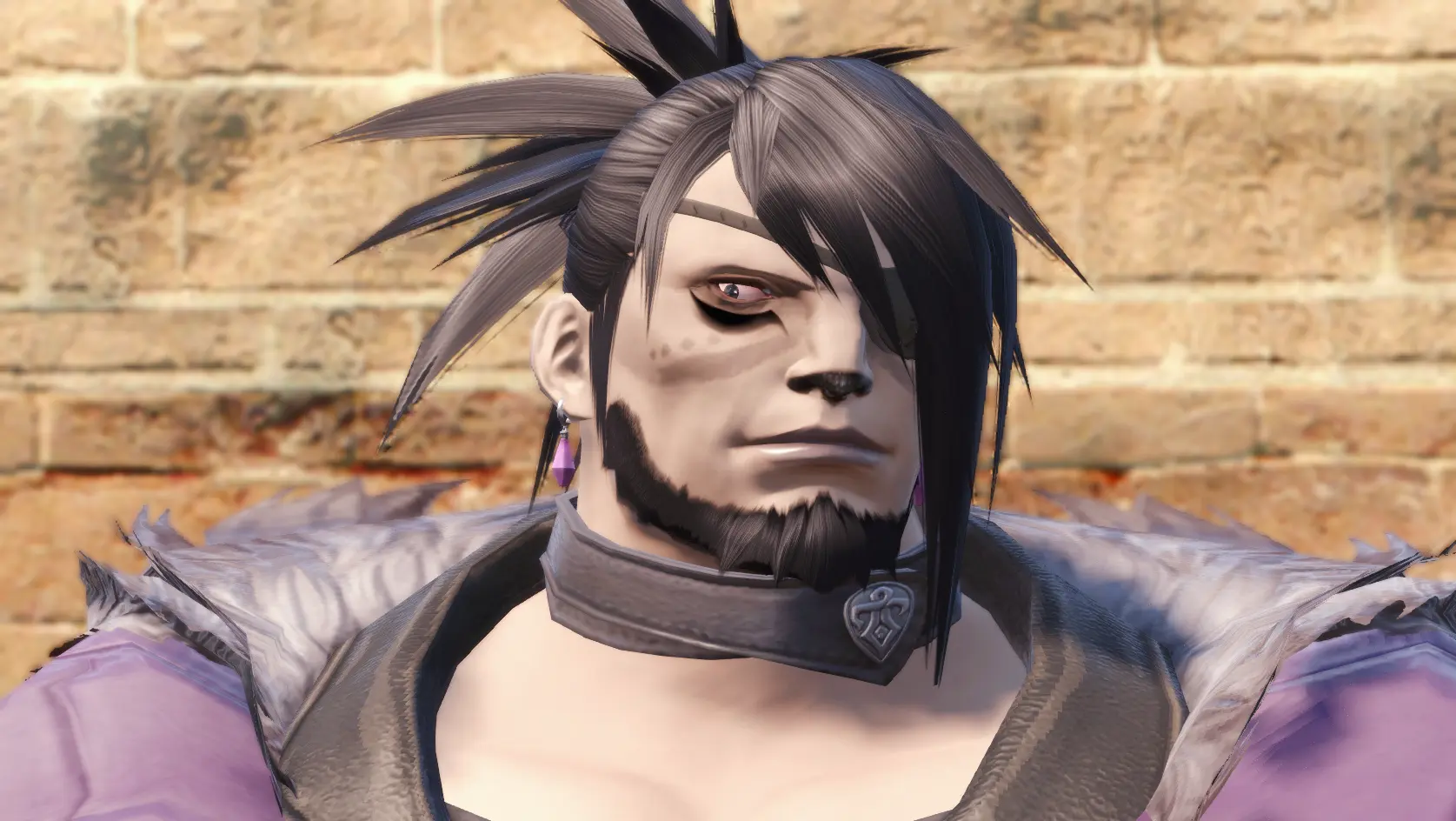
A texture pack that gives male Hellsguard Roegadyn a more dog-like nose, replacing the default black triangle on their noses. Includes a diffuse, normal, and multi map for faces 101, 102, 103, and 104, which can be manually applied via
Note before reading: Trans lives are not a political issue. Happy Pride!
I made this mod originally for myself (a Hellsguard Roegadyn Face 101 player), because I was dissatisfied with the (in my opinion) pitiful dark spot on Hellsguard noses. I wanted my character to have a much darker, more beast-like nose. So, I hand-painted all three facial textures in Photoshop to achieve that look, and I even decided to port it to the other three faces. Enjoy!
Please note: this mod uses the vanilla face textures as a base. If you have a face mod installed already, you will have to personally edit it in Photoshop yourself.
To install:
Step 1: You will need TexTools. The download for it can be found in the TexTools Discord, linked here: https://discord.gg/ffxivtextools
Step 2: Go to the item list, search "By Category" (should be the default), then go to Character > Face > Roegadyn Male
Step 3: Find your character's face textures in the dropdowns. Hellsguard faces start at 101 and go to 104 under "Face Number". Find the face textures you want to edit. Each face has three texture maps: a diffuse, a normal, and a multi.
Step 4: Import the corresponding files from this download to each of those files in TexTools. For example, to change the diffuse map for Roegadyn Face 102, you would hit "import" while you have the default diffuse map selected and then upload the modded texture labeled "Male Face 102 Diffuse.png". To get the full look, you would need all three texture maps for each face installed.
Step 5: Open XIV and make sure the mod worked.
Making edits and incorporating this mod into other face textures is completely fine as long as you credit me and it is made public. Don't use elements from this texture pack for anything locked behind a paywall.
This is my first ever mod! I don't normally create mods, but feel free to check out my art and support me if you like it:
Patreon: https://www.patreon.com/caincorner
Ko-Fi: https://ko-fi.com/caincorner
Linktree: https://linktr.ee/caincorner
📊 Mod Details
- Game
- Finalfantasy14 Mods
- Author
- CainCorner
- Version
- 1.0.0
- Downloads
- 51
- Endorsements
- 0
- Category
- Characters
- Created
- 6/4/2021
- Updated
- 6/4/2021
🔧 How to Install Final Fantasy XIV Mods
Download from Nexus Mods.
📖 Full step-by-step install guide for Final Fantasy XIV →
Visit the official mod page for specific installation instructions for this mod.
🎮 Need cheat codes or console commands? Check ur gaming wiki for Final Fantasy XIV commands, item IDs, and more.
Keep browsing — more Final Fantasy XIV mods await