Colorful Fantasy GShade (ReShade) Preset
⚪ Last updated 2021Preview
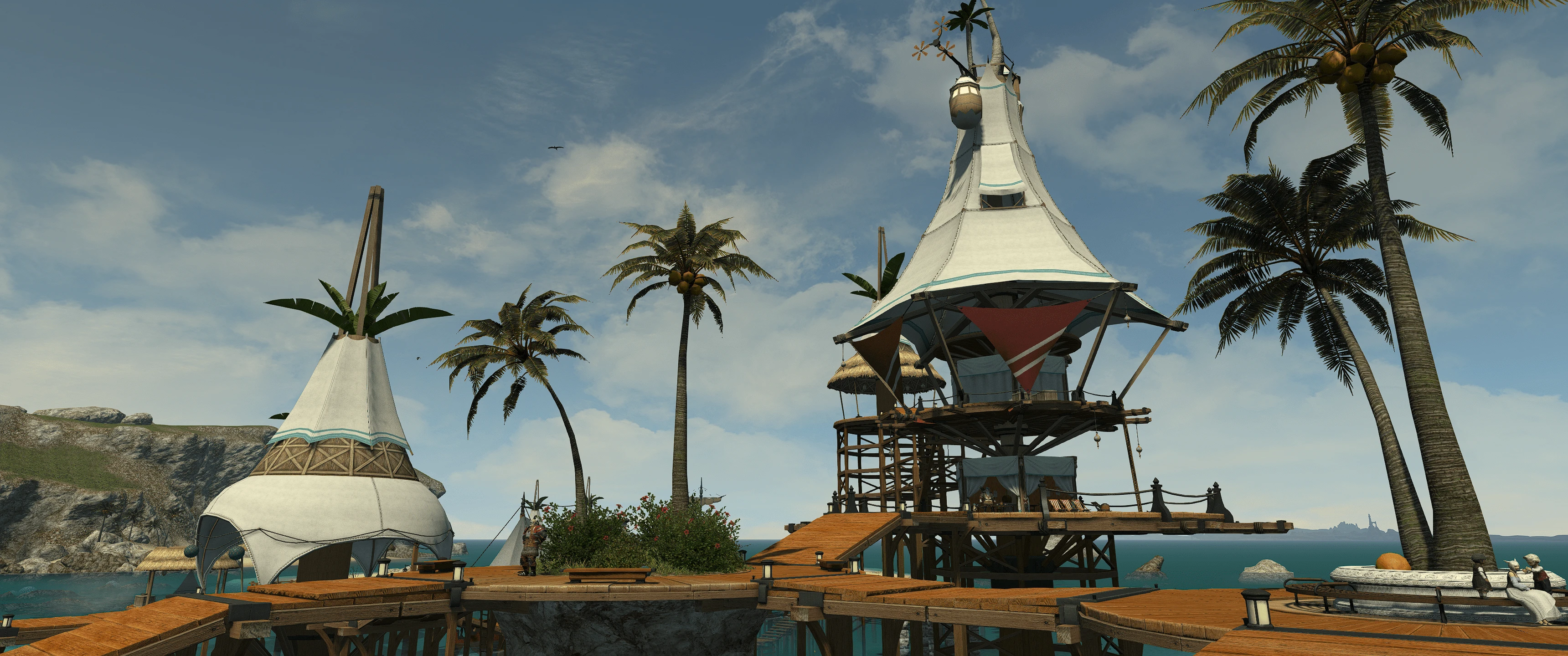
🔍 Analysis
- 👍 4.5% endorsement rate — high engagement, a strong quality signal
- 🏆 #31 of 119 Visuals mods in this game by downloads
📋 About This Mod
I love colorful RPGs but I also want to retain the original artistic direction. This preset makes the colors pop without overly garish whites or completely muted blacks. It really reinvigorates the game.
Grass is greener, sky is bluer, darks aren't deleted. Performance hit is minimal
1. Install gshade onto ffxiv (https://youtu.be/5GGDve_usPA?t=101)
2. Place Colorful Fantasy folder into gshader-presets folder that is located in the ffxiv game folder(where you exe's are)
3. Shift F2 to set preset in game
📊 Mod Details
- Game
- Finalfantasy14 Mods
- Author
- Colorful Fantasy
- Version
- 1.0
- Downloads
- 1,890
- Endorsements
- 85
- Category
- Visuals
- Created
- 4/19/2021
- Updated
- 4/19/2021
🔧 How to Install Final Fantasy XIV Mods
Download from Nexus Mods.
📖 Full step-by-step install guide for Final Fantasy XIV →
Visit the official mod page for specific installation instructions for this mod.
🎮 Need cheat codes or console commands? Check ur gaming wiki for Final Fantasy XIV commands, item IDs, and more.
Keep browsing — more Final Fantasy XIV mods await