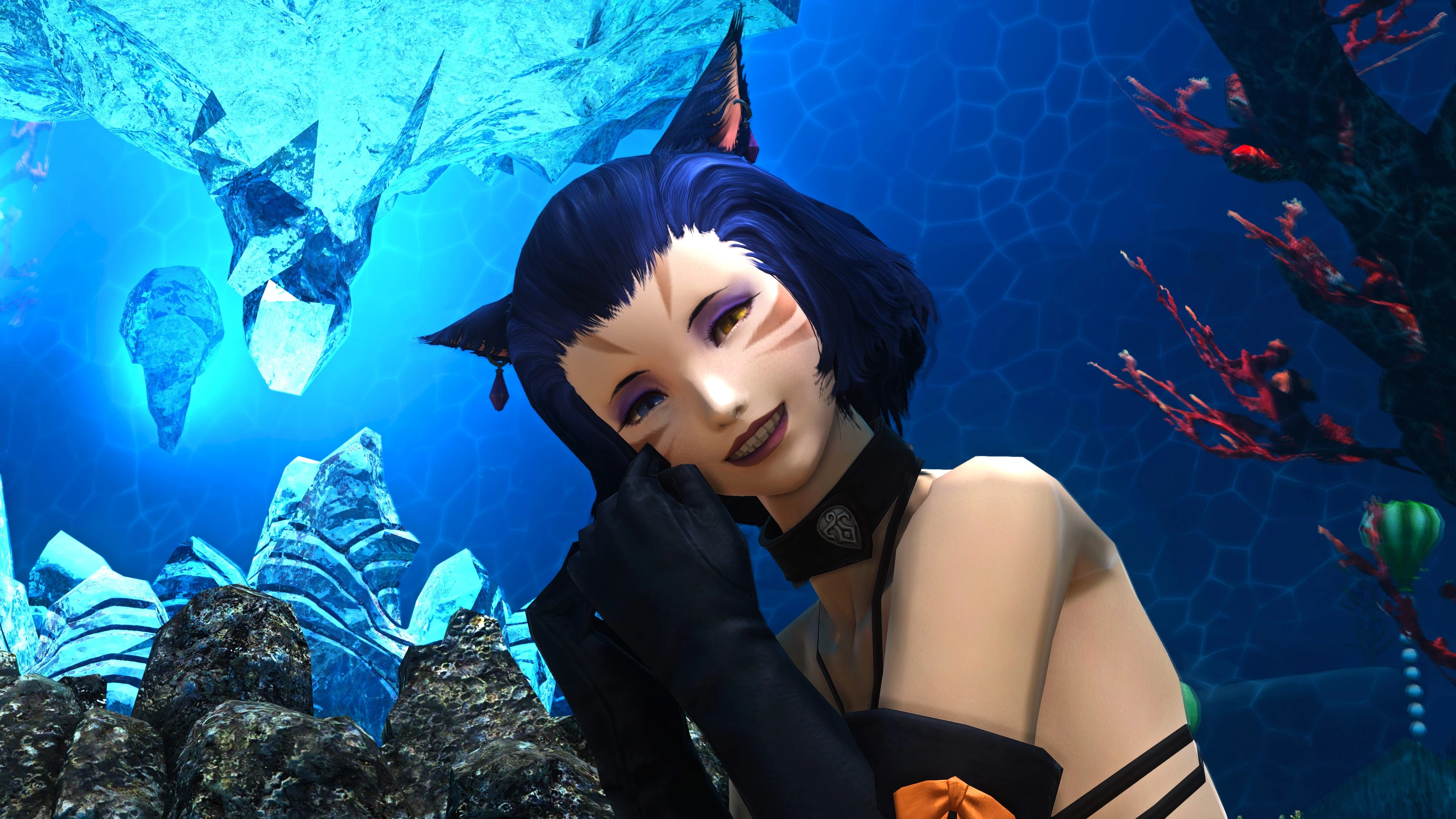
Arfien's ReShade (previously Gshade) preset for FFXIV
🟠 Updated over a year agoPreview
🔍 Analysis
- 👍 2.2% endorsement rate — high engagement, a strong quality signal
- 🏆 #6 of 119 Visuals mods in this game by downloads
📋 About This Mod
DESCRIPTION
Update 26/04/2025: Version 1. 5 uploaded. Not a complete rework but tweaked a little for DT.
Notice 09/10/2024: My reshade broke with Dawntrail with odd colours and the DOF did not work anymore. This was due to Dawntrail inverting the depthbuffer it seems. I found a solution to this on Reddit (Credit to Due-Rip7052); if this happens to you please reconfigure the depth buffer as instructed below in the Bugs section and in sticky comments.
Update 09/10/2024: Version 1. 4 released. This is still semi-WIP but I feel it is an improvement substantial enough to release given the next version 2. 0 will need major reworks for Dawntrail and could be a very long time coming. 1. 4 features brighter more vibrant highlights, especially characters. Otherwise the basic look remains the same as 1. 3.
Notice 18/04/2024: The old link to the gshade repository is broken. Please ensure when downloading reshade you download ALL of the shader repositories including legacy etc (use the "check all box" in the top right when it provides a shader list. There are 3 shaders that are needed that don't come with resahde: KeepUI.fx, SSAO.fx and MXA0 4. 0. 2 EX.fx which you can findin the comments (see sticky post, many many thanks pierre32)
Notice 04/03/2023: Gshade is dead, we must convert to reshade. Please use the Download Reshade X. X. X with full add-on support option when downloading reshade otherwise you will get severe bugs. The add-on support version has unlocked Z buffer which is how Gshade worked, the regular reshade does not have this to prevent bans on other online games that use anti-cheat.
Update 17/7/22: Version 1. 3 released which includes a bluer colour palatte to counteract the vanilla games subtle green-grey tinge using the CrossProcess. I have also added a subtle extra bloom shader, MagicBloom which will bring out highlights, though may cause some increased bloom on chat boxes-feel free to disable this if it is a bother. As before, there is a performance version of the 1. 3 shader, and I will provide old versions in the upload file for those who dislike the changes.
Update 23/9/21: Version 1. 2 released, which provides a sharper, crisper and more defined image with a cooler colour palette. This version does have reduced FPS compared to 1. 1 howev
Arfien's ReShade preset for FFXIV delivers a heavy photorealistic look with high contrast, vibrant warm tones, and optimized ambient occlusion to minimize low-poly highlights. With 691 endorsements and 32,076 downloads, it's a popular choice for players seeking maximum 3D depth realism in their game visuals.
✨ Key Features
📊 Pros & Cons
✅ Pros
- Community favorite with 691 endorsements and over 32k downloads
- Delivers that crisp, deep 3D look with warm tones that pop
- Optimized AO shaders keep low-poly edges from looking too harsh
⚠️ Cons
- Heavy preset might tank your FPS on mid-range rigs
- Warm color tone isn't for everyone—if you prefer neutral or cool palettes, this will clash
- ReShade presets can conflict with other visual mods or in-game settings, so test carefully
For FFXIV players who want a dramatic, photorealistic upgrade with rich contrast and warm vibes. If you're into screenshots and immersive visuals, this is your jam. Skip if you prefer a subtle or vanilla look, or if your PC struggles with demanding shaders.
💡 Beginner Tips
- Make sure you have ReShade installed and set to load the preset file in-game.
- Use the ReShade overlay to tweak intensity sliders if the effect feels too strong for your taste.
- If you're on a lower-end GPU, try disabling some of the heavier shaders like ambient occlusion to boost performance.
📊 Mod Details
- Game
- Finalfantasy14 Mods
- Author
- Arfien
- Version
- 1.4
- Downloads
- 32,076
- Endorsements
- 691
- Category
- Visuals
- Created
- 2/28/2021
- Updated
- 4/26/2025
🔧 How to Install Final Fantasy XIV Mods
Download from Nexus Mods.
📖 Full step-by-step install guide for Final Fantasy XIV →
Visit the official mod page for specific installation instructions for this mod.
🎮 Need cheat codes or console commands? Check ur gaming wiki for Final Fantasy XIV commands, item IDs, and more.
Keep browsing — more Final Fantasy XIV mods await