Simple Stats Meter
🟠 Updated over a year agoPreview
🔍 Analysis
- 👍 2.7% endorsement rate — high engagement, a strong quality signal
- 🏆 #42 of 112 User Interface mods in this game by downloads
📋 About This Mod
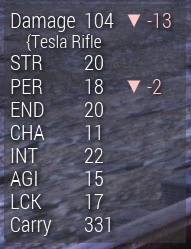
A HUD display that shows damage done by player and dynamic changes to SPECIAL, currencies, and other stats.
Description
This mod provides a simple but very customizable display of some player stats and emphasizes any changes that occur. This can help players know when some buffs start and stop.
Details
This mod works by tying into UI events. Due to this, there may be some lag before a change in stats is displayed. Also, weapon damage may not update until a shot is fired.
The amount of time that a change in stats is displayed can be configured.
One of the stats I was frequently asked to add was AP regen but I have not found a way to get any useful numbers for that.
3. 3 Update
This update changes how the options to reset the DPS information and write a report out to the file work. I have also added an option to manually reload the INI file instead of having it on a timer.
The new HUDTools menu system can be accessed via the F11 key (at almost any time). Controller users will need to be in the Pip-Boy and hold down L3 for a couple of seconds.
Navigation can be done via WASD or arrow keys. Options can be selected via Space, Enter, or E. Tab and Escape will exit the menu. For controllers, the left stick or the DPAD will navigate, A for select and B to exit. The Pip-Boy menu may also respond to controller movement but it will not change selections while in the HUDTools menu.
3. 2 Update
This mod now requires HUDModLoader (if not using Text Chat) (even if using Text Chat).
This update adds some new options for customizing the appearance of individual lines. Check the Appearance Flags section (near the bottom).
New global options:
timesecondsformat
New window options:
showplayercount
showcustomweight
showhighesthit
showweaponhighesthit
3. 0 Update
I am pleased to finally be able to release
StatsMeter version 3. 0
!This version includes a number of highly requested features (and a few that weren't requested).
-
[]Multiple windows, each completely configurable.
[
]Horizontal windows.[]New stats (name, level, critical meter, game time, supplies).
[]Incorporation of Simple DPS Meter functionality.
[]With the increased complexity, I have attempted to limit how often the display gets updated. This may help some people that were having lag while in radiation zones (I never experienced this myself so I can't test it).
[]Fixed hunger and thirst. (You dare to challenge me, Bethesda?!)
[]Fixed overlay issue when used with Text Chat.
[]Additional options added to the "showcustom" command to allow for a lot more flexibility when counting items in inventory.
If you have been using both Simple Stats Meter and Simple DPS Meter, please remove DPSMeter.ba2 from your Fallout76Custom.ini.
If you want only the DPS or only the previous StatsMeter display, then please edit the .ini or download the optional .ini examples.
Planned Changes
Next Version
-
[]Localization
[
]Stat lines with two valuesWhen/If I can
-
[]Adrenaline meter/timer.
[
]Perk loadout name.Installation
Manual Installation
Download HUD Mod Loader in addition to this mod (even if you are using Text Chat).
Extract StatsMeter.ba2, StatsMeter.ini, HUDModLoader.ba2, and hudmodloader.ini to Fallout 76's data folder (default: \Program Files (x86)\Steam\SteamApps\common\Fallout76\Data)
Note: do not edit hudmoloader.ini unless you are certain you know what you are doing. List of mods being loaded is in Fallout76Custom.ini.Navigate to Fallout 76's settings folder (default: My Documents\My Games\Fallout 76)
Create or edit the file "Fallout76Custom.ini" in this directory.
Add StatsMeter.ba2 and HUDModLoader.ba2 to the sResourceArchive2List line in the Fallout76Custom.ini file. Use commas between any mods on this line.
-
[]Adrenaline meter/timer.
-
[]Localization
📊 Mod Details
- Game
- Fallout76 Mods
- Author
- dtim
- Version
- 3.3
- Downloads
- 12,498
- Endorsements
- 332
- Category
- User Interface
- Created
- 10/1/2023
- Updated
- 7/26/2025
🔧 How to Install Fallout76 Mods
Download from Nexus Mods.
📖 Full step-by-step install guide for Fallout76 →
Visit the official mod page for specific installation instructions for this mod.
🎮 Need cheat codes or console commands? Check ur gaming wiki for Fallout76 commands, item IDs, and more.
Keep browsing — more Fallout76 mods await