Recipes and Plans Glow
⚪ Last updated 2018Preview
🔍 Analysis
- 👍 3.3% endorsement rate — high engagement, a strong quality signal
- 🏆 #1 of 244 Models and Textures mods in this game by downloads
📋 About This Mod
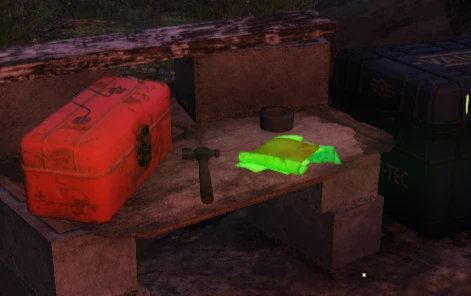
Dont you just hate missing plans and recipes when you're out exploring, well no more! Recipe books and Plans now glow a beautiful green. Due to demand, i have added a purple glow option for users that are colourblind!
Update V1. 5
-
[]Due to a messed up texture in the main, delberts was defaulting to ANOTHER texture instead, Delberts has now been fixed! so all recipes and plans now glow!
Installation
- [
[]Add Glow.ba2 to your archive load list in Fallout76Custom.ini.
[]Launch the game.
Baka File Tool Users
Under optional files, there is a loose copy of the files needed for the mod. Just extract this to your \Bethesda.net Launcher\games\Fallout76\Data
directory and run the baka file tool. The main Glow.ba2 is not needed for Baka File Tool users.
Installation for first timers
-
[]Create or edit the following file: \My Games\Fallout 76\Fallout76Custom.ini
[
]Copy and paste the following lines into Fallout76Custom.ini:sResourceArchive2List = SeventySix - ATX_Main.ba2, SeventySix - ATX_Textures.ba2, Glow.ba2
- Save your file and you're good to go.
Entries are separated by a comma.
Whenever you want to add an archive to your load list, simply append the archive name to the end of this list. To stop loading the archive, remove it from the list.
📊 Mod Details
- Game
- Fallout76 Mods
- Author
- runew0lf
- Version
- 1.5
- Downloads
- 182,947
- Endorsements
- 5,983
- Category
- Models and Textures
- Created
- 11/21/2018
- Updated
- 12/5/2018
🔧 How to Install Fallout76 Mods
Download from Nexus Mods.
📖 Full step-by-step install guide for Fallout76 →
Visit the official mod page for specific installation instructions for this mod.
🎮 Need cheat codes or console commands? Check ur gaming wiki for Fallout76 commands, item IDs, and more.
Keep browsing — more Fallout76 mods await