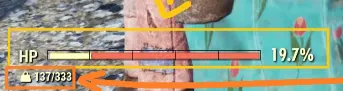
Compatible Weight Indicator
⚪ Last updated 2024Preview
🔍 Analysis
- 👍 3.2% endorsement rate — high engagement, a strong quality signal
- 🏆 #58 of 112 User Interface mods in this game by downloads
📋 About This Mod
Provides a weight indicator below the health bar
Description:
This is my second mod ever, and the first "compatible" one following Compatible Show Health Redux approach, it is just a weight indicator in the main hud.
How to install (Description was copied from Keretus): (if your are using the game pass version then paths and config file name are differente)
-
[]Extract the CompatibleWeightIndicator.ba2 file to your Fallout 76 Data folder (default: C:\Program Files (x86)\Bethesda.net Launcher\games\Fallout76\Data)
[
]Navigate to your Fallout 76 settings folder in "My Games" (default: %USERPROFILE%\Documents\My Games\Fallout 76)[]If this is your first mod, extract the optional "Fallout76Custom.ini" file to the current directory. Otherwise, append the name of the new archive, "CompatibleWeightIndicator.ba2", to the list, separated by a comma, like so:
sResourceArchive2List = CompatibleWeightIndicator.ba2
Compatibility:
-
[]I have followed the copatibility mod of Bilbo164, this mod is a stand alone script tested successfully with Compatible Show Health Redux and Segmented Health Bar using the following load order:
sResourceArchive2List=CompatibleShowHealthRedux.ba2,CompatibleWeightIndicator.ba2,SegmentedHealthBar.ba2
How to mod: (This is a summary of my 4hrs travel learning to "mod")
-
[]This video is gold, it showed me how to decompile/compile the fallout 76 files (bae.exe and bakaFileTool.exe).
[
]After looking and reading I realized that the UI of Skyrim, Fallout 4 and Fallout 76 is made using the same technology so I found this mod listing his tools and realized I would need to use JPEXS.[]Bilbo164 has a very good section hin his mod Compatible Show Health Redux that explain how to make your mod compatible with standalone script mods.
Tools:
-
[]bae.exe -> Decompile fallout 76 files
[]bakaFileTool.exe -> Compile fallout 76 files
[]JPEXS -> Manage .swf files (pain)
[]Figma -> Edit .svg
- [] Segmented Health Bar (first one, is a copy of Compatible Show Health Redux without the quest bug)
-
[]bae.exe -> Decompile fallout 76 files
-
[]This video is gold, it showed me how to decompile/compile the fallout 76 files (bae.exe and bakaFileTool.exe).
-
[]I have followed the copatibility mod of Bilbo164, this mod is a stand alone script tested successfully with Compatible Show Health Redux and Segmented Health Bar using the following load order:
📊 Mod Details
- Game
- Fallout76 Mods
- Author
- Michael Pico
- Version
- 0.1
- Downloads
- 8,945
- Endorsements
- 290
- Category
- User Interface
- Created
- 5/26/2024
- Updated
- 5/26/2024
🔧 How to Install Fallout76 Mods
Download from Nexus Mods.
📖 Full step-by-step install guide for Fallout76 →
Visit the official mod page for specific installation instructions for this mod.
🎮 Need cheat codes or console commands? Check ur gaming wiki for Fallout76 commands, item IDs, and more.
Keep browsing — more Fallout76 mods await