Chromos' Map Vendors and Touch-Up
⚪ Last updated 2019Preview
🔍 Analysis
- 👍 5.1% endorsement rate — high engagement, a strong quality signal
- 🏆 #53 of 112 User Interface mods in this game by downloads
📋 About This Mod
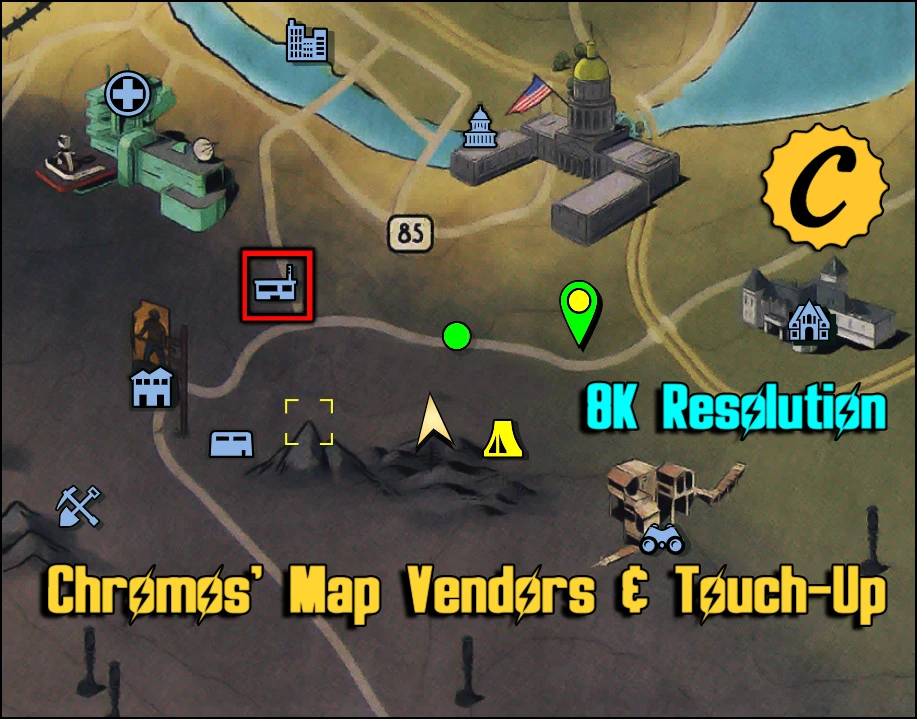
8K Res. and Touch-Up modifications added. Robot vendor locations integrated into the world map with brightness & contrast enhancements.
8K Resolution now available.
Now includes Touch-Up modifications.
As of August 3rd, 2022 - Mod is currently out-of-date. An update is not likely anytime soon, if at all.
However there are some great map mods out there these days. This one was made for them early days. Hope everyone enjoyed it while it lasted.
The mod requires more time than I can throw at it and certainly more concentration than what I seem to be capable of these days.
As always, happy gaming!
Changes in v3. 04
Compatibility update for Patch 9 - May 7, 2019 update.
Changes in v3. 03
Compatibility update for Patch 7. 5 - March 26, 2019 update.
Changes in v3. 02
Compatibility update for Wild Appalachia – March 13, 2019 update.
FIX: Accidentally misnamed the MapTouchUp.ba2, please check your files accordingly.
Changes in v3. 01
Compatibility update for Feb. 19th Patch
Changes in v3. 0
Added a caps icon to the vendor list
Changed the map file compression for better performance
Now includes Touch-Up modifications (Highlight Cursor/CAMP/Waypoint/Team Dot color changes)
Have you not memorized the locations yet? Tired of alt tabbing or looking on your phone for robot vendors?
Well I got the MAP FOR YOU!!! CALL NOW!..... I mean hit the download button, it is free after all.
I added a color coded legend on the upper left and put matching colored coded squares around the map markers with robot vendors at them.
Was a PIA getting it all lined up neatly
You will also notice some brightness and contrast touch up, making things pop a little more.
It is simply quite amazing at what a little bit of brightness/contrast touch up can do.
To install...
Copy & Paste the MapVendors.ba2 and MapTouchUp.ba2 files into the Fallout 76\Data directory.
Default install location
C:\Program Files (x86)\Bethesda.net Launcher\games\Fallout 76\Data
Your game installation may be different if you chose a custom location before downloading the game
Now copy & paste the included Fallout76Custom.ini into the directory below.
C:\Users\YourComputersUsername\Documents\My Games\Fallout 76
Edit in MapVendors.ba2 and MapTouchUp.ba2 to your already created Fallout76Custom.ini
sResourceArchive2List = SeventySix - 00UpdateMain.ba2, SeventySix - 01UpdateMain.ba2, SeventySix - 00UpdateStream.ba2, SeventySix - 01UpdateStream.ba2, SeventySix - 00UpdateTextures.ba2, SeventySix - 01UpdateTextures.ba2, SeventySix - MeshesExtra.ba2, SeventySix - 02UpdateMain.ba2, SeventySix - 03UpdateMain.ba2, SeventySix - 04UpdateMain.ba2, SeventySix - 02UpdateStream.ba2, SeventySix - 03UpdateStream.ba2, SeventySix - 04UpdateStream.ba2, SeventySix - 02UpdateTextures.ba2, SeventySix - 03UpdateTextures.ba2, SeventySix - 04UpdateTextures.ba2, SeventySix - GeneratedMeshes.ba2, SeventySix - StaticMeshes.ba2, SeventySix - 05UpdateMain.ba2, SeventySix - 05UpdateStream.ba2, SeventySix - 05UpdateTextures.ba2, MapVendors.ba2, MapTouchUp.ba2
To install Loose file...
I, myself, have never used loose files.
If you're looking for a loose file to install with, then you probably already know what you're doing with them.
If you got any questions, do not hesitate to ask. Take it easy on me, this was my first Fallout mod >.<
Something a little extra
A write up I done for having your own custom loading screens.
📊 Mod Details
- Game
- Fallout76 Mods
- Author
- BigEx20 AKA Chromos
- Version
- 3.04
- Downloads
- 9,609
- Endorsements
- 493
- Category
- User Interface
- Created
- 12/9/2018
- Updated
- 5/13/2019
🔧 How to Install Fallout76 Mods
Download from Nexus Mods.
📖 Full step-by-step install guide for Fallout76 →
Visit the official mod page for specific installation instructions for this mod.
🎮 Need cheat codes or console commands? Check ur gaming wiki for Fallout76 commands, item IDs, and more.
Keep browsing — more Fallout76 mods await