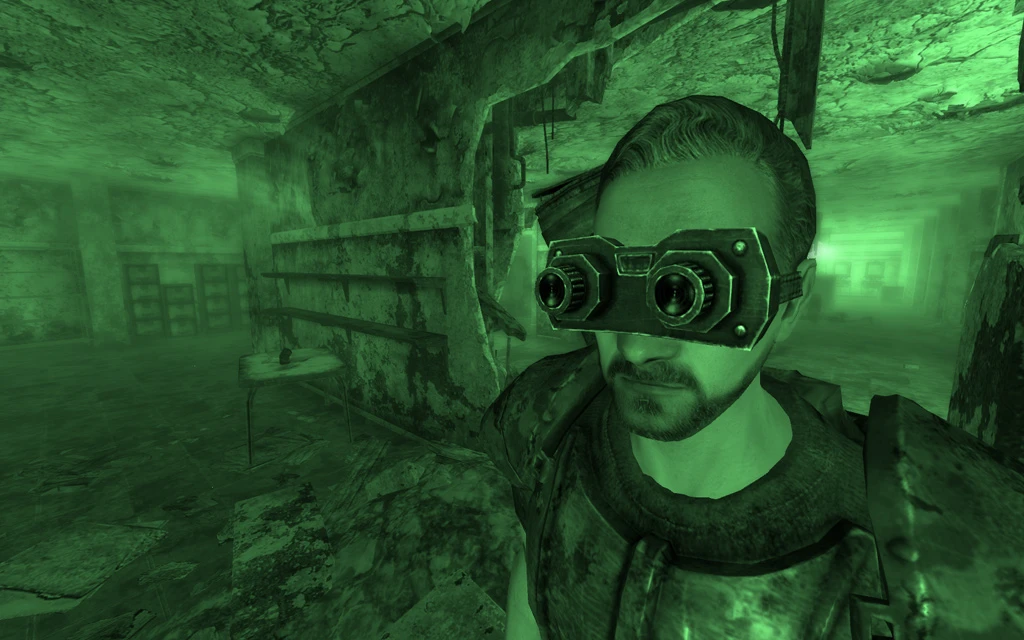
Nightvision Goggles - Powered
⚪ Last updated 2009Preview
🔍 Analysis
- 👍 5.6% endorsement rate — high engagement, a strong quality signal
- 🏆 #73 of 420 Gameplay Effects and Changes mods in this game by downloads
📋 About This Mod
================== Nightvision Goggles (Powered)
Version: 1. 1 Date: 11-02-2009 Author: Antistar (Joseph Lollback) E-mail: josephlollback@hotmail.com ==================
1. Description 2. Requirements 3. Installation/Uninstallation 4. Playing the mod 5. Save games 6. Conflicts/Known Errors 7. Credits 8. Modder's Resource Info 9. Contact and Information 10. Legal Stuff/Disclaimer 11. Version History
=============== 1. DESCRIPTION ===============
Adds Nightvision Goggles that slowly drain Energy Cells while in use. Can be purchased from general merchants in Megaton, Tenpenny Tower, Rivet City and Underworld.
Night-vision is a powerful aide for wanderers of the Wasteland: it enables one to see further in low-light conditions than with a light source (like from a Pip-Boy); and do so without giving away one's position. With these Nightvision Goggles, the drawback that offsets these benefits is the consumption of Energy Cells while the goggles are in use - at a rate chosen by the player, using an in-game menu. Another mild drawback would be the image-ghosting (or 'motion-blur') experienced by users unless they keep their head steady.
=============== 2. Requirements ===============
- Fallout 3
======================== 3. INSTALLATION/UNINSTALLATION ========================
Installation:
- Using 7-Zip (http://www. 7-zip.org), extract the contents (everything - ALL files and folders) of the NightvisionGoggles(Powered). 7z archive file to your Fallout 3Data directory. If asked if you want to overwrite files and folders, click 'Yes to all'.
- In the Data Files section of the Fallout 3 Launcher - or using a tool like Fallout 3 Mod Manager - place a tick in the box next to NightvisionGoggles(Powered).esp.
Upgrading from an earlier version:
- Ensure your character is not currently wearing the Nightvision Goggles, and save your game.
- Using 7-Zip (http://www. 7-zip.org), extract the contents (everything - ALL files and folders) of the NightvisionGoggles(Powered). 7z archive file to your Fallout 3Data directory. If asked if you want to overwrite files and folders, click 'Yes to all'.
- Load your save-game, and continue playing.
Uninstallation:
- Ensure your character is not currently wearing the Nightvision Goggles, and save your game.
- In the Data Files section of the Fallout 3 Launcher - or using a tool like Fallout 3 Mod Manager - clear the tick in the box next to NightvisionGoggles(Powered).esp.
- If desired, delete all files copied to your Fallout 3Data directory during installation (check the NightvisionGoggles(Powered). 7z archive file to identify these
📊 Mod Details
- Game
- Fallout3 Mods
- Author
- Antistar
- Version
- 1.1
- Downloads
- 46,164
- Endorsements
- 2,574
- Category
- Gameplay Effects and Changes
- Created
- 1/6/2009
- Updated
- 2/11/2009
🔧 How to Install Fallout 3 Mods
Download from Nexus Mods.
📖 Full step-by-step install guide for Fallout 3 →
Visit the official mod page for specific installation instructions for this mod.
🎮 Need cheat codes or console commands? Check ur gaming wiki for Fallout 3 commands, item IDs, and more.
Keep browsing — more Fallout 3 mods await