Little Boy
⚪ Last updated 2009Preview
🔍 Analysis
- 👍 3.5% endorsement rate — high engagement, a strong quality signal
- 🏆 #58 of 62 Utilities mods in this game by downloads
📋 About This Mod
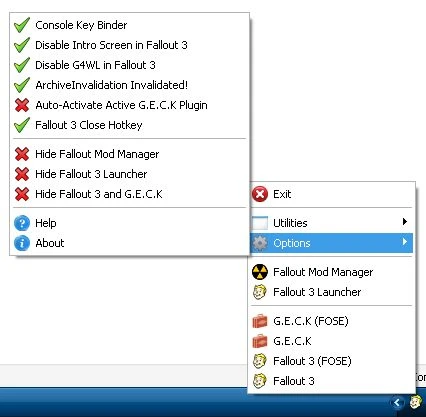
If you have used a pervious version please uncheck \"Disable G4WL in Fallout 3\" and \"Disable Intro Screen in Fallout 3\" before installing the new version. The aim of this program is to provide various improvments/features/tweaks and easy managment of various Fallout 3 features making your Fallout 3 experience more enjoyable! Little Boy is a tray icon driven program providing quick access to starting: Fallout 3, Fallout 3 with FOSE (if installed), G. E. C. K (if installed), G. E. C. K with FOSE, Fallout 3 Launcher and Fallout Mod Manager (if installed), along with a vast amount of little utilities and options. FEATURES Plugin Manager The Plugin Manager allows quick enabling/disabling of plugins along with altering of the plugin\'s load order (right-click plugin) and viewing of the plugin\'s author/description/plugins saved with. Note1: Fallout 3 dosen\'t load esp\'s/esm\'s by the order they are in plugins.txt but by esm\'s oldest to newest first, then esp\'s oldest to newest. Note2: When you start the Plugin Manager esm\'s will appear at the top oldest to newest then esp\'s oldest to newest, you can move a esp\'s load order above a esm but but it will not load before an esm. BSA Manager The BSA Manager allows you to quickly enable/disable BSA archives and also alter their load order (right-click BSA). Gamesave Manager The Gamesave Manager allows you to manage all your gamesaves (even the G4WL gamesaves!), this utility will display various information about your gamesaves (character name, level ect) and it also has the option to delete them (right-click)! Note1: The Gamesave Manager supports multiple selection, press shift or ctrl to select multiple gamesaves/plugin names. Note2: The plugin name in the \"Plugins Saved With:\" will appear green if you have the plugin and it is active or red if you do not have it or it is not active, right-click and you can copy the selected plugin name(s) to the clipboard. Note3: Right-click in the gamesave list area and you can change the sort order (Alphabetically, Oldest to Newest, Newest to Oldest). Home Key Binder Allows you to easily bind the Home key to an action of your choice. Note: By default the Home key opens Games for Windows LIVE, binding the Home key is only recommended if you have disabled G4WL since it will no longer open G4WL. Fallout 3 Settings Allows you to configure the majority of Fallout 3\'s settings (all the Fallout Launcher options, in-game options plus some hidden ones), also allows you to change the HUD\\Pip-Boy color via a color picker. Note: For stability reasons all settings are restricted to the limits imposed in-game\\Fallout Launcher, Copy Plugin List to Clipboard This will place a list of all currently active plugins in Fallout 3 to your clipboard (ctrl+v or right-click paste) in their correct load order (esm\'s oldest
📊 Mod Details
- Game
- Fallout3 Mods
- Author
- Quarn
- Version
- 1.2.1
- Downloads
- 7,584
- Endorsements
- 262
- Category
- Utilities
- Created
- 12/24/2008
- Updated
- 8/16/2009
🔧 How to Install Fallout 3 Mods
Download from Nexus Mods.
📖 Full step-by-step install guide for Fallout 3 →
Visit the official mod page for specific installation instructions for this mod.
🎮 Need cheat codes or console commands? Check ur gaming wiki for Fallout 3 commands, item IDs, and more.
Keep browsing — more Fallout 3 mods await