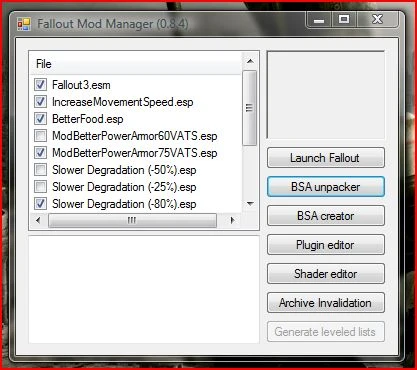
Fallout mod manager
⚪ Last updated 2010Preview
🔍 Analysis
- 👍 2.8% endorsement rate — high engagement, a strong quality signal
- 🏆 #2 of 62 Utilities mods in this game by downloads
📋 About This Mod
A collection of utilities related to both creating and using mods.
Main Features:
For the mod user:
- []Fail-Safe Mod Installs.
Don't worry if a mod install fails; FOMM cleans up after itself, preventing half-installed mods.[
]Mod Versioning.FOMM is able to upgrade mods without have to re-activate them, and without changing which mods overwrite which.[]Mod Reactivation
You can change the installation options of mods without have to reinstall them.
For the mod author and tinkerers:
- []Configurable Scripts
Control how your mod can be installed, and give your users choices. You can write powerful install scripts using the flexible XML Configuration scripts, the more powerful C# Scripts, or event the traditional OBMM/OMOD script language.[]Low-Level Editing Tools
FOMM still includes: TESsnip, BSA Creator/Unpacker, Shader Editor.
Note to Mod Authors:
FOMod scripts for FO:NV mods should derive from FalloutNewVegasBaseScript, instead of BaseScript. The functions in the scripting language have changed to reflect the differences between FO3 and FO:NV (for example, NVSE instead of FOSE). If your scripts don't derive from FalloutNewVegasBaseScript they will still work, but you won't have access to the new functions, and calling FOSE-related functions will cause your script to fail.
Installation - 0. 12. 6
This version can be installed over earlier versions without any additional work. It will upgrade its log files as required. Note that the upgrade process will not touch your mods, but it can take anywhere from a few minutes to a couple of hours, depending on how many, and what type, fomods you have installed.
Uninstallation - 0. 12. 6
If you wish to go back to an earlier version:
1) Open FOMM 0. 12.x
2) Deactivate all your mods
3) Close FOMM
4) Install the old FOMM version
5) Open the old FOMM
6) Activate the desired mods
Installation - 0. 13.x
If you are installing FOMM for the first time:
- []Download the executable installer.
[]Double-click the installer.
[]Follow the instructions in the installation wizard.
If you are upgrading from a version of FOMM that is 0. 13. 0 or newer:
- []Download the executable installer.
[
]Double-click the installer.[]Follow the instructions in the installation wizard.
If you are upgrading from a version of FOMM that is older than 0. 13. 0:[]Download the executable installer.
[]Double-click the installer.
[]Follow the instructions in
- []Download the executable installer.
📊 Mod Details
- Game
- Fallout3 Mods
- Author
- Timeslip
- Version
- 0.13.21
- Downloads
- 2,196,396
- Endorsements
- 62,391
- Category
- Utilities
- Created
- 11/22/2008
- Updated
- 11/25/2010
🔧 How to Install Fallout 3 Mods
Download from Nexus Mods.
📖 Full step-by-step install guide for Fallout 3 →
Visit the official mod page for specific installation instructions for this mod.
🎮 Need cheat codes or console commands? Check ur gaming wiki for Fallout 3 commands, item IDs, and more.
Keep browsing — more Fallout 3 mods await