hologram pipboy3000
⚪ Last updated 2014Preview
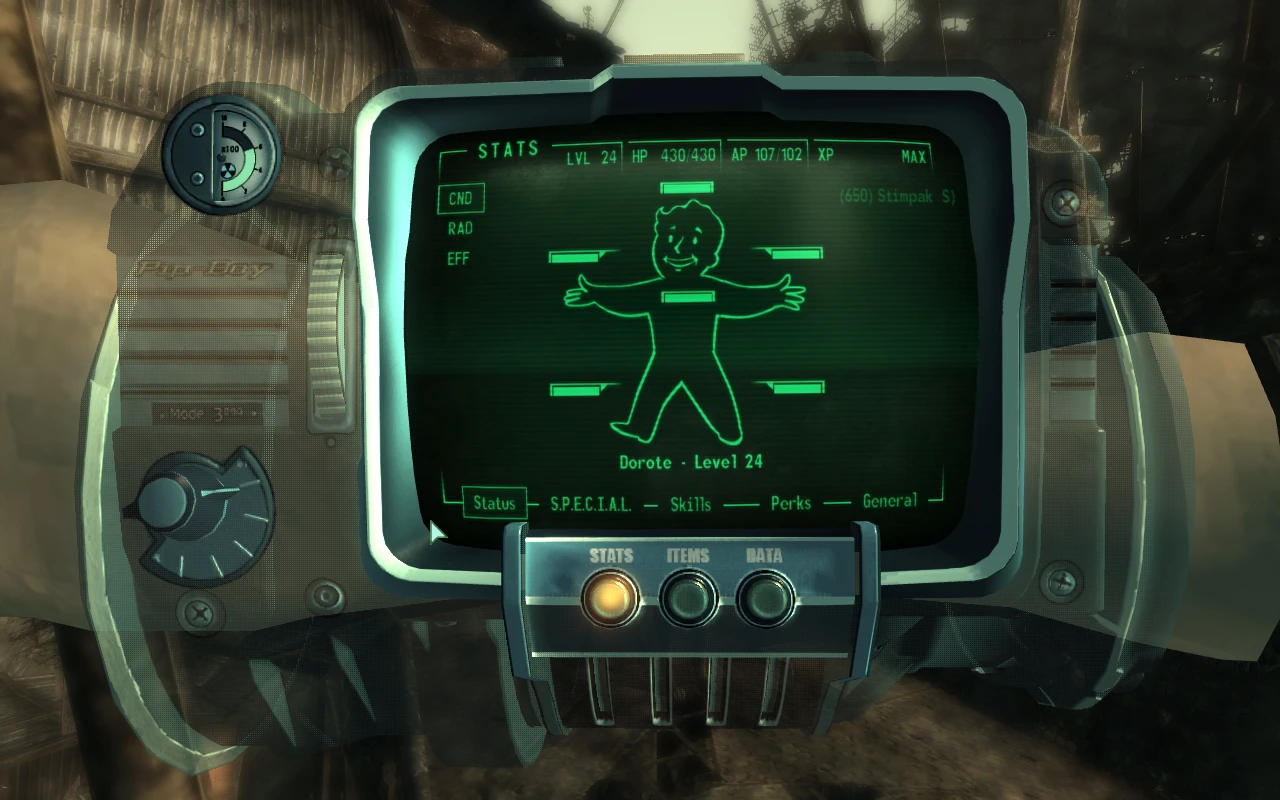
🔍 Analysis
- 👍 3.1% endorsement rate — high engagement, a strong quality signal
- 🏆 #198 of 429 Models and Textures mods in this game by downloads
📋 About This Mod
Name: Hologram Pipboy3000 Version: 1. 05 Author: xzax Date: 01/01/14
Sorry, I am not good to use english but i will try to explain.
Happy New Year People !!!
Description ============================================== Re texture of the Pip-boy more look like hologram.
Update-05 ====== -Make compatible with N. M. M. -Add some fix from FalloutNV version. -Two Wristband type select one.
Update-04 ====== -add new texture for non english version. Thak you Tr4ilbl4zer.(if you want to know more goto read Tr4ilbl4zer comment)
Update-03 ====== -Fix some bug for nothing the pipboy shows. Thak you gorgar75. (if you want to know more goto read gorgar75 comment)
Update-02 ====== -Fix female pipboy is not transparent to transparent now
Update-01 ====== -Fix pipboy for man character -add more color First Color,Blue,Green,Amber -Two type Full and Semi transparent -Two type mash Glow and not Glow
N. M. M ===== Select only one type of Wristband and mesh you want to use (Glow or Not Glow). Select only one type of Wristband Texture you want to use (Full or Semi).
Installation ============================================== Recomment: Use ArchiveInvalidation Invalidated http://www.fallout3nexus.com/downloads/file.php?id=944
- First you need to install a mesh for pipboy3000.
- -------------------------------------------------
- Open the zip file hologram pipboy3000 and extract folder data
- for mesh into your Fallout 3 folder and replace the existing files.
- (default C:Program Files Bethesda SoftworksFallout 3).
- Chose type of pipboy3000 that you want to use
- folder data in folder mesh-Glow is the Glow light pipboy3000.
- folder data in folder mesh-not Glow is normal pipboy3000.
- second you need to install a textures for pipboy3000.
- -----------------------------------------------------
- Open the zip file hologram pipboy3000 and extract folder pipboy3000
- for Textures into your Fallout 3 folder and replace the existing files.
- (default C:Program Files Bethesda SoftworksFallout 3Datatextures).
- Chose type of textures for pipboy3000 that you want to use
- folder in folder Texture Full is all transparent part of pipboy3000.
- (not include black screen)
- folder in folder Texture Semi is some transparent part of pipboy3000.
- (not include black screen)
- Chose color of textures for pipboy3000 that you want to use
- -First Color
- -Amber
- -Blue
- -green
- In each Color folder have folder pipboy3000 in that. You will Chose folder pipboy3000 from one color that you want to use and extract to Fallout 3Datatextures
📊 Mod Details
- Game
- Fallout3 Mods
- Author
- xzax
- Version
- 1.05
- Downloads
- 18,324
- Endorsements
- 562
- Category
- Models and Textures
- Created
- 12/11/2008
- Updated
- 1/3/2014
🔧 How to Install Fallout 3 Mods
Download from Nexus Mods.
📖 Full step-by-step install guide for Fallout 3 →
Visit the official mod page for specific installation instructions for this mod.
🎮 Need cheat codes or console commands? Check ur gaming wiki for Fallout 3 commands, item IDs, and more.
Keep browsing — more Fallout 3 mods await