FalloutLauncher Replacer for Steam
⚪ Last updated 2019Preview
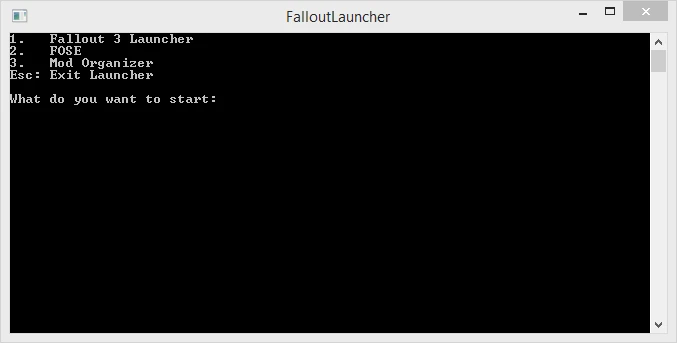
🔍 Analysis
- 👍 4.8% endorsement rate — high engagement, a strong quality signal
- 🏆 #35 of 62 Utilities mods in this game by downloads
📋 About This Mod
A new FalloutLauncher.exe meant for Steam users to allow steam features while using FOSE or Mod Organizer.
Bethesda has released a new update to remove GFWL, to make this program work again you need to rename the file FalloutLauncherSteam.exe in Fallout 3 directory to something else (for example FalloutLauncherSteam_ORG.exe) then rename the file included in this download to FalloutLauncherSteam.exe and install normally. But FOSE currently doesn't work so this program is only useful for running Mod Organizer mods without FOSE, as far as I understand.
Description
This is an replacement launcher for the default Fallout 3 Launcher (FalloutLauncher.exe) that is meant to be used together with Steam. If you don't have the Steam version this is pretty much useless for you.
It will allow you to launch Fallout with FOSE or through Mod Organizer while still allowing Steam features such as the overlay, game time tracking, streaming, etc. You can also launch the default launcher if needed.
Source code is available at GitHub.
If you're having issues with Steam overlay (i.e. not appearing), make sure ALL applications (Steam, Fallout 3, FOSE/MO, etc...) is running with the same privileges, either as normal or administrator. Miss-matching this might be interfering with the overlay hooking into the game process.
Configuration
An optional INI is available. It offers more options then arguments/flags. The mayor ones being startup arguments for the available programs. And the ability to add a custom entry.
It's not present by default. In order to get the template you must create a empty file called FalloutLauncher.ini in the same folder as the executable and run the launcher once. The program will detect if it's empty and create the template. If the file is not empty it will try to read it as an INI file.
The INI can be used as a replacement for Steam arguments/flags, though arguments/flags set in Steam will overwrite the INI values. So clear your arguments/flags from Steam if you wanna use the INI instead.
The template contains four sections:
📊 Mod Details
- Game
- Fallout3 Mods
- Author
- AlexxEG
- Version
- 1.5
- Downloads
- 25,543
- Endorsements
- 1,229
- Category
- Utilities
- Created
- 6/18/2015
- Updated
- 8/31/2019
🔧 How to Install Fallout 3 Mods
Download from Nexus Mods.
📖 Full step-by-step install guide for Fallout 3 →
Visit the official mod page for specific installation instructions for this mod.
🎮 Need cheat codes or console commands? Check ur gaming wiki for Fallout 3 commands, item IDs, and more.
Keep browsing — more Fallout 3 mods await