Fallout 3 Mod Installer
⚪ Last updated 2009Preview
🔍 Analysis
- 👍 3.0% endorsement rate — high engagement, a strong quality signal
- 🏆 #32 of 62 Utilities mods in this game by downloads
📋 About This Mod
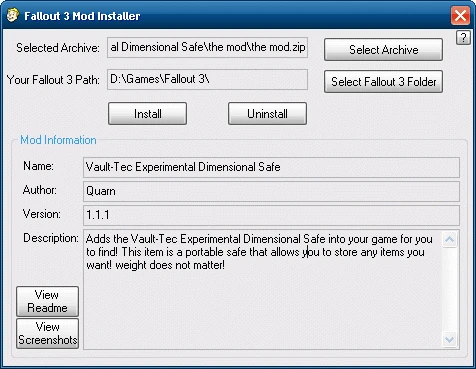
This little program will make installing/uninstalling mods a breeze! Fallout 3 Mod Installer is a very easy to use program that supports the popular compression formats and the 2 most popular ways people structure their mod archive\'s (\\Fallout 3\\Data\\ or \\Fallout 3\\) which makes Fallout 3 Mod Installer compatible with most mod archives around! Using Fallout 3 Mod Installer Simply right-click on an mod archive in windows explorer/other file manager and send it Fallout 3 Mod Installer then you\'re ready to install/uninstall that mod archive, alternatively you can just open Fallout 3 Mod Installer from the shortcut created in your start menu and select an archive from there. Uninstalling a mod is just as easy as installing it was, simply select the mod archive that you\'ve previously installed and click uninstall. Important Notes\\Issues -Fallout 3 Mod Installer supports installing zip/7z/rar/fomod archives. -Fallout 3 Mod Installer does not keep any logs of what is installed/uninstalled or write anything to the registry making it totally portable. -When installing a mod if the file already exists in your \\Fallout 3\\Data\\ folder it will simply be overwritten with NO warnings. Checks have been put in place to prevent malicious mod archives installing/uninstalling core Fallout 3 files. -Screenshots (.png, .bmp, .gif, .jpg), fomod info and FO3ModInfo.ini found in the archive won\'t be installed. Note: ArchiveInvalidation.txt won\'t be installed either, it is an annoying thing made pointless by ArchiveInvalidation Invalidated!. -Depending on how the selected 7z archive is compressed and how big the archive is it may take some time to display the archive\'s mod information, view readme\'s and view screenshot\'s. -Fallout 3 Mod Installer uses parts of 7-Zip (7z.exe, 7z.dll) which is licensed under the GNU LGPL license. Version History v1. 2. 0 (13\1\\2009) -When installing a mod archive you\'ll now be presented with a screen where you can select which esp(s), esm(s) and bsa(s) you want activated. -Removed the now useless \"Activate\" section from FO3ModInfo.ini and related code. -Fixed plugin activation/deactivation not working under Windows Vista. -Fixed the mod version not being retreived from fomods sometimes. -Fixed Fallout 3 Mod Installer\'s main window not being disabled when the about button was clicked or when an error occured selecting your Fallout 3 folder. -Updated 7-Zip components to v4. 64. v1. 1. 0 (011\\2009) -Tweaked the GUI a little, fixed the tab cycling order, set default button to install and setup alt+hotkeys for all the buttons. -Added warning if the selected archive isn\'t structured correctly for installing/uninstalling with Fallout 3 Mod Installer (may not be 100% accurate). -Added warning if the selected fomod archive contains scripting. -ArchiveInvalidation.txt will no longer be extracted from archives. -Added detection su
📊 Mod Details
- Game
- Fallout3 Mods
- Author
- Quarn
- Version
- 1.2.0
- Downloads
- 30,676
- Endorsements
- 928
- Category
- Utilities
- Created
- 12/30/2008
- Updated
- 1/13/2009
🔧 How to Install Fallout 3 Mods
Download from Nexus Mods.
📖 Full step-by-step install guide for Fallout 3 →
Visit the official mod page for specific installation instructions for this mod.
🎮 Need cheat codes or console commands? Check ur gaming wiki for Fallout 3 commands, item IDs, and more.
Keep browsing — more Fallout 3 mods await