Classic Black Leather Armor Male and Female
⚪ Last updated 2008Preview
🔍 Analysis
- 👍 4.0% endorsement rate — high engagement, a strong quality signal
- 🏆 #192 of 429 Models and Textures mods in this game by downloads
📋 About This Mod
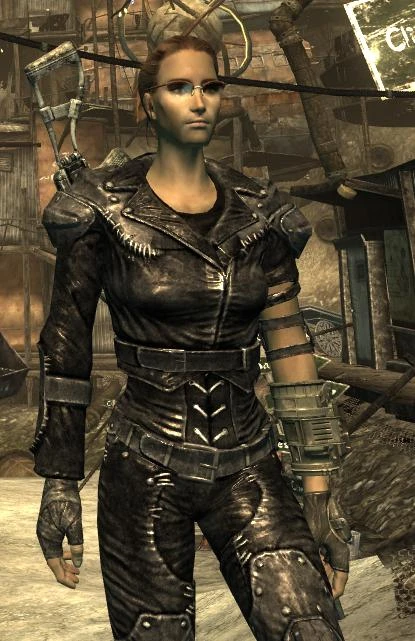
Texture adjustment to make leather armor look more like the black suit from Fallout 1 & 2.
Classic Black Leather Armor v1. 3 tavtav I remember being so excited when I saw leather armor on the trader\'s list of items! It was always such a great piece of gear to get early in the first two Fallout games. Not only was it decent protection and readily available, black leather road warrior outfits ALWAYS look great, right? Then I put it on and saw this brownish suit. BLeaargghhhh!! This mod is a simple adjustment to make the leather armor more in line with the classic Fallout games. Update v1. 3: Added normal maps to the archive and archiveinvalidation.txt, this should fix the \"no shine\" problem. Update v1. 2: Adjusted specular map to fix the \'no shine\' bug some players are experiencing. **Update v1. 1: Adjusted female version to remove purplish color. Installation: 1) Copy the textures folder to your Data folder inside the Fallout 3 one. You can also copy the files and/or sub-folders into your textures folder manually if you\'re worried about messing with previous texture mods. 2) If you don\'t already have a file called ArchiveInvalidation.txt, copy it to your Fallout 3 folder. If you do, copy the following text and add it to your existing one: textures/armor/leatherarmor/outfitf.dds textures/armor/leatherarmor/outfitm.dds textures/armor/leatherarmor/glovesm.dds textures/armor/leatherarmor/outfitf_n.dds textures/armor/leatherarmor/outfitm_n.dds textures/armor/leatherarmor/glovesm_n.dds 3) Go to the folder C:\\Documents and Settings\\user\\My Documents\\My Games\\Fallout3 and edit FALLOUT.ini if you haven\'t already, and change the line \"bInvalidateOlderFiles=0\" to \"bInvalidateOlderFiles=1\" if you haven\'t already. Load up Fallout 3 and you should be ready to go! IF this doesn\'t work, then I recommend doing the following: 1) Download ArchiveInvalidation Invalidated (Manual Version) at: http://www.tesnexus.com/downloads/file.php?id=10724 2) Copy ArchiveInvalidationInvalidated!.bsa to your \"data\" folder. 3) Go to the folder C:\\Documents and My Documents\\My Games\\Fallout3 and edit FALLOUT.ini if you haven\'t already, and change the line that starts with \"SArchiveList\" (ctrl-f is a good way to do this) with the following: SArchiveList=ArchiveInvalidationInvalidated!.bsa, Fallout - Textures.bsa, Fallout - Meshes.bsa, Fallout - Voices.bsa, Fallout - Sound.bsa, Fallout - MenuVoices.bsa, Fallout - Misc.bsa You should now never have to bother with your ArchiveInvalidation file again! :) Feel free to use this texture in any mods or projects you\'re working on, just make sure to put credit in there somewhere for me! If anyone has feedback or suggestions I can be reached at: tavvy_tav@yahoo.com
📊 Mod Details
- Game
- Fallout3 Mods
- Author
- tavtav
- Version
- 1.3
- Downloads
- 18,709
- Endorsements
- 757
- Category
- Models and Textures
- Created
- 11/8/2008
- Updated
- 11/17/2008
🔧 How to Install Fallout 3 Mods
Download from Nexus Mods.
📖 Full step-by-step install guide for Fallout 3 →
Visit the official mod page for specific installation instructions for this mod.
🎮 Need cheat codes or console commands? Check ur gaming wiki for Fallout 3 commands, item IDs, and more.
Keep browsing — more Fallout 3 mods await