Weapon Armor and Power Armor Mods Glow
⚪ Last updated 2018Preview
🔍 Analysis
- 👍 4.5% endorsement rate — high engagement, a strong quality signal
- 🏆 #58 of 247 Models and Textures mods in this game by downloads
📋 About This Mod
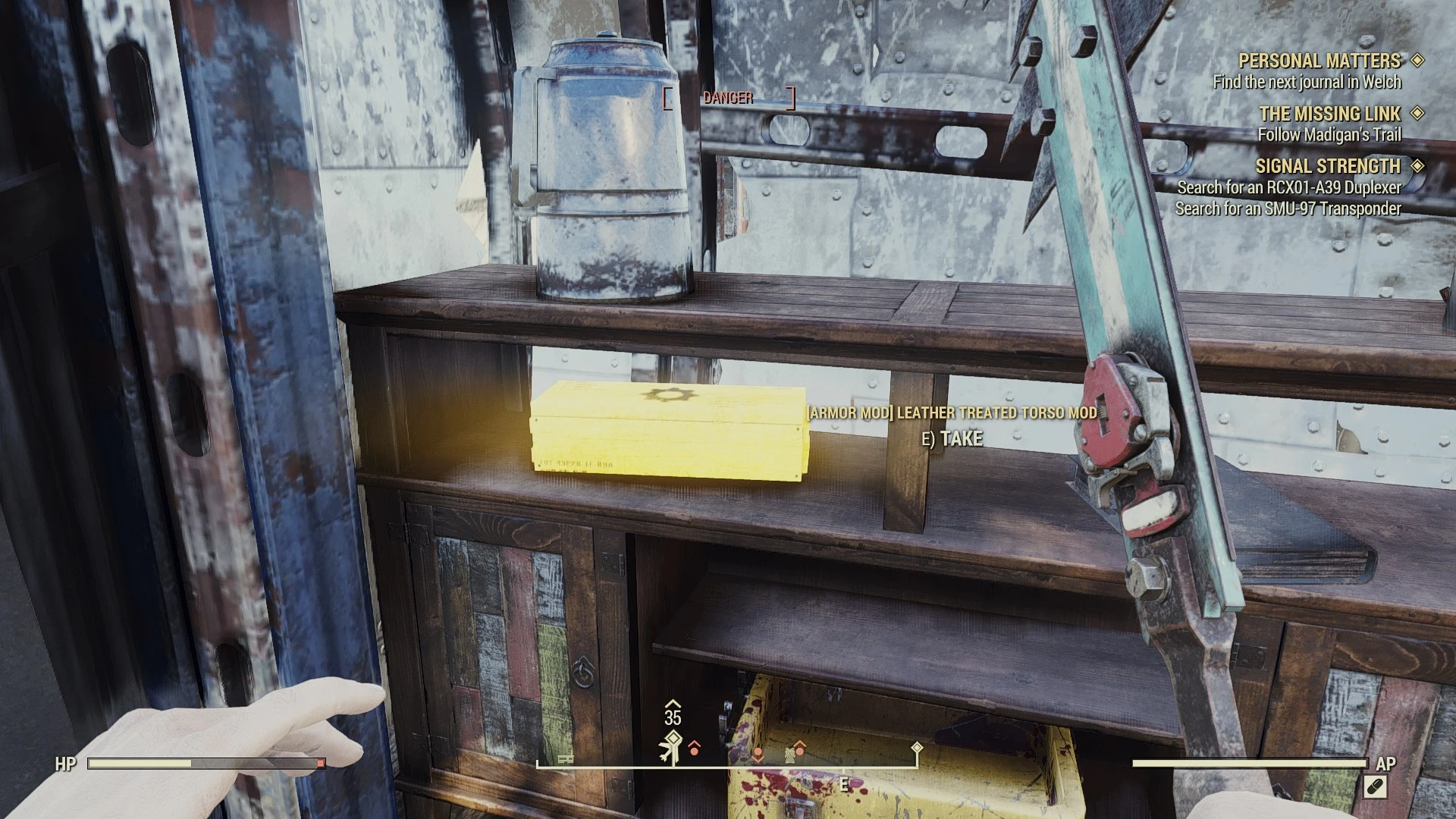
Mods are horrid to find and can be hard to see, not any more, they now emit a bright yellow glow!
Installation
-
[]Download and extract the mod to your Fallout 76 Data folder, e.g. <Program Files>\Bethesda.net Launcher\games\Fallout76\Data.
[
]Add ModBoxGlow.ba2 to your archive load list in Fallout76Custom.ini.[]Launch the game.
Baka File Tool Users
Under optional files, there is a loose copy of the files needed for the mod. Just extract this to your \Bethesda.net Launcher\games\Fallout76\Data
directory and run the baka file tool. The main ModBoxGlow.ba2 is not needed for Baka File Tool users.
Installation for first timers
-
[]Create or edit the following file: \My Games\Fallout 76\Fallout76Custom.ini
[]Copy and paste the following two lines into Fallout76Custom.ini:
SResourceArchive2List = ATX_Main.ba2, SeventySix - ATX_Textures.ba2, ModBoxGlow.ba2
[]Save your file and you're good to go.
Entries are separated by a comma.
Whenever you want to add an archive to your load list, simply append the archive name to the end of this list. To stop loading the archive, remove it from the list.
-
[]Create or edit the following file: \My Games\Fallout 76\Fallout76Custom.ini
This Fallout 76 mod makes weapon, armor, and power armor mods emit a bright yellow glow, making them easier to spot in the world. It's a simple visual aid with 516 endorsements and 11,438 downloads, last updated in December 2018. Installation requires manual file placement and an INI edit.
✨ Key Features
📊 Pros & Cons
✅ Pros
- Community-tested with 516 endorsements and over 11k downloads.
- Solves a real problem: mods are hard to see, and this glow makes them obvious.
- Simple concept, easy to understand for anyone tired of missing mods.
⚠️ Cons
- Last updated in 2018 — may not work with the current game version after updates.
- Installation requires manual INI editing, which can be intimidating for beginners.
- The glow is bright yellow, which might be too garish for some players' tastes.
For Fallout 76 players who struggle to spot mods in the world and want a simple visual cue. It's perfect for looters who want to save time searching. Skip if you prefer a more immersive or subtle approach to item discovery.
💡 Beginner Tips
- Make sure to edit Fallout76Custom.ini in your My Games\Fallout 76 folder, not the game's installation folder.
- If you use the Baka File Tool, grab the loose files from the optional section and skip the .ba2 entirely.
- After editing the INI, launch the game once to verify the glow appears; if not, double-check the file path and syntax.
📊 Mod Details
- Game
- Fallout 76 Mods
- Author
- Runew0lf
- Version
- 1.0
- Downloads
- 11,438
- Endorsements
- 516
- Category
- Models and Textures
- Created
- 12/9/2018
- Updated
- 12/9/2018
🔧 How to Install Fallout 76 Mods
Use Vortex. Place .ba2 files in Data folder. Use cautiously online.
📖 Full step-by-step install guide for Fallout 76 →
Visit the official mod page for specific installation instructions for this mod.
🎮 Need cheat codes or console commands? Check ur gaming wiki for Fallout 76 commands, item IDs, and more.
Keep browsing — more Fallout 76 mods await