High Resolution Texture Pack
⚪ Last updated 2022This mod may not work until the author updates it. Check for an update, or see the rollback guide.
Preview
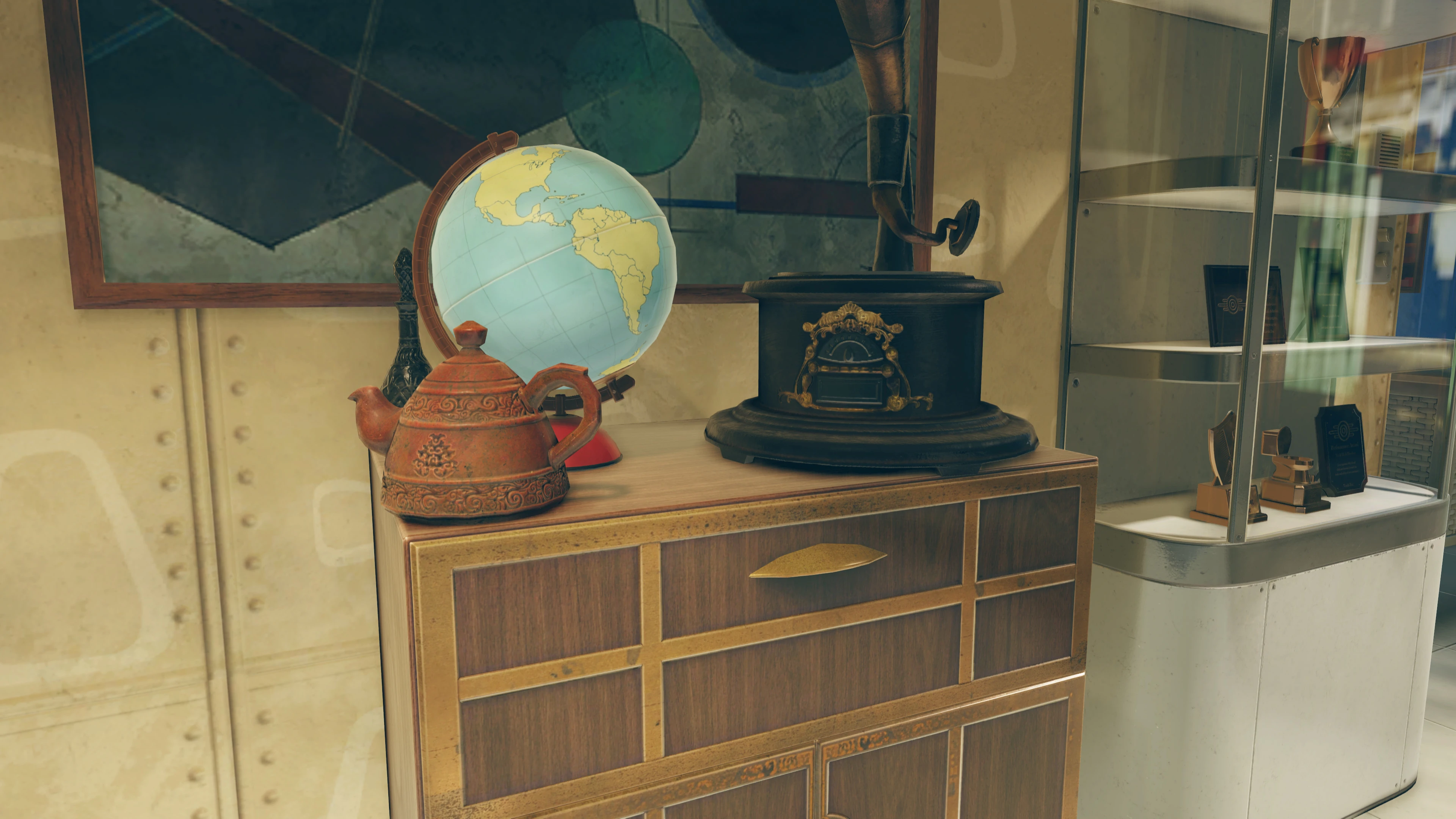
🔍 Analysis
- 👍 0.3% endorsement rate
- 🏆 #2 of 247 Models and Textures mods in this game by downloads
📋 About This Mod
High Resolution Texture Pack
After many false starts, much planning and effort, I'm very happy to announce the High Resolution Texture Pack for Fallout 76.
This mod ports the Fallout 4 HD DLC in its entirety to Fallout 76, adjusted to the new texture formats and re-assembled in combination with the new AO, subsurface scattering, and reflection texture formats that was introduced in Fallout 76! It also brings back the textures from before the Wastelanders update that was of a higher resolution than those found in the current version of Fallout 76. Together, these textures brings back a lot of detail to Fallout 76, some of which it never had, and some of which was lost along the way.
Installation
This is a very large mod, combined into a total of 10 .ba2 archives for you to install. You can either install all of them, or just pick the ones you want.
First, make sure to add the names of the .ba2 files you've installed to your Fallout76Custom.ini config file, located in Documents\My Games\Fallout 76\Fallout76Custom.ini. If it doesn't already exist, you can create a new one, and it will be picked up automatically by Fallout 76. Add the following to it, or merge with your existing sResourceIndexFileList:
sResourceIndexFileList=high_resolution_texture_pack_01.ba2,high_resolution_texture_pack_02.ba2,high_resolution_texture_pack_03.ba2,high_resolution_texture_pack_04.ba2,high_resolution_texture_pack_05.ba2,high_resolution_texture_pack_06.ba2,high_resolution_texture_pack_07.ba2,high_resolution_texture_pack_08.ba2,high_resolution_texture_pack_09.ba2,high_resolution_texture_pack_010.ba2
Installation with Vortex
From the Files tab, click "Mod Manager Download" on the packages you want to install. Enable them via Vortex once they have finished downloading.
Manual Installation
Download the individual .ba2 files you'd like, and manually extract them into your Fallout76\Data folder
Performance Impact
You can expect pretty significant VRAM and disk requirements if you install all of the high resolution texture archives, as the Fallout 4 HD DLC textures are combined with high resolution AO, Subsurface Scattering, and reflection maps, to bring additional detail to the HD DLC textures. The not-quite-PBR lighting engine in Fallout 76 use more texture maps than in Fallout 4, so you can expect the VRAM usage to be far greater than what you saw Fallout 4 with the HD DLC textures. At minimum, to install all of the textures, you should have 10GB of VRAM, and ideally, 16GB or more.
How the mod is built
The archives of this mod is built automatically with a complex build pipeline:
[]First, it walks through the pre-wastelanders textures and compares their resolution with those found in the current version of Fallout 76. It selects those of a higher resolution.
[]It then walks through the Fallout 4 HD DLC textures that match textures found in the current version of Fallout 76. It computes the mean-square-error between the HD DLC texture and the equivalent Fallout 76 texture to automate deciding if the textures are "similar enough" based on heuristics. If the deviation exceeds a pre-determined threshold, the texture won't be considered, as its art style differs too much from that in Fallout 76. From the Set of remaining textures, it picks those textures that are greater in resolution that those found in the current version of Fallout 76, as well as of higher resolution than among the selected pre-wastelanders textures.
[]It then walks through the combined Set of pre-wastelanders and HD DLC textures. For each texture matched in the HD DLC:
[]If the related diffuse map deviated too much in style from that in Fallout 76, but another texture map such as the normal map or glow map is determined to be portable and of higher fidelity, the diffuse map will be AI-upscaled with Real-ESRGAN to match.
[]If the texture is a normal map in the BC5_UNORM format, it will be converted into BC5_SNORM in the sRGB color space.
[]If the texture is a light map (s.dds), it will be broken down into its individual color- and alpha channels, which will then be combined with color channels from the equivalent Fallout 76 light map (l.dds), which will be AI-upscaled with Real-ESRGAN to match the target resolution. These will be combined in new light maps as can be seen in the illustration below:
[*] If any texture maps has been included from the HD DLC, it then checks if the Fallout 76 r.dds file exists and needs upscal
This mod ports the Fallout 4 HD DLC textures to Fallout 76, upgrading environmental detail with higher-resolution assets and restoring pre-Wastelanders textures. It's a large package of 10 .ba2 archives, requiring manual INI configuration or Vortex installation. With 555 endorsements and 169k downloads, it's a popular visual enhancement for Fallout 76 players.
✨ Key Features
📊 Pros & Cons
✅ Pros
- Community favorite with 555 endorsements and over 169k downloads.
- Brings back lost detail and adds new visual fidelity to Fallout 76.
- Flexible installation—you can pick and choose which archives to install.
⚠️ Cons
- Large mod with 10 archives, potentially heavy on storage and load times.
- Manual installation requires editing INI files, which may intimidate beginners.
- Last updated in 2022—may not be compatible with recent game updates.
For Fallout 76 players who want sharper textures and more environmental detail without overhauling the whole game. If you're comfortable with mod managers or editing INI files, this is a solid visual upgrade. Skip if you prefer lightweight mods or aren't interested in cosmetic changes.
💡 Beginner Tips
- Use Vortex for easier installation—it handles the INI edits automatically.
- If installing manually, make sure to merge the sResourceIndexFileList line with any existing entries in your Fallout76Custom.ini.
- Start with just a few archives to test performance before adding all 10.
📊 Mod Details
- Game
- Fallout 76 Mods
- Author
- Wessberg
- Version
- 1.2.0
- Downloads
- 169,309
- Endorsements
- 555
- Category
- Models and Textures
- Created
- 9/18/2021
- Updated
- 3/9/2022
🧩 Commonly Used Together
Users add these mods to the same collections — a real compatibility signal, not an AI guess.
🔧 How to Install Fallout 76 Mods
Use Vortex. Place .ba2 files in Data folder. Use cautiously online.
📖 Full step-by-step install guide for Fallout 76 →
Visit the official mod page for specific installation instructions for this mod.
🎮 Need cheat codes or console commands? Check ur gaming wiki for Fallout 76 commands, item IDs, and more.
Keep browsing — more Fallout 76 mods await