Black Leather Outfits Retexture Bundle
⚪ Last updated 2021🖼️ Gallery (6 images)




🔍 Analysis
- 👍 4.9% endorsement rate — high engagement, a strong quality signal
- 🏆 #188 of 247 Models and Textures mods in this game by downloads
📋 About This Mod
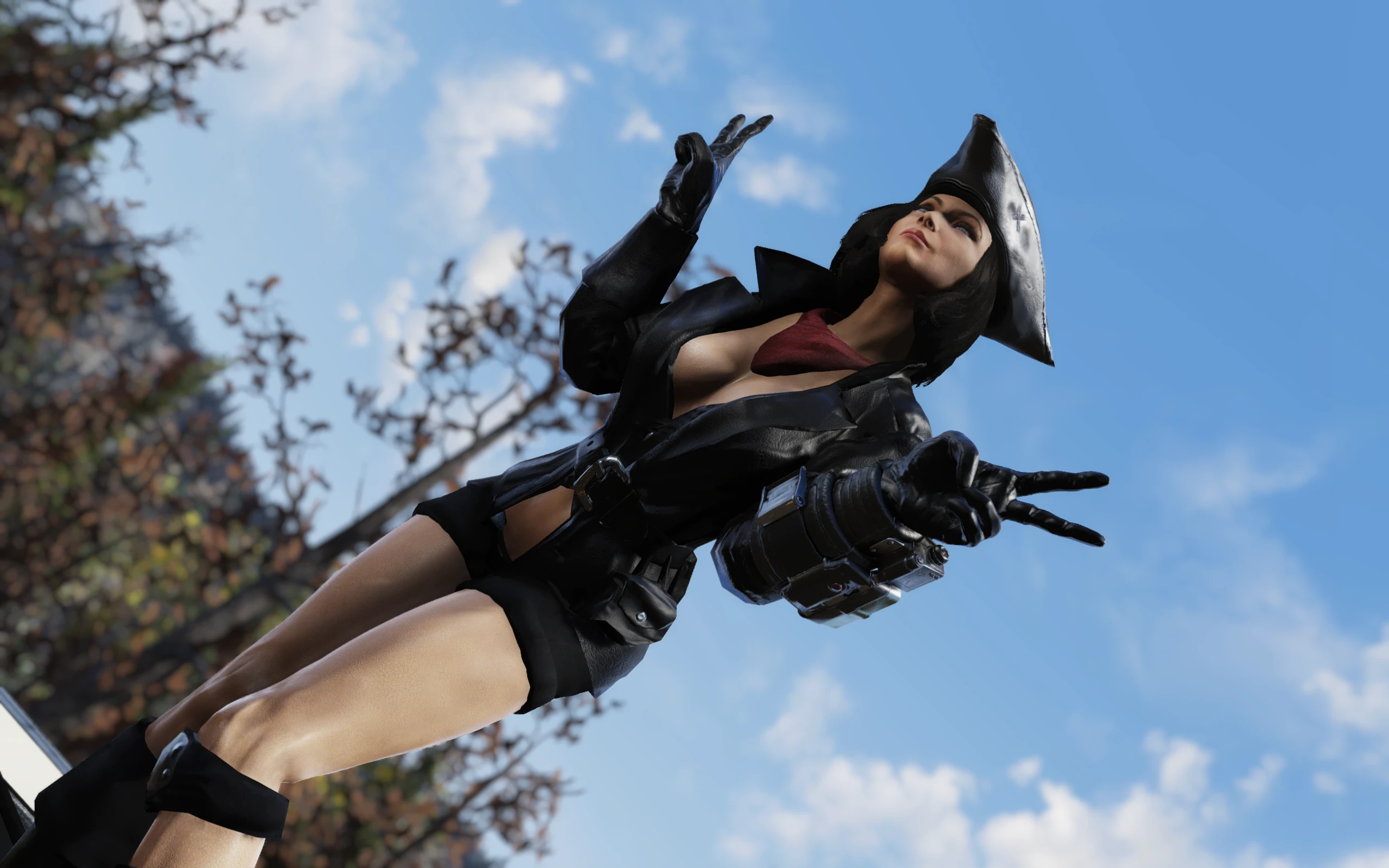
These are simple high-def retextures for Hunter's Long Coat (can be obtained in game), Western Hat (obtainable in-game), Western Duster (Atomic Shop item), Starlet Sniper Outfit (Atomic Shop) and Mercenary Outfit (Steel Reign questline).
Version 1. 2 Contents
-
[]Black Leather Starlet Sniper Outfit
[
]Black Leather Mercenary Outfit[]Black Leather Cowboy Hat
[]Black Leather Western Duster
- Black Leather Hunter's Long Coat
Installation
1. Extract the ba2 files from the archive you've downloaded to your Fallout76/Data folder.2. Check whether you've got the Fallout76Custom.ini file under Documents/My Games/Fallout 76 folder, and if not, create it.
2a. If you've just created the .ini file, you need to open it and input this string in it:
3. Find sResourceArchive2List = line under the section of your Fallout76Custom.ini or type it down if there is no such line.
4. If you've downloaded AiO Bundle, then add LeatherClothes_M.ba2, LeatherClothes.ba2 to the end of the sResourceArchive2List line.
4a. If you've downloaded Hunter's Long Coat retexture, then add LeatherHC_M.ba2, LeatherHC.ba2 to the end of the sResourceArchive2List line.
4b. If you've downloaded Western Duster retexture, then add LeatherWD_M.ba2, LeatherWD.ba2 to the end of the sResourceArchive2List line.
4c. If you've downloaded Mercenary Outfit retexture, then add LeatherMrc.ba2 to the end of the sResourceArchive2List line.
4d. If you've downloaded Starlet Sniper Outfit retexture, then add BSS.ba2 to the end of the sResourceArchive2List line.
Note: Only you will see this retexture in your game, other players will still see clothing textures they have in their game, so it's just for your own aesthetic pleasure and screenshotting purposes.If you liked this mod, please click the "Endorse" button and also check out my other mods:
Global mods:
Appalachia Decorated - Festive Light- Street Lighting - Lit Billboards - add some holiday cheer to the wasteland with this mod!
Appalachia Restored - lets you explore pre-war version of Appalachia, where everything is clean and pristine!
Winter in Appalachia - turn your wasteland into winter wonderland!
Subtle Snow Weather - removes the snowflakes from weather machines completely or makes them smaller.
No Dust and Sand Storms - re
A retexture bundle that gives black leather outfits a fresh look, created by Rigell. With 159 endorsements and 3,239 downloads, it's a niche cosmetic mod for players who want darker, sleeker leather gear. Last updated in July 2021.
✨ Key Features
📊 Pros & Cons
✅ Pros
- Decent community support with 159 endorsements
- Over 3,200 downloads show it's been tried by many
- Simple cosmetic enhancement for leather fans
⚠️ Cons
- Last updated in 2021 — may not be compatible with newer game versions
- Limited to black leather outfits only
For players who want their leather armor to look more stylish and darker. If you're into cosmetic overhauls and don't mind a bit of uncertainty about compatibility, this could be for you. Skip if you're looking for gameplay changes or more comprehensive texture packs.
💡 Beginner Tips
- Check the mod's file structure to ensure you place textures in the correct game folder.
- If you use a mod manager, consider using it to avoid overwriting other texture mods.
- Since it's a retexture, it won't affect gameplay, so you can safely test it without worrying about balance.
📊 Mod Details
- Game
- Fallout 76 Mods
- Author
- Rigell
- Version
- 1.2
- Downloads
- 3,239
- Endorsements
- 159
- Category
- Models and Textures
- Created
- 7/8/2021
- Updated
- 7/13/2021
🔧 How to Install Fallout 76 Mods
Use Vortex. Place .ba2 files in Data folder. Use cautiously online.
📖 Full step-by-step install guide for Fallout 76 →
Visit the official mod page for specific installation instructions for this mod.
🎮 Need cheat codes or console commands? Check ur gaming wiki for Fallout 76 commands, item IDs, and more.
Keep browsing — more Fallout 76 mods await