Appalachia Restored
🟡 Updated this year🖼️ Gallery (6 images)





🔍 Analysis
- 👍 3.0% endorsement rate — high engagement, a strong quality signal
- 🏆 #99 of 247 Models and Textures mods in this game by downloads
📋 About This Mod
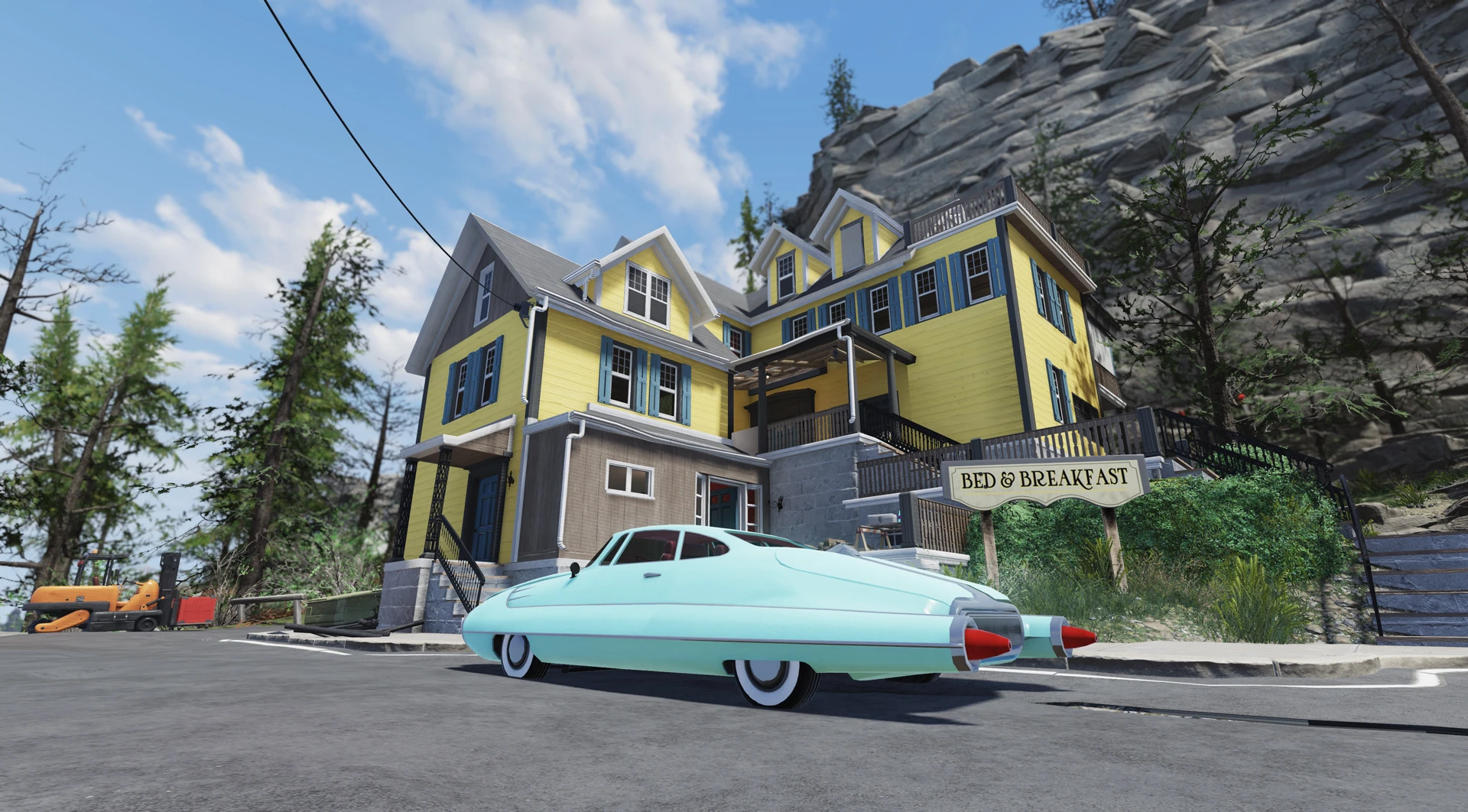
This mod aims at reverting everything to its pre-war state - architecture, clutter, furniture, roads, removing tons of trash from the streets and houses, adding whole lot of lights everywhere, repairing broken buildings, you name it.
Please note that this is a work in progress and this version is far from final, there's still a lot that needs to be done. And there's a whole lot of stuff that is broken beyond repair without the access to Creation Kit. We decided to share the mod with you regardless, as after several months of work it offers decent level of changes that is going to completely alter your perception of the game as is.
This mod is a fantasy and may seem unimmersive under the circumstances of the game's lore, as it can't change the game's story and all the lore pieces that are there. To make things more immersive we pretend that massive earthquakes happened all across Appalachia, thus all the destruction, but many things still look undamaged/pristine.
It's highly recommended to use Spring in Appalachia mod alongside this one (all screenshots made with both mods on) as it greatly adds to the clean atmosphere of Appalachia Restored, creating even more cheerful and nice environment :D
Installation
1. Extract the ba2 file(s) from the archive you've downloaded to your Fallout76/Data folder.
2. Check whether you've got the Fallout76Custom.ini (or Project76Custom.ini if you're using Game Pass version of the game) file under Documents/My Games/Fallout 76 folder, and if not, create it.
2a. If you've just created the .ini file mentioned above, you need to open it and input this string in it:
3. Find sResourceArchive2List = line under the section of your Fallout76Custom.ini or type it down if there is no such line.
4. Add ", AR_M.ba2, AR_T.ba2, AR_Lights.ba2" (without quotes) to the end of the sResourceArchive2List line.
Please note that this mod adds a lot of new light sources to the world and it might affect performance on lower-end machines. If you'll experience performance issues, try to remove the AR_Lights.ba2 you've previously added to the sResourceArchive2List line. This will make the world less lit up and cozy, but might help to regain some fps.
Important Note: Only you will see the world changes in your game, other players won't, so it's just for your own aesthetic pleasure.
Frequently Asked Questions
-What exactly is covered by the mod?
Most of the game's man-made interiors - floors, walls, ceilings, building facades, almost every small piece of clutter, vanilla game furniture, vehicles, industrial machinery. For now armor/PA/outfits/weapons are not covered, though you can still have cleaner versions of some of them using other mods listed below. We will probably work on at least some part of vanilla armor and outfits down the road.
-I still see broken stuff in my game like roads and walls, some rust and dirt here and there, is that a bug?
Most probably - no, not a bug. As we already mentioned, this mod is a work in progress and we will continue to repair what's repairable, add more clean/pristine stuff to the mod and remove remaining trashpiles etc as the time goes. Some things can't be repaired without Creation Kit though, and some shouldn't for logistical purposes - you need passable destroyed walls here and there to explore otherwise inaccessible areas.
-Does this mod affect C. A. M. P. items?
It does partly. Atomic shop stuff is mostly untouched though, as we were only aiming to clean up all the world's vanilla assets, and the pool of unique ATX items is so vast it would require few more months of work to revert them all to pristine condition. Many vanilla camp items will appear cleaner/pristine though such as furniture and vanilla building kits.
Please don't ask us to clean up item X or Y because you use it so much at your camp, our main focus is still on vanilla world assets. We might add some of the ATX items down the road.
-I keep falling through some roofs here and there, is it a bug?
It is part of the "the price you pay" for having neat repaired building facades. We replaced a lot of roofs with their undamaged versions, but the collision could not be added without full modding support in most cas
Appalachia Restored is a WIP texture and model overhaul for Fallout 76 that transforms the wasteland into a pre-war state, cleaning up trash, repairing buildings, and adding lights. With 179 endorsements and 5,997 downloads, it offers a significant visual change but requires manual INI editing and is best paired with Spring in Appalachia.
✨ Key Features
📊 Pros & Cons
✅ Pros
- Community-approved with 179 endorsements and nearly 6k downloads
- Dramatically changes the game's atmosphere to a cleaner, brighter wasteland
- Actively maintained, last updated December 2025
⚠️ Cons
- Work in progress, far from final, with many broken areas due to Creation Kit limitations
- Manual installation requires editing INI files, which can be tricky for beginners
- May feel unimmersive for lore purists, as the clean state contradicts the game's story
For Fallout 76 players who want a visual overhaul that makes the world feel more alive and less post-apocalyptic. If you enjoy a cheerful, clean environment and don't mind a bit of lore bending, this is for you. Skip if you prefer the gritty, lore-accurate wasteland or want a simple mod manager install.
💡 Beginner Tips
- Make sure to create Fallout76Custom.ini (or Project76Custom.ini for Game Pass) exactly as described, and add the BA2 files to the sResourceArchive2List line.
- Use a mod manager like Vortex to handle the BA2 extraction, but you'll still need to manually edit the INI.
- Pair with Spring in Appalachia for the full effect, as the author recommends it for the best visuals.
📊 Mod Details
- Game
- Fallout 76 Mods
- Author
- Rigell and IceLain
- Version
- 0.1.2
- Downloads
- 5,997
- Endorsements
- 179
- Category
- Models and Textures
- Created
- 3/30/2024
- Updated
- 12/28/2025
🔧 How to Install Fallout 76 Mods
Use Vortex. Place .ba2 files in Data folder. Use cautiously online.
📖 Full step-by-step install guide for Fallout 76 →
Visit the official mod page for specific installation instructions for this mod.
🎮 Need cheat codes or console commands? Check ur gaming wiki for Fallout 76 commands, item IDs, and more.
Keep browsing — more Fallout 76 mods await