Yakitori Audio Converter - Convert fuz-xwm-wav-various audio files
⚪ Last updated 2020⚠️ Install Order · 2 steps
Install in this order, then this mod last — most mods fail to load without their framework and dependencies in place.
Preview
🔍 Analysis
- 👍 7.5% endorsement rate — high engagement, a strong quality signal
- 🏆 #23 of 25 Utilities mods in this game by downloads
📋 About This Mod
1. Introduction
2. Motivation and purpose
3. Major features
4. Supported file format
5. Requirements
7. Uninstall
8. How to use
9. Notes / Limitation / Known issues
10. Credits & Special Thanks
====================================================================================================================
1. Introduction
====================================================================================================================
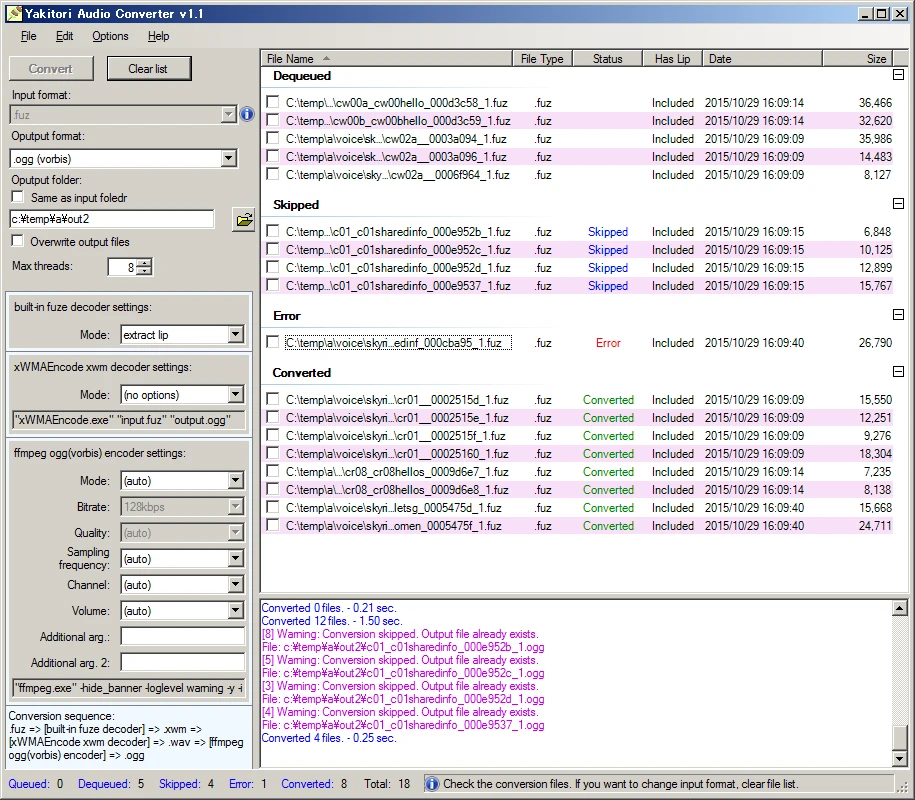
This tool is "Yet Another" audio converter. By default, you can convert between fuz, xwm and wav files. By separately download and install the following tools, you can convert to/from various audio files such as mp3, and convert from various video files such as mp4 and wmv: LAME, FFmpeg
Also you can convert audio files from bsa/ba2 directly. Just drop bsa/ba2 files to the tool window.
Tutorial Video
Lucien follower author Joseph Russell has created a video guide to Recording Dialogue using this tool and more. This is a video for Skyrim, but it should be useful for Fallout4. Thanks Joseph!
1C-c6GjpxD0
What's Yakitori?
Yakitori (Japanese: 焼き鳥) is a Japanese type of skewered chicken. Google image seach here: https://www.google.com/search?q=yakitori&tbm=isch
At first the name of this tool was "Yet Another Audio Converter". However, I noticed that there was already a tool with the same name and decided to think about another name to avoid confusion. Then I went to a izakaya(Japanese pub) and ordered some beer and Yakitori, and suddenly I came up with the idea, so naming it to Yakitori (no sense but I wanted to name the beginning with "Y" lol).
For Japanese users: Japanese guide now available.
日本のユーザへ: 日本語の利用ガイドがこちらにあります => http://thinkingskeever.hatenablog.com/entry/2016/02/02/191802
====================================================================================================================
2. Motivation and purpose
====================================================================================================================
I'm often convert fuz files to wav/mp3 format and editing with Audacity or playback with Media Player. For this kind of work, Skyrim Audio Converter by JohnB https://www.nexusmods.com/skyrim/mods/8303/ met comparative requirements. I was using all the way this tool but sometimes bit unstable in my PC and I wanted to specify more conversion parameters, so I decided to develop this tool. I want to emphasize that Skyrim Audio Converter gave m
Yakitori Audio Converter is a utility tool for converting audio files between fuz, xwm, and wav formats, with optional support for mp3 and other formats via LAME or FFmpeg. It has 1,057 endorsements and 14,150 downloads, last updated in October 2020. This tool is for modders and players who need to convert audio files for modding or personal use.
✨ Key Features
📊 Pros & Cons
✅ Pros
- Solid track record with over 1,000 endorsements and 14k downloads – clearly a tool people trust.
- Handles the niche formats (fuz, xwm) that are a pain to deal with otherwise – a real time-saver for modders.
- Flexible: you can expand it to handle mp3 and more if you grab LAME or FFmpeg.
⚠️ Cons
- Last updated in 2020 – might not play nice with newer game versions or modding tools, so test before relying on it.
- Requires extra setup (LAME or FFmpeg) to get the full format support – not fully featured out of the box.
- It's a niche utility, so if you only need wav-to-mp3, there are simpler tools out there.
For modders who need to convert audio files between fuz, xwm, and wav formats, especially for Bethesda games. Also useful for players who want to tweak game audio files. Skip if you only need basic audio conversion – this is specialized for game audio formats.
💡 Beginner Tips
- If you're converting for Skyrim or Fallout, make sure you know which format the game expects – fuz for voice, xwm for music, etc.
- Grab LAME or FFmpeg first if you want mp3 support – it's a simple download and drop-in, but do it before you need it.
- Test a single file conversion before batch processing to avoid surprises with your specific audio files.
📊 Mod Details
- Game
- Fallout 4 Mods
- Author
- BowmoreLover
- Version
- 1.4
- Downloads
- 14,150
- Endorsements
- 1,057
- Category
- Utilities
- Created
- 2/1/2016
- Updated
- 10/14/2020
🔧 How to Install Fallout 4 Mods
Download from Nexus.
📖 Full step-by-step install guide for Fallout 4 →
Visit the official mod page for specific installation instructions for this mod.
🎮 Need cheat codes or console commands? Check ur gaming wiki for Fallout 4 commands, item IDs, and more.
Keep browsing — more Fallout 4 mods await