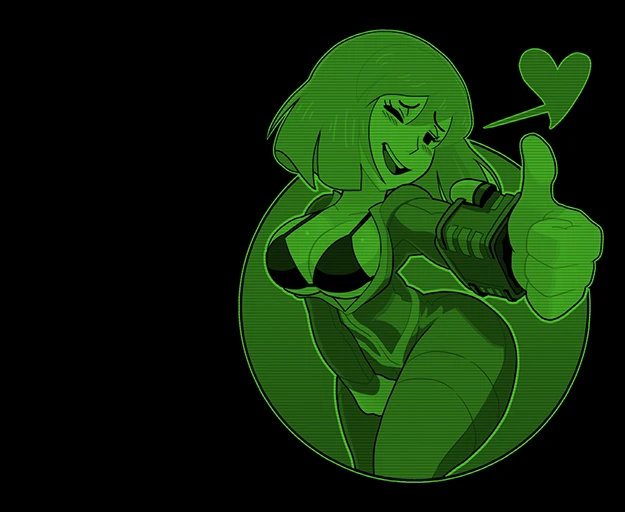
Vaultmeat Pervert Pip-boy
⚪ Last updated 2016⚠️ Install Order · 2 steps
Install in this order, then this mod last — most mods fail to load without their framework and dependencies in place.
Preview
🔍 Analysis
- 👍 2.5% endorsement rate — high engagement, a strong quality signal
- 🏆 #19 of 76 Visuals and Graphics mods in this game by downloads
📋 About This Mod
Now with in 8 color choices and a special FULL COLOR version!
Special Thanks to
Zenos875 and bwins95
I originally made this Vault Meat screen for myself but thought I would share it.
I know this isn't everyone's cup of tea, so please refrain from unproductive comments.
Not compatible with any other mods that change the pipboy's background. Whichever you install last will overwrite the other.
All art credit goes to Gashi.
Futa versions included to keep with shad's theme
Any other suggestions for how to adjust the picture may be considered.
Also check out my VaultMeat Pip-Girl 3000 Mod
A cosmetic Pip-Boy background mod for Fallout 4 featuring Shadman's vault meat character, drawn by Gashi. It replaces the default Pip-Boy screen with a custom image. Popular with 13,027 endorsements and over 516,000 downloads, last updated in 2016.
✨ Key Features
📊 Pros & Cons
✅ Pros
- Huge community adoption with 13,027 endorsements and over 516k downloads.
- Adds a unique, artistic touch to your Pip-Boy screen.
- Lightweight and easy to install—just drop it in your data folder.
⚠️ Cons
- Last updated in 2016—may not be compatible with the latest Fallout 4 patches or DLC.
- Purely cosmetic—no gameplay changes, so if you want functional mods, this isn't it.
- The artwork is niche and may not appeal to everyone's taste.
For Fallout 4 players who want to personalize their Pip-Boy with a distinctive, fan-made artwork. If you're a fan of Shadman's style or just want a change of scenery, this is for you. Skip if you're looking for gameplay enhancements or prefer a more vanilla look.
💡 Beginner Tips
- Place the file in your Fallout 4 Data folder (usually C:\Program Files (x86)\Steam\steamapps\common\Fallout 4\Data).
- Make sure to enable the mod in your load order if you're using a mod manager like Nexus Mod Manager or Vortex.
- If the background doesn't show up, check that you have the correct file structure—it should be a .ba2 or loose files in the right folders.
📊 Mod Details
- Game
- Fallout 4 Mods
- Author
- adomiel
- Version
- 2.0
- Downloads
- 516,868
- Endorsements
- 13,027
- Category
- Visuals and Graphics
- Created
- 1/3/2016
- Updated
- 3/6/2016
🧩 Commonly Used Together
Users add these mods to the same collections — a real compatibility signal, not an AI guess.
🔧 How to Install Fallout 4 Mods
Download from Nexus.
📖 Full step-by-step install guide for Fallout 4 →
Visit the official mod page for specific installation instructions for this mod.
🎮 Need cheat codes or console commands? Check ur gaming wiki for Fallout 4 commands, item IDs, and more.
Keep browsing — more Fallout 4 mods await