Synthkind Redefined - Gen2 Synth Overhaul (Plus Nick Valentine and DiMa)
⚪ Last updated 2021⚠️ Install Order · 2 steps
Install in this order, then this mod last — most mods fail to load without their framework and dependencies in place.
Preview
🔍 Analysis
- 👍 0.5% endorsement rate
- 🏆 #155 of 271 Models and Textures mods in this game by downloads
📋 About This Mod
What is it?
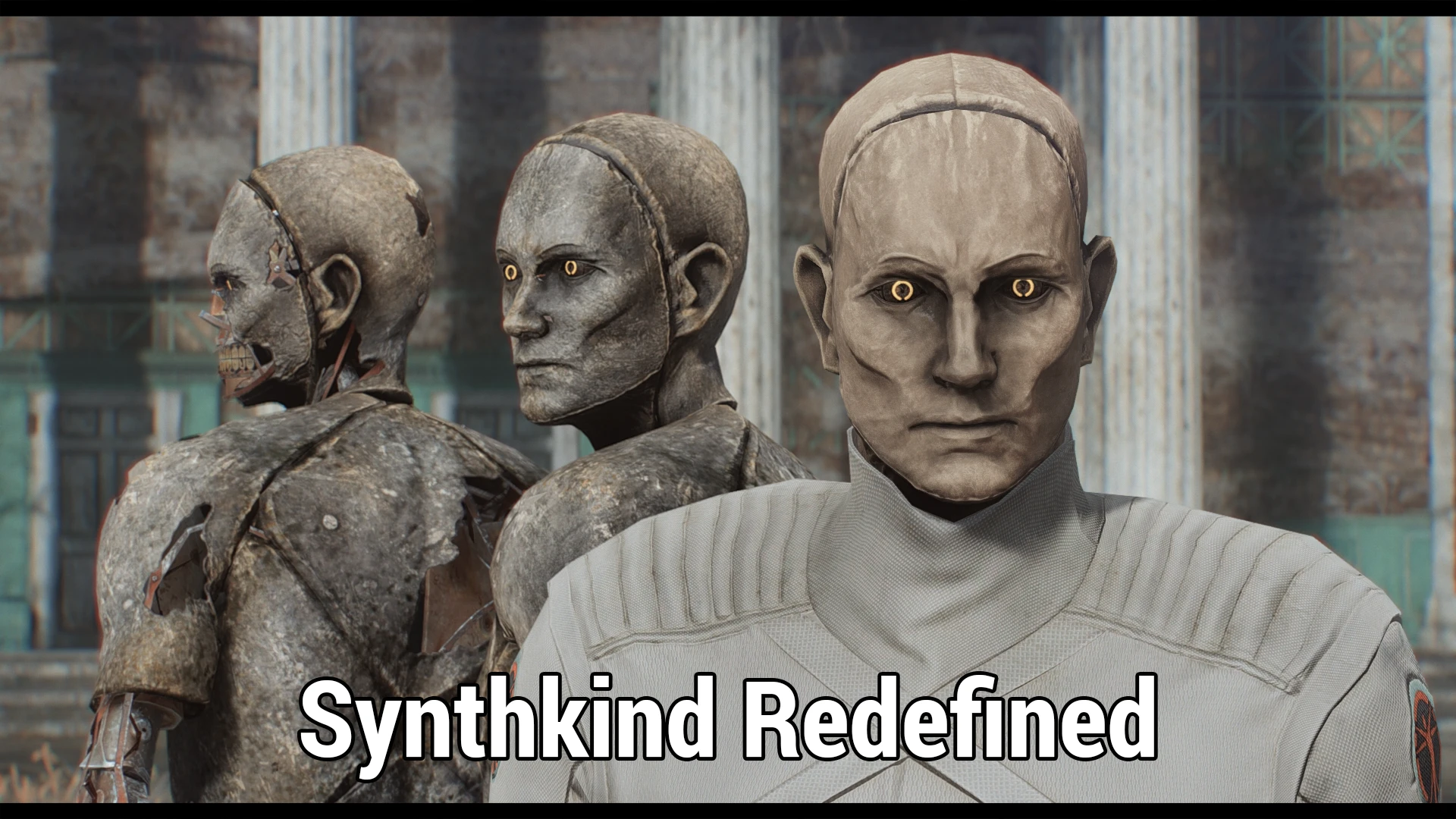
The next step I wanted to take after my Sharper Synths textures. While there are a handful of new or altered textures out there for synths... none of them were quite what I wanted. I liked the look Bethesda gave them, the style - but I thought it could stand for a bit of an upgrade. So, Synthkind Redefined goes a little further than just a texture replacement! SRD also tweaks and improves on a few other aspects of synths. It provides unique textures for Nick Valentine and DiMa - not just faces, but also bodies. DiMa has been given an all new face texture based on the unused version found in Far Harbor, as well as a matching body texture. The materials for his glass parts have been tweaked to reduce their brightness and emphasize the cracks and damage present.
This mod also includes the Jaw Sync feature from my other mod, called, unsurprisingly, Valentine Jaw Sync. As DiMa's new face textures also expose the inner workings of his head, SRD also extends this feature to him.
Main screenshots taken with an ENB, but I have included a few without, for accurate representation. They are labeled with 'No ENB'.
There is an option in the installer for a Base Game version of the mod, if you do not own Far Harbor.
Show me a comparison!
Tell me about the textures!
Two versions available. Standard download is SD sizes. 512 eyes/mouth, 1k for face and 2k body, with normal/specular maps half those sizes. There is an HD version available as well. 512 mouth(and Gen1 eyes), 1k eyes, 2k faces, and 4k bodies, with normal/specular maps half those sizes. Use one or the other.
Gen1 synths have received the smallest adjustments. A new eye texture, general adjustments for increased definition to their body, and a few minor color tweaks - like their teeth, which have been changed to a more iron/steel tone.
Gen2 synths are the core focus of this mod - They have received new eye and skin textures, built completely from scratch. The eyes feature two variants - a simple style closer to vanilla, or a more elaborate shuttered style, drawing from vintage camera parts. Both eyes also have a new glow map! DiMa gets to benefit from these new eye textures as well - no more muddy, impossible cataract textures - instead, the neon in his eyes has burnt out and the aperture is depicted in a wider position.
Gen2 synths have also received adjustments to their mouth textures, pulling back on the yellow tones present and making the teeth an iron/steel tone.
Clean Gen2 synths, such as those seen in the institute, no longer have the unusual jaundiced tone to their flesh, and the pink c
Synthkind Redefined is a texture overhaul for Gen2 Synths in Fallout 4, featuring hand-painted textures that stay true to the vanilla aesthetic while adding unique looks for Nick Valentine and DiMa, new eyes, and expanded wardrobe options for Nick. It supports both DLC and No DLC versions, making it accessible to all players.
✨ Key Features
📊 Pros & Cons
✅ Pros
- High community trust with 1,221 endorsements and over 250k downloads.
- Faithful to vanilla style while improving visual quality.
- Adds unique touches for iconic characters like Nick and DiMa.
⚠️ Cons
- Last updated in 2021, so may not be compatible with the latest game patches or mods.
- Only affects Gen2 Synths, so players looking for broader synth overhauls will need other mods.
- No explicit installation instructions provided, which might be tricky for modding newcomers.
For Fallout 4 players who want to enhance the look of Gen2 Synths without straying from the game's original art direction. Also a must-have for fans of Nick Valentine and DiMa who want more visual variety. Skip if you're looking for gameplay changes or overhauls beyond textures.
💡 Beginner Tips
- Choose the correct version (DLC or No DLC) based on your installed DLC to avoid missing textures.
- Use a mod manager like Vortex or Mod Organizer 2 to easily toggle between versions and avoid overwrite conflicts.
- If you're using other synth texture mods, load this one after them to ensure its textures take priority.
📊 Mod Details
- Game
- Fallout 4 Mods
- Author
- radbeetle
- Version
- 1.1
- Downloads
- 251,925
- Endorsements
- 1,221
- Category
- Models and Textures
- Created
- 11/13/2020
- Updated
- 10/2/2021
🔧 How to Install Fallout 4 Mods
Download from Nexus.
📖 Full step-by-step install guide for Fallout 4 →
Visit the official mod page for specific installation instructions for this mod.
🎮 Need cheat codes or console commands? Check ur gaming wiki for Fallout 4 commands, item IDs, and more.
Keep browsing — more Fallout 4 mods await