Streamlined Pip-Boy Fallout 4 (Pipboy aesthetics)
⚪ Last updated 2016⚠️ Install Order · 2 steps
Install in this order, then this mod last — most mods fail to load without their framework and dependencies in place.
Preview
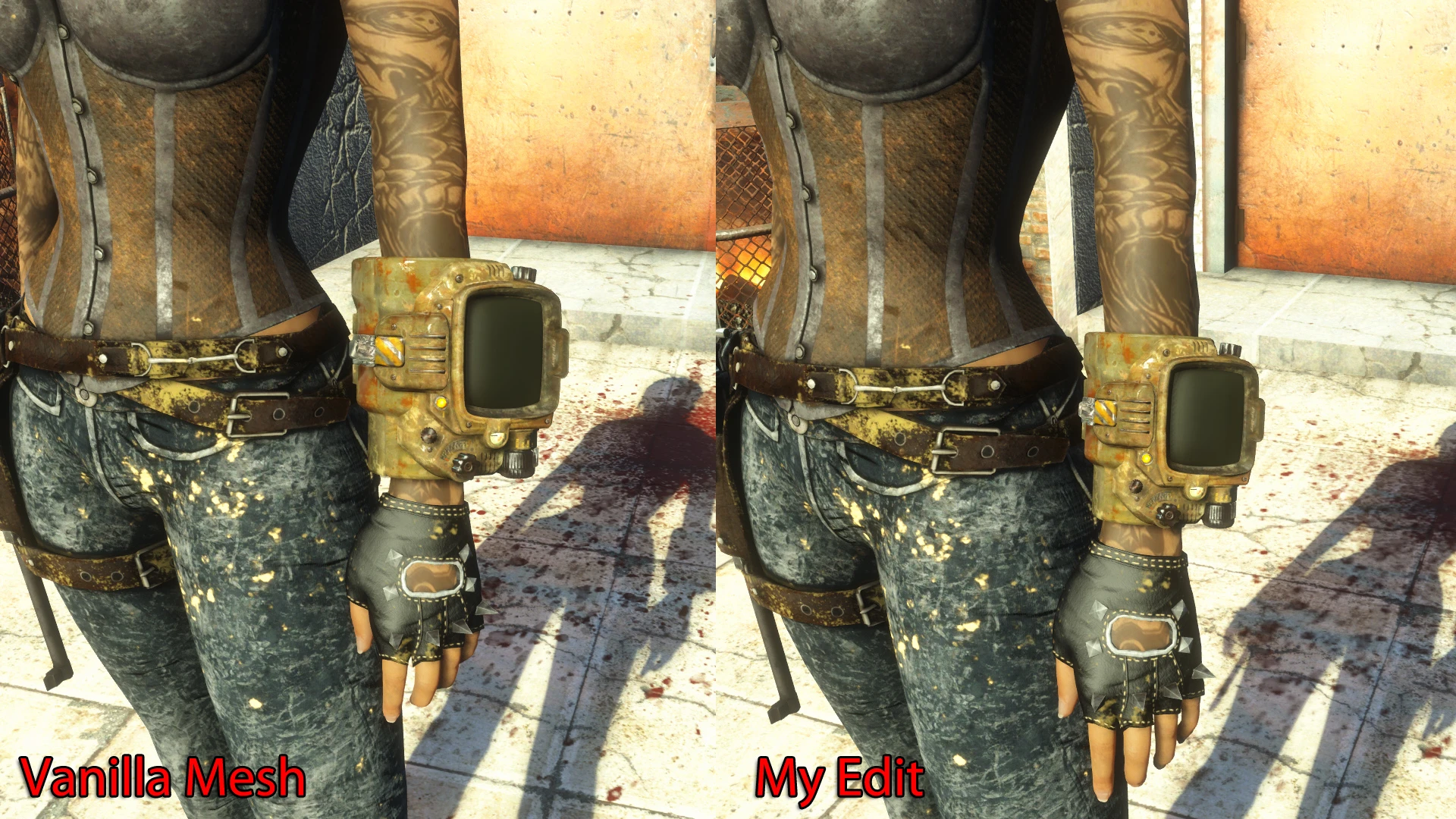
🔍 Analysis
- 👍 3.9% endorsement rate — high engagement, a strong quality signal
- 🏆 #1 of 12 Pip-Boy mods in this game by downloads
📋 About This Mod
Hello!
This is an edit of the vanilla ThirdPerson Pip-Boy mesh so it fits better to female body replacer. I aligned the mesh to the CBBE Zeroed Slider Body (Check the comparison Screenshot).
For the FirstPerson mesh I simply took the ThirdPerson mesh and renamed it (not because me being lazy, I tried to work with the original mesh, but many more issues occurred compared to the Third- Person mesh). It works without crashes and is fully functional, but:
The FirstPerson mesh now hasn't got any animations (the hand still does the animations), no holotape animation, no turning the buttons. Hands and Pip-Boy are not aligned (not fixable). The glow overlay is different, now if you enter the Pip-Boy menu with Pip-Boy light on, you will get dazzled (just check the screenshot). These issues are the reason why I release the FirstPerson mesh as an OPTIONAL file.
This mesh doesn't offer Bodyslide features.
It will not work (clipping issues) with thick clothing (like a coat for example). Also if you don't think the Pip-Boy fits too loose on your character this mod is not for you.
Fallout 4 uses the same Pip-Boy mesh for female and male characters, which means my mod will clip with the arm of male characters.
Installation:
You can install my mod with the ModManager. If you want to install it manually then download the archive and put the content in your Fallout 4 Data folder.
Unistallation:
Uninstall the mesh with the ModManager or manually delete the file from your data folder (check the archive for the folder path and filename).
Compatibility:
My mod should be compatible with every Pip-Boy retexture. It's incompatible with mods which alter the 3d model of the Pip-Boy (like the Pip-Boy Flashlight Mod).
Have fun!
Tools used:
Outfit Studio, Thanks to ousnius
Q: Will you do a Bodyslide version? A: Nope, I don't use Bodyslide, ingame I use the base Zeroed Slider Body.
Q: Will you do different sizes? A: Nope, already took me some hours to do this one mesh.
Q: Your Modpage looks horrible! A: This is not a question but yeah I know.
Q: Will you do a version for XBone? A: Nope, just one for PS4; just kidding. Since I don't own a Fallout 4 version for PS4/XBone so I can test my mod there won't be a console version.
Mods used for Screenshots:
Evil Detective. (CBBE. JaneBod. Vanilla) by GrinnginUrchen Seen Better Days Player PIPBOY Retexture by BlackBlossom
A mesh edit that makes the Pip-Boy less clunky and better aligned with the CBBE Zeroed Slider Body, primarily for female characters. With 923 endorsements and 23,958 downloads, it's a popular cosmetic fix for those who find the default Pip-Boy too loose.
✨ Key Features
📊 Pros & Cons
✅ Pros
- Community-approved with 923 endorsements and nearly 24k downloads
- Solves a real visual annoyance for CBBE users
- Lightweight mesh edit—no gameplay changes, just a cleaner look
⚠️ Cons
- Only useful if you use CBBE Zeroed Slider Body—otherwise it's pointless
- Last updated in 2016, so it may not be compatible with newer mod setups
- Not for you if you think the default Pip-Boy fit is fine
For Fallout 4 players who use CBBE and hate how the Pip-Boy floats or looks bulky on their female character. If you're not using CBBE Zeroed Slider, skip this—it won't do anything for you.
💡 Beginner Tips
- Make sure you have CBBE installed and the Zeroed Slider body selected in BodySlide
- Use a mod manager like Vortex or MO2 to install—it's just a mesh replacer, so load order doesn't matter much
- If you see clipping, check that your body preset matches the Zeroed Slider exactly
📊 Mod Details
- Game
- Fallout 4 Mods
- Author
- Wast1980
- Version
- 1
- Downloads
- 23,958
- Endorsements
- 923
- Category
- Pip-Boy
- Created
- 9/6/2016
- Updated
- 9/7/2016
🔧 How to Install Fallout 4 Mods
Download from Nexus.
📖 Full step-by-step install guide for Fallout 4 →
Visit the official mod page for specific installation instructions for this mod.
🎮 Need cheat codes or console commands? Check ur gaming wiki for Fallout 4 commands, item IDs, and more.
Keep browsing — more Fallout 4 mods await