Spoiler-free Quest Animations
⚪ Last updated 2016⚠️ Install Order · 2 steps
Install in this order, then this mod last — most mods fail to load without their framework and dependencies in place.
Preview
🔍 Analysis
- 👍 3.8% endorsement rate — high engagement, a strong quality signal
- 🏆 #6 of 81 User Interface mods in this game by downloads
📋 About This Mod
Spoiler-free Quest Animations
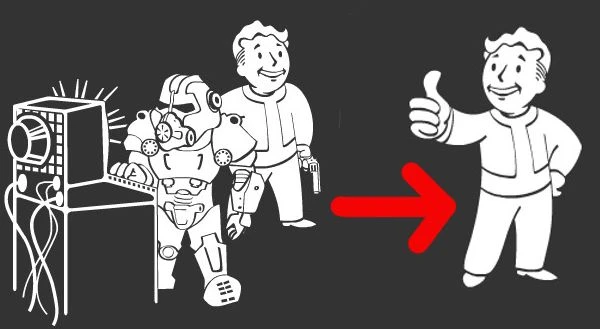
v1. 0I considered the animations when starting a quest and in the pip-boy quest log as just yet another annoying bling bling.
That was until the animation for "Call to Arms" showed what will actually happen in the quest. I was really pissed about this spoiler, because that was actually my first time encountering this particular enemy.
To prevent this from happening again, I created this Mod. It will replace all special quest animations with the default "thumbs up" animation. (I actually wanted to replace them with an empty animation, but the game somehow didn't accept these files and played the default animation anyway. So I used this animation to avoid potential problems.)
The generic faction animations I left untouched, because they don't contain spoilers.
If you're annoyed by the animations in the quest log, check out this mod: Quest Summary by Default
Because of the default animation, you can't tell apart the important stuff from the radiant filler quests? Check this out: All Radiant Quests Marked
Addon for Automatron available here: Spoiler-free Quest Animations - Automatron by Pokepunch (Thanks)
1. Unzip the archive to your \Data\ folder. 2. If you have not done already, enable mods: Enabling Modding for PC
1. Delete "\interface\components\faction vault boys\" 2. Delete "\interface\components\quest vault boys\"
Or just use NMM.
Warning:
The file names of the animation files contain the quest names. If you don't want to be spoiled, do not look into the folders.How did I do it: - replaced all quest specific .swf files in "\quest vault boys\" and "\faction vault boys\" with "defaultboy.swf" from "\quest vault boys\miscellaneous quests\"
A lightweight UI mod that swaps quest-specific animations for generic ones, removing spoilers from quest tracking. With 884 endorsements and 23,196 downloads, it's a proven choice for players who want to avoid story reveals. Last updated in 2016, so compatibility with newer game versions is uncertain.
✨ Key Features
📊 Pros & Cons
✅ Pros
- Community-approved with 884 endorsements and over 23k downloads.
- Does exactly what it says—kills spoiler animations without extra bloat.
- Lightweight and easy to install; no dependencies to fiddle with.
⚠️ Cons
- Last updated in 2016—might break with current game patches.
- Only affects animations, so if you wanted more UI tweaks, this isn't it.
For story-driven players who hate having quest details spoiled by the UI. Also great for streamers or anyone doing a blind playthrough. Skip if you're fine with vanilla animations or want a more comprehensive UI overhaul.
💡 Beginner Tips
- Since it's a simple file replacement, just drop the files into your Data folder and enable the mod in your launcher.
- If you're using a mod manager, make sure to set the load order so this mod loads after any UI overhauls to avoid conflicts.
- Test on a new save or after the first quest to confirm the animations are gone.
📊 Mod Details
- Game
- Fallout 4 Mods
- Author
- Beaker
- Version
- 1.0
- Downloads
- 23,196
- Endorsements
- 884
- Category
- User Interface
- Created
- 11/13/2015
- Updated
- 8/30/2016
🔧 How to Install Fallout 4 Mods
Download from Nexus.
📖 Full step-by-step install guide for Fallout 4 →
Visit the official mod page for specific installation instructions for this mod.
🎮 Need cheat codes or console commands? Check ur gaming wiki for Fallout 4 commands, item IDs, and more.
Keep browsing — more Fallout 4 mods await