Shadow of Boston
⚪ Last updated 2015⚠️ Install Order · 3 steps
Install in this order, then this mod last — most mods fail to load without their framework and dependencies in place.
Preview
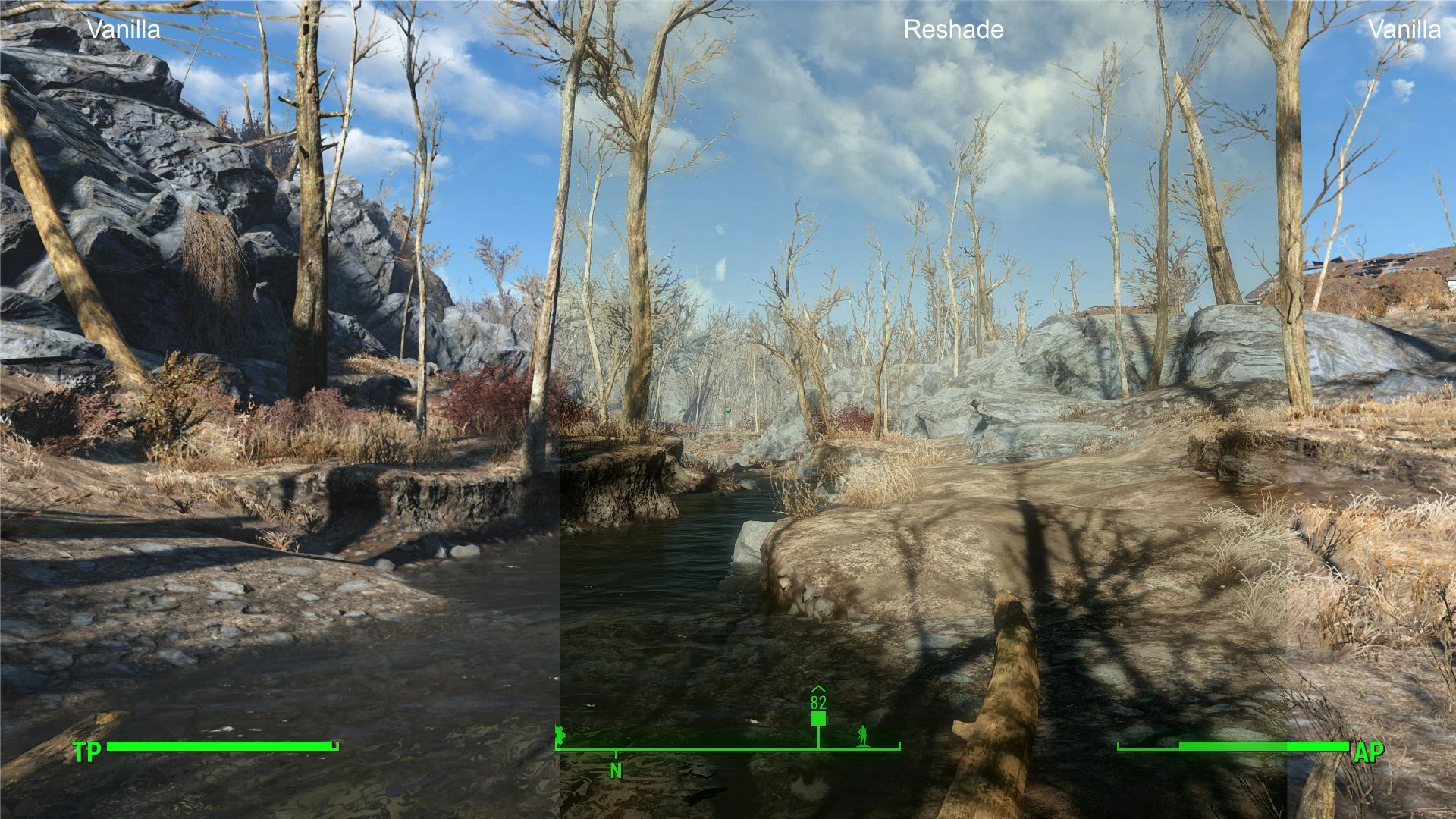
🔍 Analysis
- 👍 5.4% endorsement rate — high engagement, a strong quality signal
- 🏆 #4 of 8 ReShade Presets mods in this game by downloads
📋 About This Mod
Welcome to Shadow of Boston - a radiant Reshade
7cj6hNFLjOE
Please join and support us
What is this?
This is a simple Reshade preset (there will be a more detailed ENB preset later on) to give the game a more real look.
It aims to reproduce the look of the S. T. A. L. K. E. R Series.
Why?
The atmosphere changes dramatically after a Nuclear war.
Therefor the Sunlight also changes and bleaches out everything in a more radiating tone.
In this preset though i try to stay a bit more colorful than in "The love of Eli"
Installation
1. Install the Reshade framework and follow the mediator.exe first step instructions.
2. You will find a Reshade folder inside the Fallout4 main directory.
3. Put the content of this reshade preset inside the Reshade folder in your FO4 Folder and replace the existing files.
Tutorial of manually install Reshade:
lVFJ40lo3zA
Shadow of Boston is a ReShade preset for Fallout 4 that aims for a more realistic, darker aesthetic inspired by Shadow of Chernobyl. It reduces the candy-colored look, deepens shadows, and sharpens the image. With 297 endorsements and over 5,500 downloads, it's a niche but popular choice for players wanting a grittier atmosphere.
✨ Key Features
📊 Pros & Cons
✅ Pros
- Community-approved with 297 endorsements and over 5,500 downloads
- Gives Fallout 4 a grittier, more realistic vibe that fits the post-apocalyptic setting
- Simple to install—just drop the preset into your ReShade folder
⚠️ Cons
- Last updated in 2015, so it may not be compatible with the latest ReShade versions or Fallout 4 updates
- Requires ReShade to be installed separately, which adds an extra step
- The preset's darker look might not suit players who prefer the vanilla color palette
For Fallout 4 players who want a darker, more realistic atmosphere reminiscent of STALKER. If you're tired of the game's default vibrant colors and want a grittier wasteland, this is for you. Skip if you prefer the original look or don't want to mess with ReShade.
💡 Beginner Tips
- Make sure you have ReShade installed and set up for Fallout 4 before adding this preset.
- After installing, tweak the preset's settings in-game using the ReShade overlay to match your monitor's brightness.
- If the game looks too dark, adjust the shadow and gamma settings within the preset to your liking.
📊 Mod Details
- Game
- Fallout 4 Mods
- Author
- Mangaclub
- Version
- 1.0
- Downloads
- 5,510
- Endorsements
- 297
- Category
- ReShade Presets
- Created
- 11/10/2015
- Updated
- 11/12/2015
🔧 How to Install Fallout 4 Mods
Download from Nexus.
📖 Full step-by-step install guide for Fallout 4 →
Visit the official mod page for specific installation instructions for this mod.
🎮 Need cheat codes or console commands? Check ur gaming wiki for Fallout 4 commands, item IDs, and more.
Keep browsing — more Fallout 4 mods await