HD Distance and Detail ReShade (Blur Fix)
⚪ Last updated 2018⚠️ Install Order · 2 steps
Install in this order, then this mod last — most mods fail to load without their framework and dependencies in place.
Preview
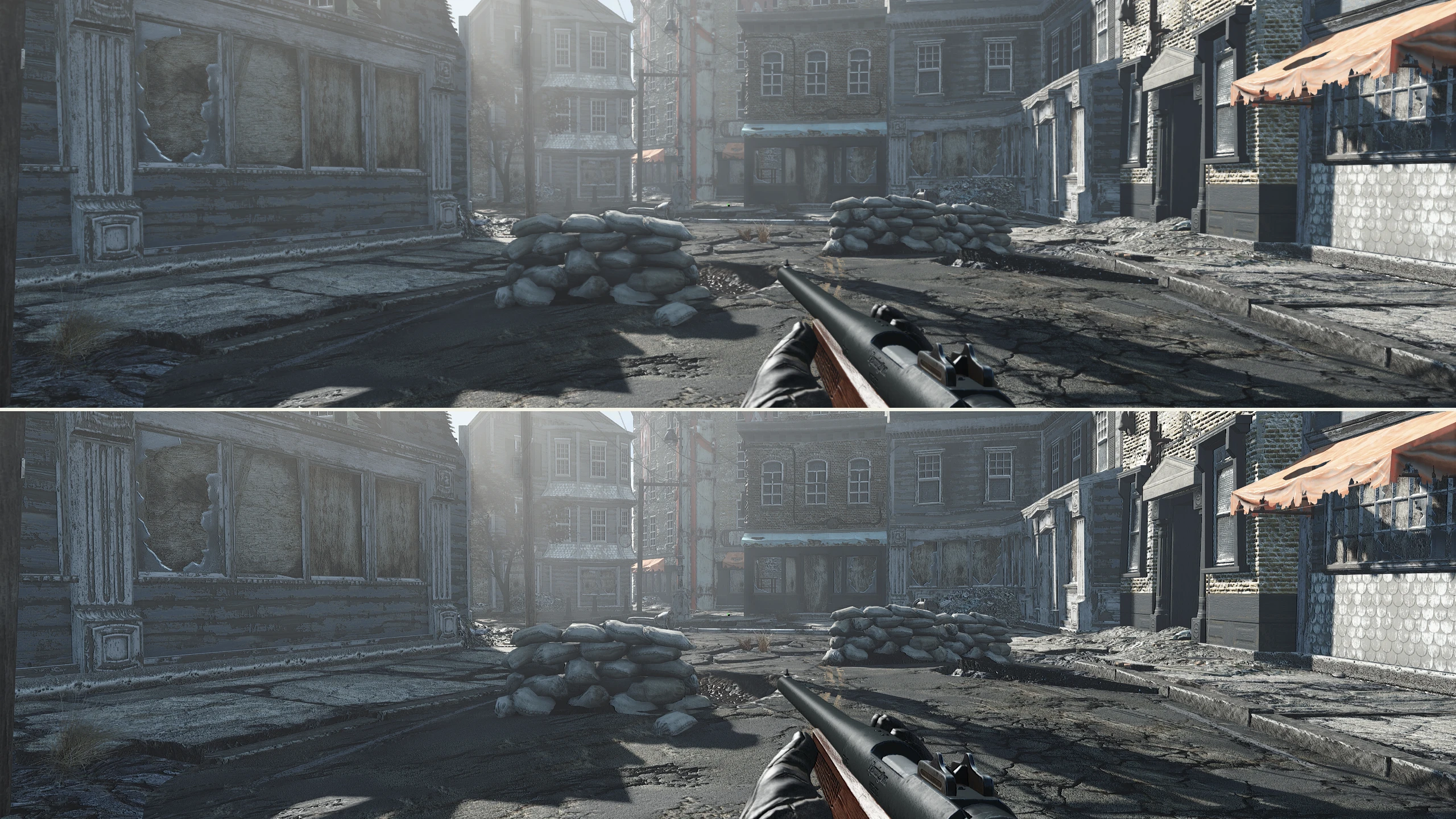
🔍 Analysis
- 👍 5.0% endorsement rate — high engagement, a strong quality signal
- 🏆 #5 of 8 ReShade Presets mods in this game by downloads
📋 About This Mod
This description was taken from the Fallout: New Vegas version. Slight edits were made for clarity
Description
This basically removes blur.
This is a ReShade preset that utilizes only Lumasharpen and an extremely slight amount of Emboss to stress the details of textures (also used some smoothing to fix grass). The difference is slight but obvious to the trained eye. However on this Fallout 4 version the differences aren't nearly as slight. Please see screenshots.
If you can't see the difference, don't download.
Why should I use this?
Well let me answer you by telling you why I use it. I wanted to play Fallout: New Vegas again after spending some time in Fallout 4. I heavily modded my Fallout: New Vegas and decided I wanted to make it look as good as possible without using ENB. After extensive modding I finally got the game looking pretty good, but I noticed I had trouble actually focusing on anything in the distance. So I created this.
I get a headache from trying to play Fallout 4 too long due to it's blurriness caused by TAA. This ReShade fixes the problem like most injectors used by the community do but uses emboss as well which I think makes textures pop close and at a distance.
How is this even a mod?
I have no shame admitting that this took very little effort to make. It simply utilizes a method I used in Borderlands 2 to add detail to the game. The reason I posted this is because I know a lot of people have no desire to tinker with ReShade and aren't the best mods the most deviously simple?
I consider this a fix. It's like putting on glasses for me.
I cant tell the difference between the screenshots
This is a good indicator that you shouldn't use the mod. This is nothing wrong with your computer or your eyes, people just have different tastes in the way they like to experience their games. If this isn't a big enough change, don't use it.
Performance cost?
This is fine. You'll be fine. Just install
INSTALLATION
0. Download the file, baby
1. Copy all of the contents from my file into your Fallout 4 root folder (next to your .exe's)
2. Run the game
3. Revel at slight differences
A ReShade preset that removes TAA's blur while keeping its benefits, making the game clear and sharp. With 270 endorsements and 5,352 downloads, it's a community-tested visual enhancement for players who want crisper distant details.
✨ Key Features
📊 Pros & Cons
✅ Pros
- Community-approved with 270 endorsements
- Over 5,000 downloads shows it's popular
- Does exactly what it says: fixes blur while keeping TAA
⚠️ Cons
- Last updated in 2018, so may not be compatible with newer game versions
- Requires ReShade, which adds an extra setup step
- Compatibility with other ReShade presets or mods is unknown
For gamers who hate the blurry look of TAA but don't want to lose its anti-aliasing benefits. If you're tired of soft, smeared distant objects and want a sharper image without turning off TAA entirely, this preset is for you. Skip if you're happy with your current visual setup or don't use ReShade.
💡 Beginner Tips
- Make sure you have ReShade installed and set up for your game before adding this preset.
- After installing, tweak the sharpening strength in-game to match your monitor's resolution and personal preference.
- If you're using other ReShade effects, load this preset and adjust the order to avoid conflicts.
📊 Mod Details
- Game
- Fallout 4 Mods
- Author
- User_51143461
- Version
- 0.5
- Downloads
- 5,352
- Endorsements
- 270
- Category
- ReShade Presets
- Created
- 3/31/2018
- Updated
- 3/31/2018
🔧 How to Install Fallout 4 Mods
Download from Nexus.
📖 Full step-by-step install guide for Fallout 4 →
Visit the official mod page for specific installation instructions for this mod.
🎮 Need cheat codes or console commands? Check ur gaming wiki for Fallout 4 commands, item IDs, and more.
Keep browsing — more Fallout 4 mods await