Savegame Script Editor - Console Edition
⚪ Last updated 2016⚠️ Install Order · 2 steps
Install in this order, then this mod last — most mods fail to load without their framework and dependencies in place.
Preview
🔍 Analysis
- 👍 6.1% endorsement rate — high engagement, a strong quality signal
- 🏆 #8 of 17 Utilities mods in this game by downloads
📋 About This Mod
Fallout 4 uses the same scripting engine as Skyrim (Papyrus). The script data is written into your savegame in a similar fashion.
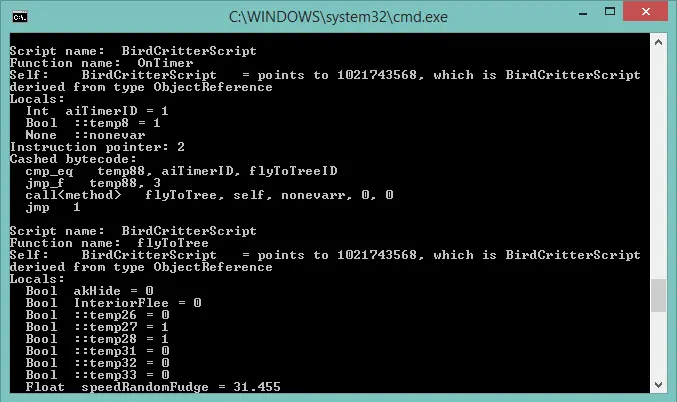
This tool allows you to review the script data inside the savegame, edit the variable values, remove script instances from the save, terminate stuck threads and more. It's the successor of my Skyrim tool.
This is a console application, meaning that you have to type all the commands in the cmd window (or you can use the predefined batch files). Actually, the first console version was made 2 weeks after the game release and all that time I was trying to fix and polish the GUI wrapper, but I have hard times with it and I don't know how soon it will be completed.
Why do I need this? - The GECK is still unreleased, but if you are going to build a scripted mod for FO4, you can already examine how the existing game scripts are interconnected and plan your modification ahead. - You can examine what scripts are running in the background (the threads will be presented at the bottom of the output). - You can gently terminate the stuck script if it's entered the neverending loop . A rare case related to bugs inside the logic. No real incidents so far. - You can gently change the specific script variable .
Cases when you SHOULD NOT use this application: - You DO NOT want to use this tool as an attempt to "increase the performance" or any other abstract reason. Any savegame editing without knowing the nature of the problem will go bad for you. - You DO NOT need this for "cleaning" the FO4 saves in a traditional way, since (1) there are no scripted mods to uninstall so far, (2) I never heard of any serious script-related issues in FO4.
There were a bunch of reports describing that the game couldn't load a save (like "Broken saves, Fallout 4"), but make no mistake - these issues are NOT related to scripts (I personally checked). I provided the "cleaning" batch file just in case. Most likely, you won't have any orphans in your save (If you do, please provide the savegame sample to review).
In summary, I hope the tool can be useful for scripters and I don't think it has any value for a regular user.
How to use? Copy the Fallout4 savegame (*.fos) to the program folder. Every editing operation WILL write changes to the savegame you provided. So, make a back
A utility for Fallout 4 that lets you inspect and edit Papyrus script data inside savegame files, including variable values and script removal. Built for modders and players who need to fix stuck quests or debug script issues. With 430 endorsements and 7,006 downloads, it's a niche but trusted tool.
✨ Key Features
📊 Pros & Cons
✅ Pros
- Community-tested with 430 endorsements and 7,006 downloads
- Directly addresses common script-related savegame issues
- Targets the same Papyrus engine as Skyrim, so familiar to modders
⚠️ Cons
- Last updated in 2016, so may not support newer game patches or DLC
- Editing savegame scripts can corrupt saves if misused
- Potential conflicts with other save-editing tools or mods that alter scripts
For Fallout 4 modders and players who hit stuck quests or script errors and need to dig into save data. Also for tinkerers who want to tweak variables directly. Skip if you're not comfortable with technical save editing—this is a power-user tool.
💡 Beginner Tips
- Always back up your save file before editing—this tool changes raw script data.
- Use the script removal feature sparingly; removing the wrong script can break quests.
- Check if your game version is compatible, since the tool hasn't been updated since 2016.
📊 Mod Details
- Game
- Fallout 4 Mods
- Author
- flexcreator
- Version
- 1.9.1
- Downloads
- 7,006
- Endorsements
- 430
- Category
- Utilities
- Created
- 2/25/2016
- Updated
- 10/11/2016
🔧 How to Install Fallout 4 Mods
Download from Nexus.
📖 Full step-by-step install guide for Fallout 4 →
Visit the official mod page for specific installation instructions for this mod.
🎮 Need cheat codes or console commands? Check ur gaming wiki for Fallout 4 commands, item IDs, and more.
Keep browsing — more Fallout 4 mods await