Realistic World Map (RWM) v2.2 with More Visible Map Markers
⚪ Last updated 2015⚠️ Install Order · 2 steps
Install in this order, then this mod last — most mods fail to load without their framework and dependencies in place.
Preview
🔍 Analysis
- 👍 5.7% endorsement rate — high engagement, a strong quality signal
- 🏆 #26 of 45 Visuals and Graphics mods in this game by downloads
📋 About This Mod
Realistic World Map (RWM)
A Work in Progress
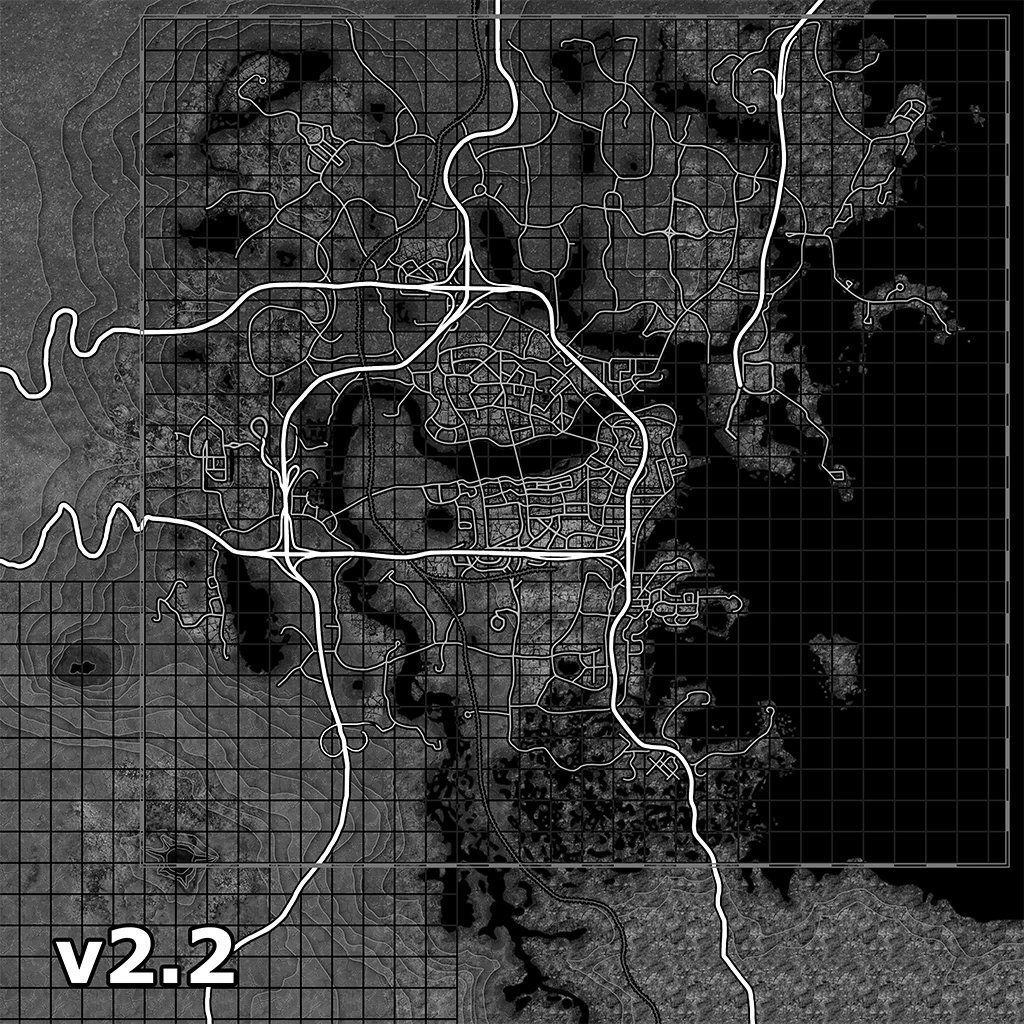
- []Description: []This mod replaces the vanilla Pipboy map with a new, detailed texture including hand-traced, re-drawn and highlighted roads as well as hand made heightmaps, cleaner shorelines, new and cleaner grid lines and a slightly darker color to make the icons pop. I've even added a new, HD version of the default map in a clean, grey-scale format with all the aforementioned changes and improvements. You can easily choose between your resolutions, Brightness, Style and whether or not you'd like Borders, Grids, Roads or the new Map Marker Icons with the new, easy-to-use FOMod installers. Currently all textures are available in 2k, 3k and 4k resolutions. Please be aware that a side-effect of higher resolutions is a more 'zoomed-in' map which for some people is seen as an improvement as it spaces out the icons making them that much easier to see. Personally I prefer the 3k resolution as a nice 'right in the middle' sort of feel.
- []NMM Installation: []Simply choose the installer you'd like to use and follow the instructions and options as given. Once finished the mod will be installed using whatever options you decided to choose. To uninstall the mod, or to change your choices, simply right click the mod in NMM and choose 'Uninstall' and then re-install the mod again to change your choices. Please note that you must right click and choose uninstall instead of simply double clicking to deactivate the mod. Deactivating the mod will not allow you to choose new options with the installer. The options are only available after a complete uninstallation through NMM.
[]Manual Installation: []Additionally you may also install the mod manually by extracting the . 7zip file, navigating to the '- Variants' folder for the map texture and the '- Map Markers' folder for the map markers, choosing your preferred version, renaming it and moving it to the correct location. Once you've chosen your versions simply rename the texture (.dds) file from whatever it's named to 'WorldMap_d.dds' and the Icon File (.swf) from whatever it's named to 'Pipboy_MapPage.swf' copying the files to their respective installation locations. []The texture (.dds) file goes in 'C:\Program Files (x86)\Steam\SteamApps\Common\Fallout 4\Data\Textures\Interface\Pip-Boy\'. [][s
Realistic World Map (RWM) v2.2 is a visual overhaul for the world map, offering 2k, 3k, and 4k resolutions, Textured or HD Vanilla styles, and toggles for grids, borders, roads, and brightness. With 2,046 endorsements and 35,585 downloads, it's a popular choice for players seeking a more vibrant map. Last updated in 2015, it may be dated but remains a solid cosmetic upgrade.
✨ Key Features
📊 Pros & Cons
✅ Pros
- Community favorite with 2,046 endorsements and over 35k downloads — clearly a hit.
- Lots of customization: resolution, style, grids, borders, roads, and brightness — you can dial it in exactly how you like.
- Makes the map pop with vibrant textures, way better than the vanilla dullness.
⚠️ Cons
- Last updated in 2015 — might not play nice with newer game versions or DLCs.
- Only a map texture swap — if you wanted gameplay changes, this isn't it.
For players who spend a lot of time staring at the world map and want it to look sharper and more colorful. Perfect for those who enjoy tweaking visual settings to match their taste. Skip if you're looking for gameplay overhauls or if you're on a newer game version that might break compatibility.
💡 Beginner Tips
- Since it's a texture replacer, just drop the files into your Data folder or use a mod manager to keep things tidy.
- If you're on a newer version of the game, test it early — old mods can cause weird visual glitches.
- Try the 2k version first if you're worried about performance; 4k looks great but can hit your FPS.
📊 Mod Details
- Game
- Fallout 4 Mods
- Author
- Vastias
- Version
- 2.2
- Downloads
- 35,585
- Endorsements
- 2,046
- Category
- Visuals and Graphics
- Created
- 11/28/2015
- Updated
- 12/8/2015
🔧 How to Install Fallout 4 Mods
Download from Nexus.
📖 Full step-by-step install guide for Fallout 4 →
Visit the official mod page for specific installation instructions for this mod.
🎮 Need cheat codes or console commands? Check ur gaming wiki for Fallout 4 commands, item IDs, and more.
Keep browsing — more Fallout 4 mods await