Realistic Lights Shadows Color and Detail SweetFX 2.0 Preset
⚪ Last updated 2015⚠️ Install Order · 2 steps
Install in this order, then this mod last — most mods fail to load without their framework and dependencies in place.
Preview
🔍 Analysis
- 👍 4.0% endorsement rate — high engagement, a strong quality signal
- 🏆 #11 of 45 Visuals and Graphics mods in this game by downloads
📋 About This Mod
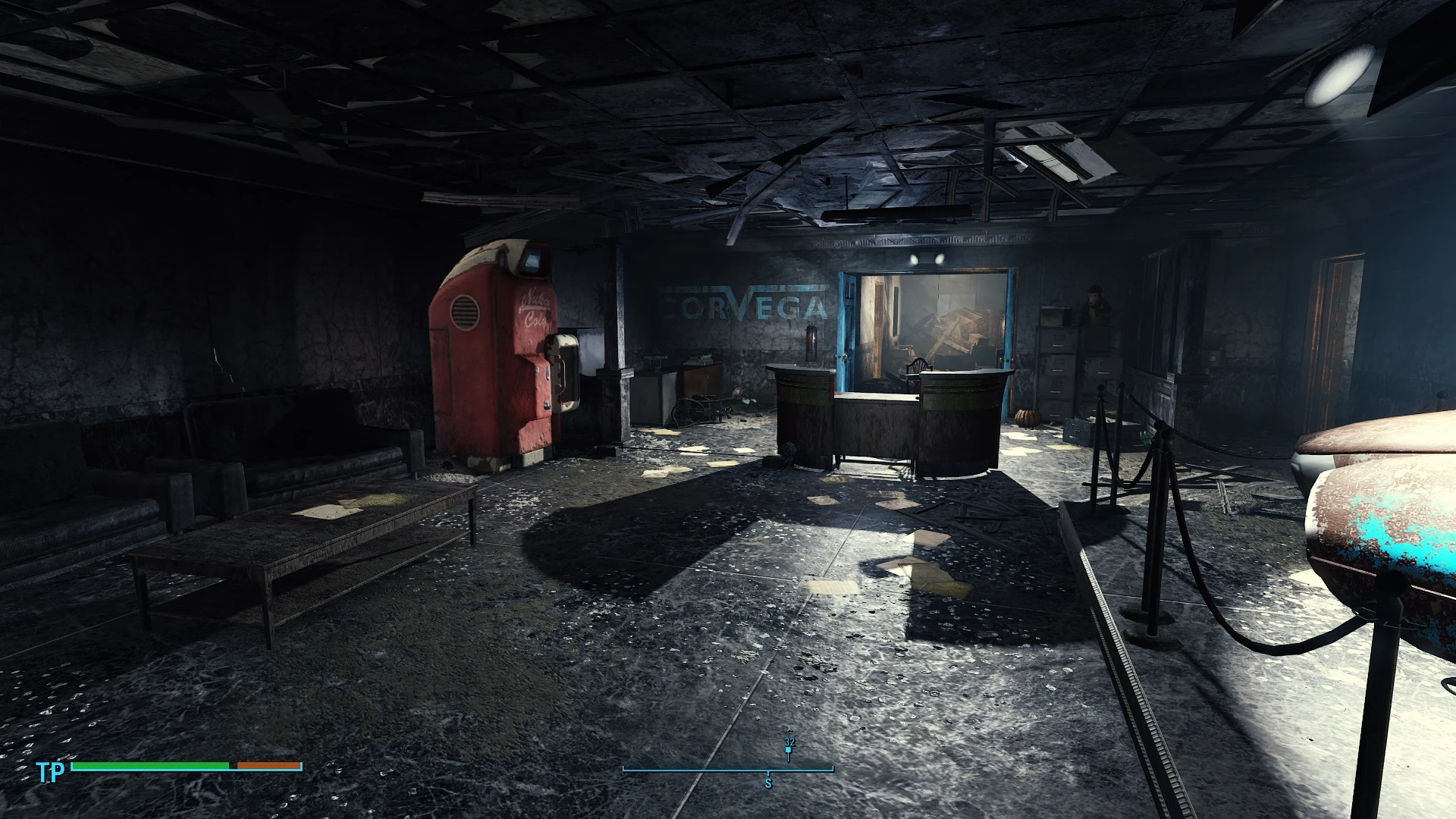
Using SweetFX 2. 0 for DX11 to change the lightening, colors, sharpness of textures and shadows to a much more impressive manner.
ENBoost Support .... This mod uses dxgi.dll not D3D11.dll
(so 3D-Vision Fix also working)
Pictures are from 6. 1 (but V 7. 0 looks very similar, color fades/transitions are much more smoother and did not leads to a "rainbow effect" anymore.
Note: THIS is my personal meaning/feeling/opinion!!!
- realistic lightening / contrast-lightening
- realistic contrasted shadows
- more "radioactive" sky (smog leads to a more red/purple skyline and cloud appearance)
- smoother colors that dynamically changes leads to straight better colorization of the game (vibrance based)
- all done without overexposing basic light sources/sky/lamps etc.
- sharpening adapted to Hi-Res texture packages not to oversharpen these
(all the pictures are taken with over 18 GB HiRes/New Textures from Nexus-Mod, mixed by me. Dont ask me which mods i have used, it is a mixture so it is not clear which textures are from which mod.) --- a comparison between SweetFX + Hires-Textures and SweetFX without Hires-Textures can be downloaded as a screenshot-package here: HiRes vs. Vanilla (0_1__m = TextureMods and SweetFX / 0_1_m = only SweetFX / 0_1_o = vanilla)
Want the shown Crosshair/Interface ?? Check out my other 2 mods:
DOT instead of Crosshair Minimalistic Crosshair HUD Interface
UPDATE to V5: NOTE: Screenshots are from prev. version!! V4 is moved to old files, so you can compare by your self with V5 on your system.
- color changes and more contrast to darker areas, some color reduction (reduced yellow), reduced overexposure
- - enables you to see details you did not have seen before in vanilla or other versions of my preset!!
- Added lite changed Version for users with 3D-Vision glasses. (My Settings in 3D-Mode: Light Boost: 100 % / Contrast: 53 %)
UPDATE to V6: - smoother dark area contrast
UPDATE to V6. 1: - fixed occurring overexpression coming up with 6. 0 in bright areas
UPDATE to V6. 2: - light boost and contrast adaption to 100 % Light boost and 53 % contrast (With 3D-Vision 1 without lightboost you have to change line 219 and may be 295)
UPDATE to V7. 0:[/siz
A SweetFX 2.0 preset that enhances lighting, color, and sharpening for more immersive visuals. With 1,800 endorsements and 45,300 downloads, it's a popular choice for players seeking a quick visual upgrade. Last updated in 2015, so compatibility with current game versions is uncertain.
✨ Key Features
📊 Pros & Cons
✅ Pros
- Community favorite with 1,800 endorsements and 45k downloads
- Simple preset install—just drop files in and go
- Boosts visual clarity with sharpening and color tweaks
⚠️ Cons
- Last updated in 2015—may not work with current game versions
- Requires SweetFX 2.0, which can conflict with other graphics mods
- No detailed setup instructions or screenshots provided
For players who want a quick, no-fuss visual enhancement without heavy performance hits. If you're into tweaking graphics settings and want a community-tested preset, this is a solid pick. Skip if you're on a newer game version or prefer modern reshade alternatives.
💡 Beginner Tips
- Make sure to back up your original game files before overwriting with the preset.
- If the game has an anti-cheat, disable it or use a mod manager to avoid issues.
- Test the preset in a dark area to see the lighting improvements clearly.
📊 Mod Details
- Game
- Fallout 4 Mods
- Author
- Lostvampire
- Version
- V7.0
- Downloads
- 45,300
- Endorsements
- 1,800
- Category
- Visuals and Graphics
- Created
- 12/12/2015
- Updated
- 12/28/2015
🔧 How to Install Fallout 4 Mods
Download from Nexus.
📖 Full step-by-step install guide for Fallout 4 →
Visit the official mod page for specific installation instructions for this mod.
🎮 Need cheat codes or console commands? Check ur gaming wiki for Fallout 4 commands, item IDs, and more.
Keep browsing — more Fallout 4 mods await