Radio Re-Done 4K
⚪ Last updated 2015⚠️ Install Order · 2 steps
Install in this order, then this mod last — most mods fail to load without their framework and dependencies in place.
Preview
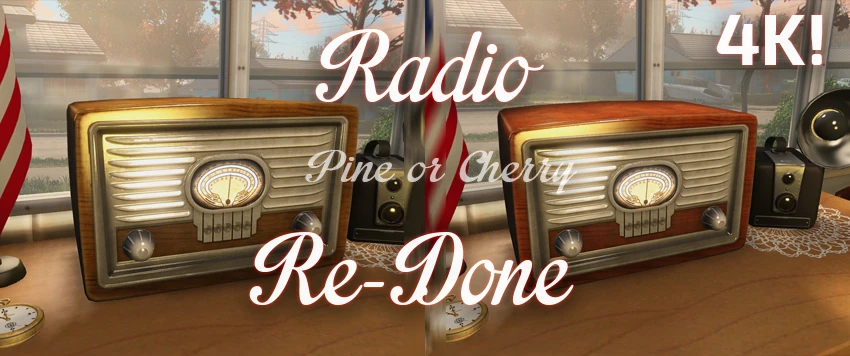
🔍 Analysis
- 👍 2.1% endorsement rate — high engagement, a strong quality signal
- 🏆 #203 of 271 Models and Textures mods in this game by downloads
📋 About This Mod
I was honestly pretty tired of those ugly radio textures.
I made this 4K retexture to add immersion and a little bit of pretty to the Post-War world. I was careful to match the dimensions of the current radio with every curve and detail to match the model with perfection.
At the moment there's only one version: Clean. I have not yet started working on the "rustic" version of this. Give it some time, it will come.
There's also a 2K choice!
Check the Changes Log at the top.
If you haven’t done so already, you first need to edit a line in the Fallout4.ini for the game to read loose files.
- []Go to:- ……Documents\My Games\Fallout4 Locate the Fallout4.ini
Change this to sResourceDataDirsFinal=STRINGS\, TEXTURES\
- []Next, you will need to extract the textures folder from the archive you just downloaded to your Fallout 4 Data Folder.
Or use Nexus Mod Manager
Project Modern House - adds Pre-War models, objects, etc. Pre-War Retextures - replaces Pre-War textures from models, objects, etc. with 4K resolution versions. Shack Floors Re-Done 4K - replaces ghetto shack floors with gorgeous new ones!
Radio Re-Done 4K is a texture overhaul for Fallout 4 that replaces the default radio textures with 4K versions, aiming to improve immersion and visual fidelity. It matches the original dimensions and details, offering a simple cosmetic upgrade for players tired of the vanilla look. With 3,880 endorsements and 187,055 downloads, it's a popular choice for texture enthusiasts.
✨ Key Features
📊 Pros & Cons
✅ Pros
- Huge community trust (3,880 endorsements, 187k downloads)
- Simple drop-in texture replacement, no gameplay changes
- Author focused on matching original geometry for seamless look
⚠️ Cons
- Last updated in 2015 — may not be optimized for current game patches or DLC
- Only affects the radio, so visual impact is limited to one object
- No screenshots or install instructions in the description
For Fallout 4 players who notice the ugly radio textures and want a quick visual upgrade without altering gameplay. Perfect for texture mod enthusiasts building a more immersive wasteland. Skip if you're looking for gameplay changes or overhaul mods.
💡 Beginner Tips
- Since it's a texture replacer, just drop the files into your Data folder or use a mod manager like Nexus Mod Manager for easy installation.
- If you're using other texture mods, load order usually doesn't matter for textures, but ensure this mod isn't overwritten by other radio retextures.
- Check the mod's comments section on Nexus for user screenshots and compatibility notes, as the description lacks images.
📊 Mod Details
- Game
- Fallout 4 Mods
- Author
- TheMatthewBe
- Version
- 1.1
- Downloads
- 187,055
- Endorsements
- 3,880
- Category
- Models and Textures
- Created
- 12/3/2015
- Updated
- 12/3/2015
🧩 Commonly Used Together
Users add these mods to the same collections — a real compatibility signal, not an AI guess.
🔧 How to Install Fallout 4 Mods
Download from Nexus.
📖 Full step-by-step install guide for Fallout 4 →
Visit the official mod page for specific installation instructions for this mod.
🎮 Need cheat codes or console commands? Check ur gaming wiki for Fallout 4 commands, item IDs, and more.
Keep browsing — more Fallout 4 mods await