PyPipboyApp - Unofficial Fallout 4 Pipboy Companion Application
⚪ Last updated 2016⚠️ Install Order · 2 steps
Install in this order, then this mod last — most mods fail to load without their framework and dependencies in place.
Preview
🔍 Analysis
- 👍 5.8% endorsement rate — high engagement, a strong quality signal
- 🏆 #3 of 25 Utilities mods in this game by downloads
📋 About This Mod
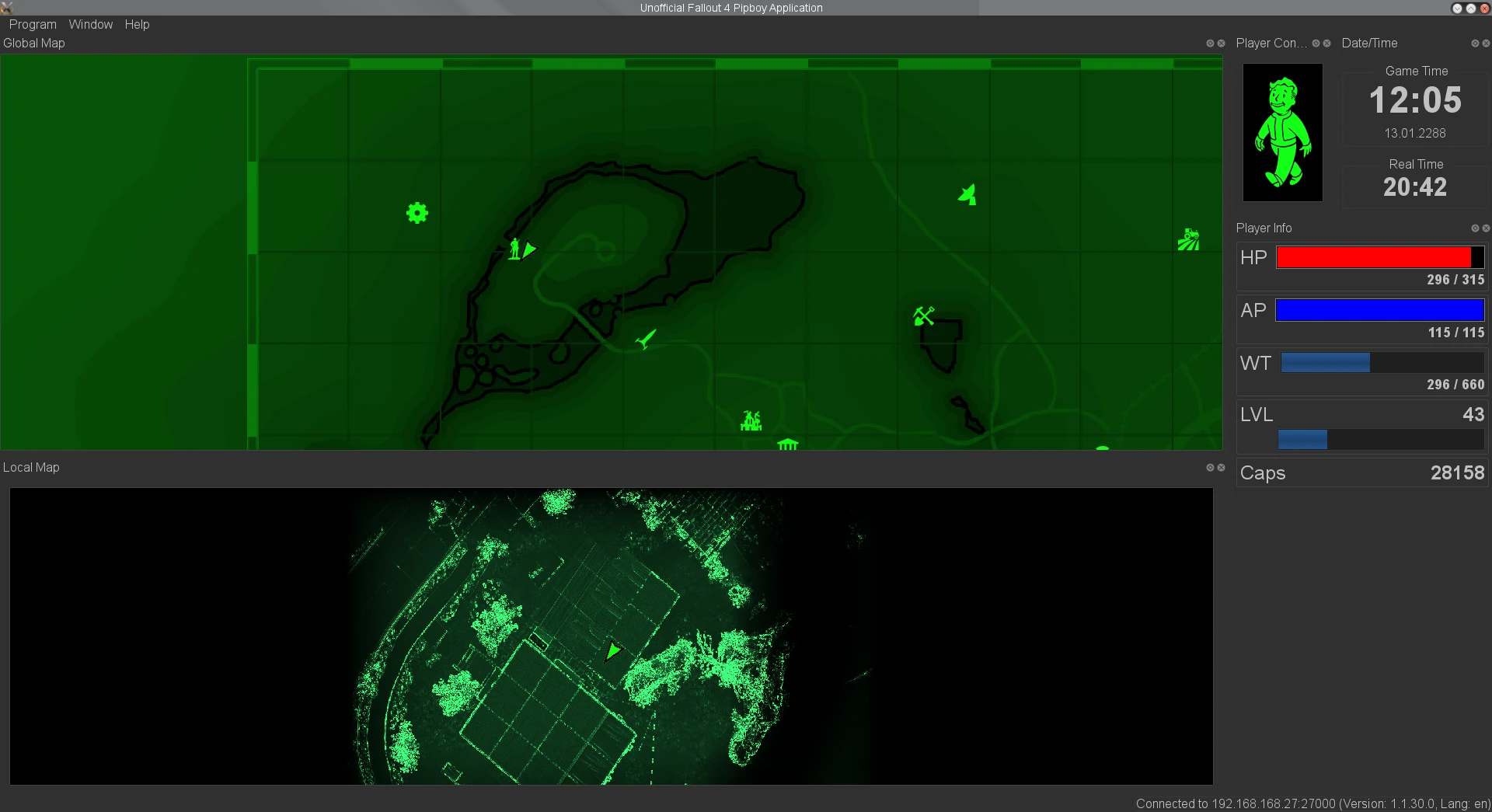
PyPipboyApp is a platform independent and extensible unofficial Fallout 4 Pipboy Companion App written in Python3 using PyQt5. It runs on Windows, Linux and Mac, and is meant as replacement of the official companion app on the PC (You don't need to mess around with that non-working android emulator anymore, isn't that great news!).
It currently provides the same features as the official companion app, and on top of that it adds it's own features like note taking, POI markers, hotkeys, automatic application of stimpacks, and more ...
Here's a introduction video (It's not up-to-date anymore and really bad, it would be great if someone could make a better one):
N6p4gvBOJ4Q
Features
- []Platform independent, extensible and Open-Source (Runs on Windows, Linux and Mac) []Uses dock widgets that can be individually shown/hidden, and dragged and dropped to any position, allowing to fully customize the GUI []Allows to even further customize the GUI by using style sheets (for an eye pleasing dark theme) []Comes with a lot of widgets that display lots of different information (local and global map, player stats, ....) []Supports taking notes and placing your own map markers []Allows you to view collectibles (Magazines and Bobble-Heads) on the map and track if you have already collected them []Allows you to send commands to the game (fast travel, equip item, ...) []Hotkey support on Windows []Relay Mode allowing you to connect two instances of this application together []Data import/export []Automatic version check
Included Widgets
- []Data Browser []Data Update Logger []Player Info []Player Condition (showing limb damage) []Date/Time []Map (Global and Local) []Hotkeys (by akamal) []Equipped Weapons and Grenades (by akamal) []Small Player Info (by akamal) []Active Effects []Radio []Location Browser []Quests (by killean) []Perks (by killean) []workshops (by killean) []Player Status and Statistics (by killean) []Doctor's Bag (by akamal) []Inventory Browser []Auto Doc (by killean)
- Ammo Count (by gwhittey)
PyPipboyApp is an open-source, cross-platform Pip-Boy companion app for Fallout 4, written in Python and Qt. It runs on Windows, Linux, and Mac, serving as a replacement for the official companion app on PC. With 683 endorsements and 11,706 downloads, it's a niche utility for players wanting a customizable Pip-Boy experience.
✨ Key Features
📊 Pros & Cons
✅ Pros
- Cross-platform support means you can use it on any OS, not just Windows.
- Open-source and extensible, so modders can tweak it to their liking.
- Solid community backing with 683 endorsements and over 11k downloads.
⚠️ Cons
- Last updated in 2016, so it may not work with the latest Fallout 4 patches or DLC.
- Requires Python and Qt setup, which might be a hassle for non-tech-savvy users.
- Potential compatibility issues with other mods that alter the Pip-Boy interface.
For Fallout 4 players who want a second-screen Pip-Boy experience on their PC, especially those on Linux or Mac who can't use the official app. Also for tinkerers who enjoy open-source tools. Skip if you're happy with the in-game Pip-Boy or want a polished, officially supported app.
💡 Beginner Tips
- Make sure you have Python and Qt installed before running the app.
- Check the mod's forum for any community patches that might fix compatibility with newer game versions.
- If you're on Windows, you might need to run the app as administrator to allow it to communicate with the game.
📊 Mod Details
- Game
- Fallout 4 Mods
- Author
- matzman666
- Version
- v0.8.4a
- Downloads
- 11,706
- Endorsements
- 683
- Category
- Utilities
- Created
- 12/5/2015
- Updated
- 2/5/2016
🔧 How to Install Fallout 4 Mods
Download from Nexus.
📖 Full step-by-step install guide for Fallout 4 →
Visit the official mod page for specific installation instructions for this mod.
🎮 Need cheat codes or console commands? Check ur gaming wiki for Fallout 4 commands, item IDs, and more.
Keep browsing — more Fallout 4 mods await