Power Armors Redone Extended
⚪ Last updated 2017⚠️ Install Order · 2 steps
Install in this order, then this mod last — most mods fail to load without their framework and dependencies in place.
Preview
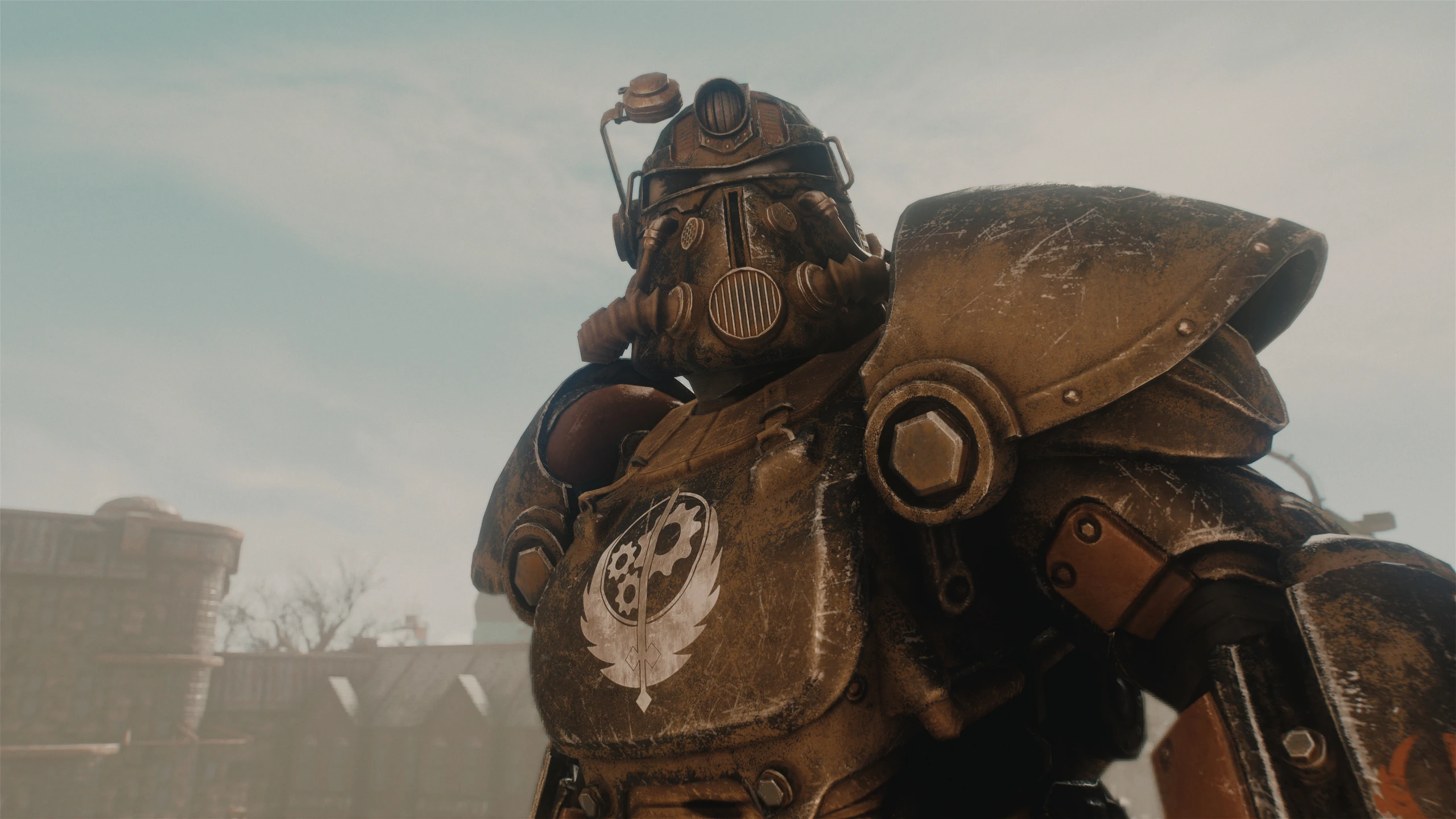
🔍 Analysis
- 👍 0.5% endorsement rate
- 🏆 #146 of 320 Models and Textures mods in this game by downloads
📋 About This Mod
This page will host texture replacers in the same style as Power Armors Redone for other Power Armor mods.
Currently the following mods have been retextured:
Consistent Power Armor Overhaul (CPAO) by Bordraw
Minutemen Paint Job by MadTod
I decided to upload these packs into their own separate page since Textures uploaded here require other mods to work and also because I may try to add other texture packs for other mods in the future.
Requirements
The original mods are required for each pack to work.
• Power Armors Redone is not required for Consistent Power Armor Overhaul .
• Minutemen Paint Job does require Power Armors Redone in order to achieve the full effect because Minutemen Paint Job does not include its own Normal nor Specular maps and reuses the HotRod ones. If you don't have Power Armors Redone installed, you'll get Vanilla Normal and Specular maps for this mod.
Performance
Same as Power Armors Redone:
All textures have been optimized and compressed in BC1 format, with each individual 2K file taking 2. 66MB (in comparison BC1 1K files take 1. 33MB)
My previous PC (5 years old i7 4770k and R9 290, 16GB of RAM)) ran the game just as good as it did with vanilla textures (I now have an i5 8600K, nVidia 1080, 16GB DDR4 in 2018)
I have uploaded both Loose files and BA versions of the mods since that may also help with performance depending on your hardware (for some people BA files load faster and reduce stuttering)
Installation
For best results please use a Mod Manager such as Mod Organizer 2 or Vortex.For Consistent Power Armor Overhaul:
• Loose Files version:
1. Open your Fallout4.ini file found at 'Documents/My Games/Fallout4/Fallout4.ini" with a text editor such as Notepad.
2. Change the line that reads "sResourceDataDirsFinal=STRINGS\" to read "sResourceDataDirsFinal=STRINGS\, textures\"
3. Download with preferred Mod Manager and install like any other mod.
1. Hide or delete the original mod Textures, otherwise the loose textures from the original mod will take priority over the BA2 file.
2. Download with preferred Mod Manager and install like any other mod.
For Minutemen Paint Job:
• Loose Files version:
1. Open your Fallout4.ini file found at 'Documents/My Games/Fallout4/Fallout4.ini" with a text editor such as Notepad.
2. Change the line that reads "sResourceDataDirsFinal=STRINGS\" to read "sResourceDataDirsFinal=STRINGS\, textures\"
3. Download with preferred Mod Manager and install like any other mod.
1. Use your favor
Power Armors Redone Extended is a texture replacer that brings the visual style of Power Armors Redone to other Power Armor mods. With 408 endorsements and 84,216 downloads, it's a popular choice for Fallout 4 players seeking consistent armor aesthetics. Last updated in 2017, it may require compatibility checks.
✨ Key Features
📊 Pros & Cons
✅ Pros
- Community-approved (408 endorsements) and widely downloaded (84k) — clearly fills a need.
- Brings the popular Power Armors Redone look to other armor mods, so your whole collection matches.
- Simple texture replacer — no new meshes or scripts, so it's lightweight and easy to install.
⚠️ Cons
- Last updated in 2017 — might not be compatible with newer armor mods or game patches.
- Texture replacer only — doesn't add new armors or change stats, so if you want gameplay changes, look elsewhere.
For Fallout 4 players who love Power Armors Redone and want that consistent look across all their power armor mods. If you're a texture purist who values visual cohesion, this is a must-have. Skip if you want new armor models or gameplay tweaks — this is purely cosmetic.
💡 Beginner Tips
- Use a mod manager like Nexus Mods' Vortex to install and manage this texture replacer — it'll handle file conflicts automatically.
- Check the mod's posts section for user reports on which armor mods work well with it, since the description is thin.
- If you're using other texture mods, load order matters — place this after other texture overhauls to ensure it takes priority.
📊 Mod Details
- Game
- Fallout 4 Mods
- Author
- Nukanist
- Version
- 1.2
- Downloads
- 84,216
- Endorsements
- 408
- Category
- Models and Textures
- Created
- 11/19/2017
- Updated
- 11/22/2017
🔧 How to Install Fallout 4 Mods
Download from Nexus.
📖 Full step-by-step install guide for Fallout 4 →
Visit the official mod page for specific installation instructions for this mod.
🎮 Need cheat codes or console commands? Check ur gaming wiki for Fallout 4 commands, item IDs, and more.
Keep browsing — more Fallout 4 mods await