Pip-Boy dual colors
⚪ Last updated 2020⚠️ Install Order · 2 steps
Install in this order, then this mod last — most mods fail to load without their framework and dependencies in place.
Preview
🔍 Analysis
- 👍 2.6% endorsement rate — high engagement, a strong quality signal
- 🏆 #6 of 10 Pip-Boy mods in this game by downloads
📋 About This Mod
Intro
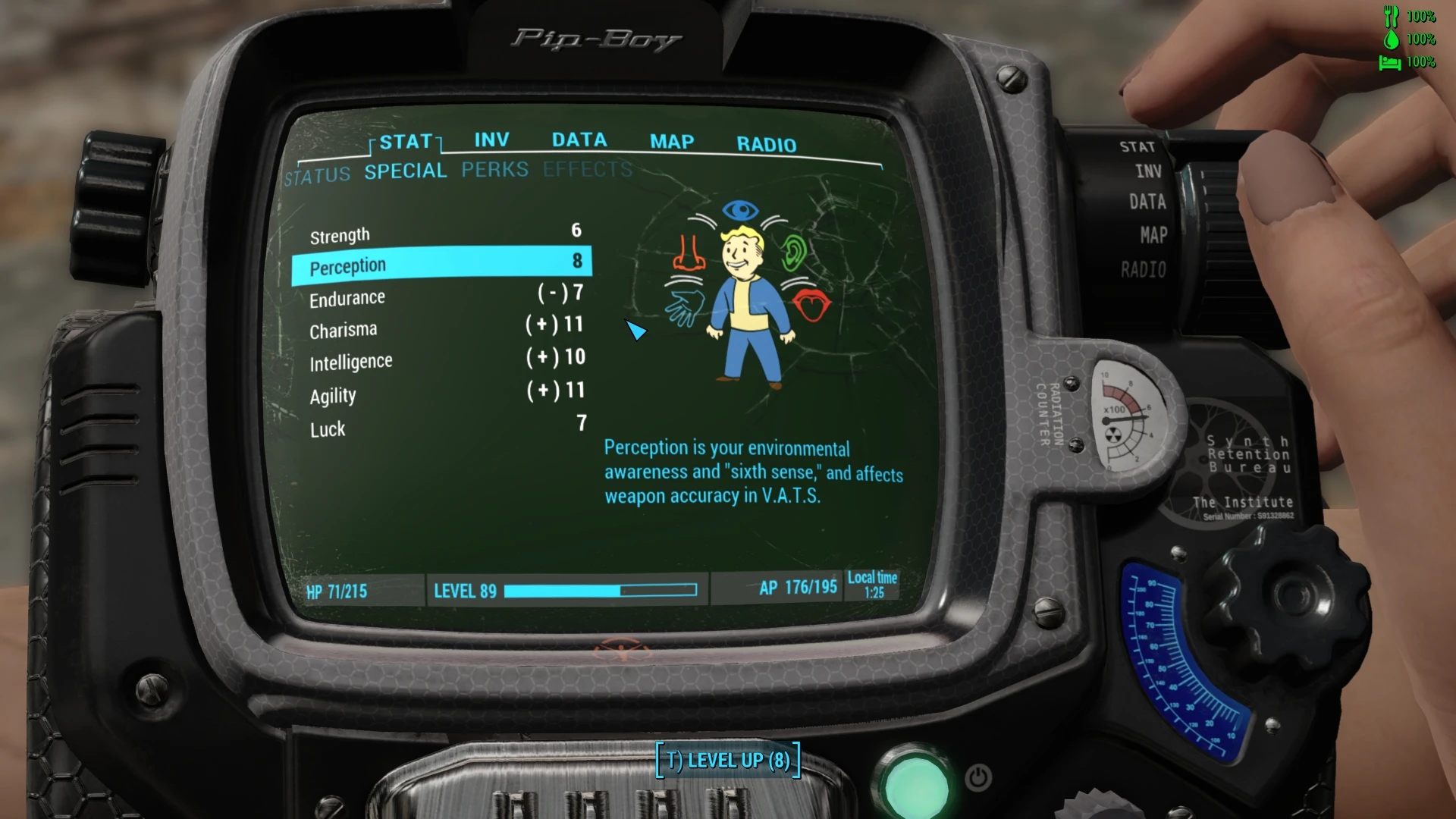
If you ever deactivated the Pip-Boy visual effects (bPipboyDisableFX=1), you may have noticed this makes the texts much easier to read, but on the downside everything on pip-boy interface becomes black & white - lifeless and lame.
There is a mod called "Gold Kit Color for Pipboy" that adds a interface with golden details (quite nice!) but unfortunately the author has never added compatibility for mods like VIS-G or Horizon.
So, take my mod as a "updated version": it's does the same thing, it's compatible with VIS-G and Horizon, in 4 different colors schemes.
ps: no assets has been reutilized from original mod.
==================================================================
==================================================================
==================================================================
==================================================================
==================================================================
==================================================================
Colors
The RGB colors below can be used in your Fallout4Prefs.ini, if you want your game HUD in these colors - you're welcome!
Blue Nuka Cola (aka Fallout 3/New Vegas blue)
Blue... like you know, the Nuka Cola Quantum™. I wonder how it tastes? I am not curious enough to buy one however.
This is my favorite by the way, if that matters.
HEX #2ecfff
iHUDColorR=46
iHUDColorG=207
iHUDColorB=255
Green Ghoul (aka Fallout 3/New Vegas green)
The old faded green from previous games, it's kind of charming, don't you think?
I don't want to taste this one.
HEX #1aff80
iHUDColorR=26
iHUDColorG=255
iHUDColorB=128
Green Mutant (aka Fallout 4 green)
The new green implemented as the default color for Fallout 4, is vivid, full of life, and brilliant.
Why Green Mutant you ask? well I don't know, it was that or Green Hulk.
Damn it, now that I think about it, Green Hulk really would be a more flashy name.
HEX #12ff15
iHUDColorR=18
iHUDColorG=255
iHUDColorB=21
Orange Mojave (aka Fallout 3/New Vegas yellow amber)
New vegas reminds me of explosions, explosions remind me of KonoSuba.
I was originally calling this color "Orange Bakuretsu", but probably nobody would understand the reference, so I gave up - sorry for wasting your time writing this.
HEX #ffb641
iHUDColorR=255
iHUDColorG=182
iHUDColorB=65
Pip-Boy dual colors is a simple cosmetic mod for Fallout 4 that adds color options to the Pip-Boy screen. With 2,755 endorsements and over 107,000 downloads, it's a popular choice for players wanting to customize their Pip-Boy's display. Last updated in October 2020, it remains a stable and widely used mod.
✨ Key Features
📊 Pros & Cons
✅ Pros
- Huge community trust with 2,755 endorsements and over 107k downloads.
- Lightweight and purely cosmetic—no impact on gameplay or performance.
- Easy to install and use, perfect for quick customization.
⚠️ Cons
- Last updated in 2020—may not be compatible with the latest Fallout 4 patches or DLC.
- Only adds two colors, so limited variety compared to other Pip-Boy reskins.
For Fallout 4 players who want a quick, simple way to add a splash of color to their Pip-Boy screen without overhauling the UI. Skip if you're looking for extensive customization options or if you're on the latest game version and worried about compatibility.
💡 Beginner Tips
- Since it's a simple texture mod, you can install it manually by dropping the files into your Fallout 4 Data folder, or use a mod manager like Vortex for easier management.
- If you're using mods that alter the Pip-Boy UI, this mod might conflict—check your load order and place it after other UI mods.
- Make sure to enable mods in your Fallout 4 settings and consider using the mod with a fresh save to avoid any issues.
📊 Mod Details
- Game
- Fallout 4 Mods
- Author
- theTAG
- Version
- 1.2
- Downloads
- 107,306
- Endorsements
- 2,755
- Category
- Pip-Boy
- Created
- 2/5/2020
- Updated
- 10/29/2020
🔧 How to Install Fallout 4 Mods
Download from Nexus.
📖 Full step-by-step install guide for Fallout 4 →
Visit the official mod page for specific installation instructions for this mod.
🎮 Need cheat codes or console commands? Check ur gaming wiki for Fallout 4 commands, item IDs, and more.
Keep browsing — more Fallout 4 mods await